










You've approved the shirt mockup, the logo looks sharp, and the customer is ready to order. Then the blanks arrive, and the heather military green looks grayer than the shirt on your screen. Before you change the artwork or adjust the transfer file, establish what you're matching: the physical garment, not its product-page name.
What Heather Military Green Actually Looks Like
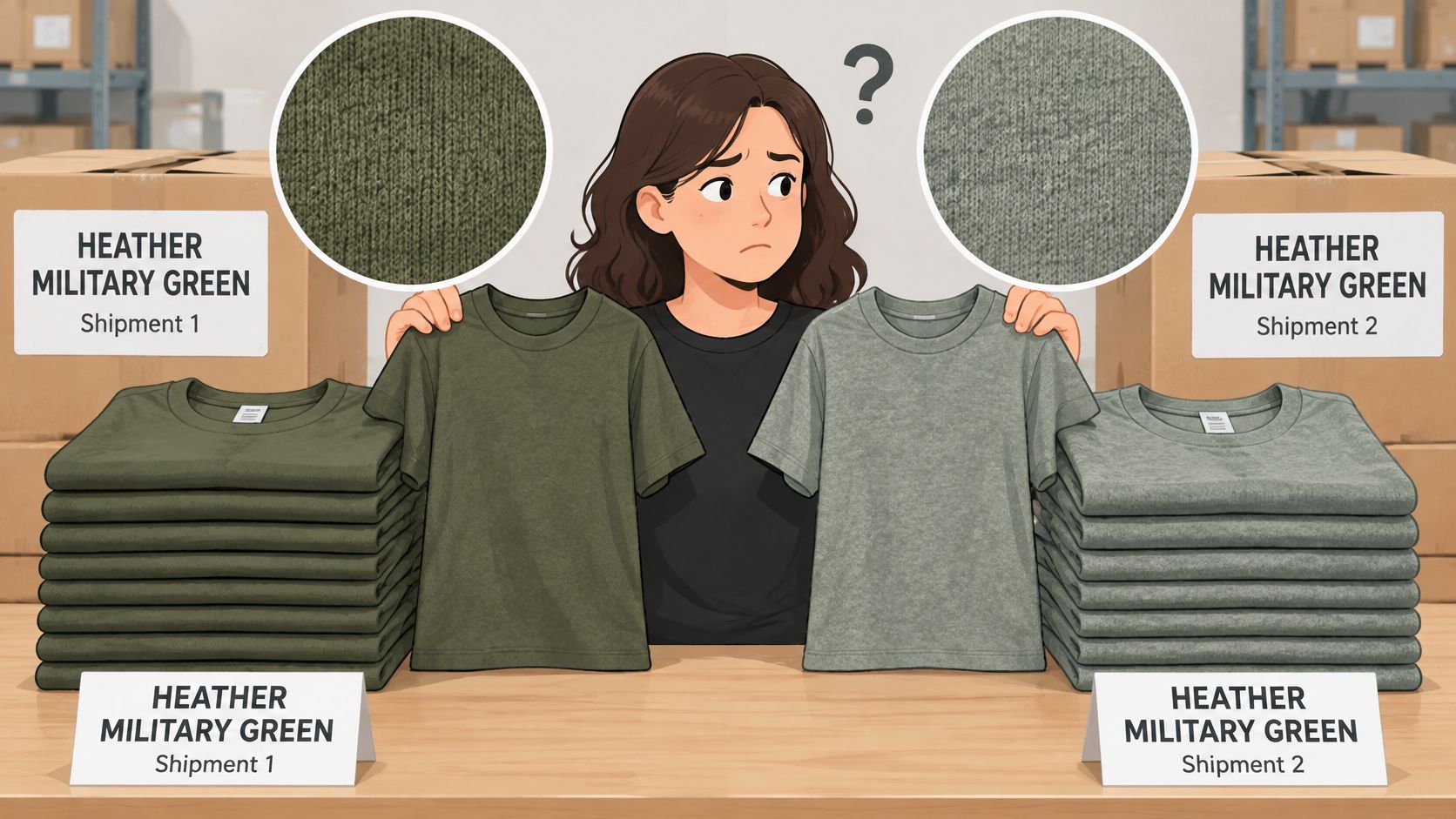
Say a team orders fifty shirts labeled Heather Military Green. The first delivery looks almost like flat olive from across the room; the next looks distinctly gray-green. Both suppliers may be using the name accurately, but the buyer hasn't specified a reproducible color target.
Heather military green usually means a muted gray-green or olive-green fabric with visible tonal variation. It isn't a bright green, and it shouldn't look like a perfectly uniform block of pigment. The balance between green, gray, and olive can change noticeably between blanks.
Read the Texture and Hue Separately
Heather describes the mixed-color fibers or yarns that create a softly mottled surface. Look closely and you'll see lighter and darker components; step back and your eye blends them into an overall shade. That's why a shirt can appear fairly uniform in a photograph yet visibly textured in your hand.
Military green identifies the broad olive-drab and olive-green family. Its history includes the U.S. Army's adoption of olive drab in 1902, followed by distribution beginning in 1906 as blue-uniform stocks were exhausted, with later shades such as OG-107 continuing that practical green-uniform tradition, according to the U.S. Army's uniform history.
The name describes a texture and a family of greens, not one fixed shade.
For a decorator, the important distinction is between surface character and overall color. A blank with obvious pale flecks can feel softer and less saturated than a solid olive shirt, even when both belong to the same general green family. The same distinction matters when evaluating charcoal heather color: the mottling is part of the finished appearance, not a defect to correct.
Don't reject a delivery solely because it differs from a monitor preview. Compare it with the approved garment sample, checking both the overall hue and the distribution of the heather effect. If no sample was approved, the order never had a reliable visual reference.
Keep the physical garment as the master reference. The color name helps you find candidates; it can't settle an approval dispute.
Shade References to Match Against
A shop order can specify “Heather Military Green” and still leave the target unclear. The name is the weakest part of the specification: it may identify a product color, a historical reference, or a screen preview. For production, define the match against a physical blank measured in CIELAB, not a monitor swatch.
Commercial military-green labels cover related but distinct shades. The Chase Tactical comparison of OD green and other military colors distinguishes olive drab, army green, and ranger green. Their shared military association does not make their lightness or undertones interchangeable.
Reference Shades for Matching Heather Military Green
| Reference | Context | Appearance | Numeric value |
|---|---|---|---|
| Olive Drab No. 33 | WWII enlisted uniforms | Muted olive drab | Match against period samples, not a screen value |
| Olive Drab No. 51 | WWII officer uniforms | Muted olive drab | Match against period samples, not a screen value |
| Olive Drab No. 7 | Later WWII field uniforms | Muted olive drab | Match against period samples, not a screen value |
| OG-107 (Olive Green 107) | U.S. combat uniforms | Olive green | Historical designation, not a garment CIELAB measurement |
| Army green digital reference | Screen mockups and previews | Muted, olive-leaning green | #4B5320 (RGB 75, 83, 32) |
| Heather Military Green garment | Actual blank for production approval | Mottled gray-green or olive | Measure in CIELAB with a spectrophotometer |
The historical rows represent different uniform references, not alternate names for a modern shirt. For a vintage design, match the intended designation against a period sample. A digital value cannot stand in for that physical reference.
For mockups, Media.io's army-green color reference gives #4B5320, equivalent to RGB 75, 83, and 32. Use it as a starting point for a muted, olive-leaning preview, not as a guaranteed textile match.
Choose the Reference That Fits the Job
A screen value keeps artwork previews consistent. A historical sample anchors a reproduction to its intended uniform reference. For production approval, use the actual garment blank: measure the fabric in CIELAB and record the reading with the style and color code.
Heather yarns mix lighter and darker components, so the fabric can look different from a solid swatch of its base green. Lighting and printing also affect the finished appearance. A screen comparison alone cannot settle a close physical match.
Ask the supplier for a physical swatch of the exact style and color code. Put the code, supplier, and approved sample identifier on the order sheet, then retain that sample for repeat orders instead of relying on a saved product-page image.
Garment Blanks That Carry the Color
Start with the blank because fabric changes the printing decision. The Jiffy listing for Gildan G500 Heather Military Green specifies 50% cotton and 50% polyester, a 5.3-ounce midweight construction, and preshrunk fabric. It also distinguishes this heather blend from solid-color versions with different fiber compositions.
That blend isn't just a purchasing detail. Polyester content can affect heat-transfer behavior, dye migration risk, and the appearance of light-colored transfer layers. A successful test on a solid cotton shirt doesn't establish that the same transfer and press setup will work equally well on the heather version.
Common Blanks in Heather Military Green and What to Check
Treat the alternatives below as blank categories to verify, not a guarantee that every supplier stocks this exact color in every construction.
| Blank | Fabric | Print consideration | Best use |
|---|---|---|---|
| Midweight tee, Gildan G500 Heather Military Green | Cotton-polyester blend and weight specified above | Confirm the blend before setting the press; test on the same blend | Team and merch runs |
| Solid-color version of the same G500 style | Different fiber composition from the heather version | Don't reuse heather test results | Solid-color matching |
| Fleece hoodie | Cotton-polyester fleece; confirm weight on the exact style specification | Test the exact fleece weight because the surface is thicker | Outerwear and cold-weather merch |
| 100% polyester performance tee | All-polyester construction | Watch for dye migration with light inks | Activewear |
| 100% cotton heather tee | All-cotton construction, if confirmed by the manufacturer | Verify the heather claim and test surface detail and adhesion | Vintage-style and screen-print look |
A thicker fleece surface can affect contact at the platen, especially near seams and pockets. A performance tee presents a different challenge: a light transfer may initially look acceptable but still needs evaluation for unwanted dye movement. Don't solve either problem by increasing heat without a controlled test.
For a vintage merchandise direction, use a Comfort Colors T-shirt design guide to develop the aesthetic, then select and test the actual blank independently. A desired look isn't a substitute for a fabric specification.
Before ordering, confirm:
- Brand and style code: Record the complete identifier, not just the garment nickname.
- Fiber ratio: Use the specification for the selected color.
- Fabric weight: Check the exact construction you'll press.
- Heather or solid: Make sure purchasing and production mean the same version.
A military-green shirt from another brand may differ in both blend and hue. The style code identifies the blank; the color name doesn't.
How to Match the Color Before Bulk Printing
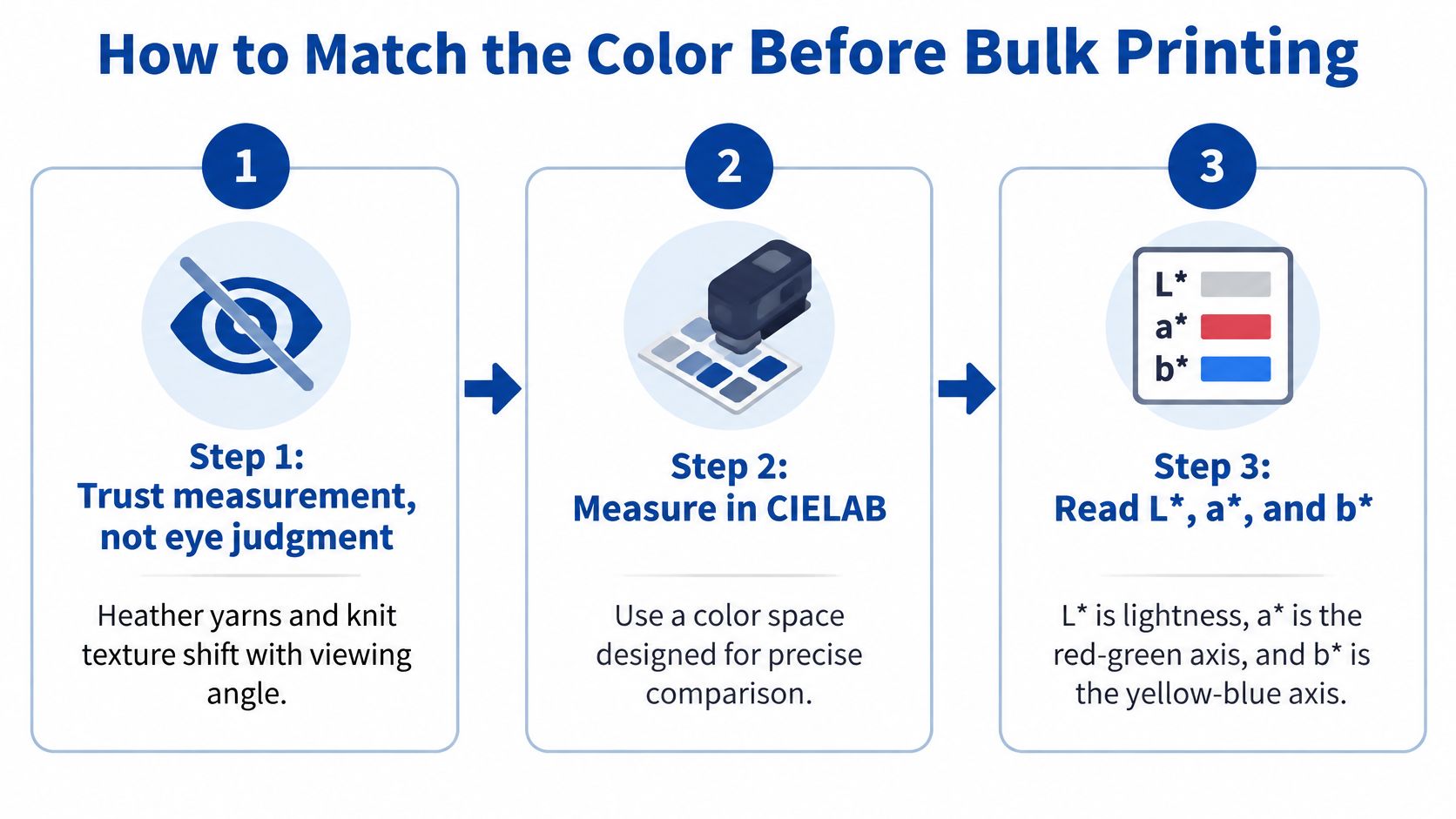
Eye judgment becomes unreliable when heather yarns, knit texture, and viewing angle alter the apparent surface. Your operator may be comparing a pale fiber cluster with a darker one without realizing it. Measurement won't remove the texture, but a consistent method helps separate actual color differences from sampling differences.
Konica Minolta's textile color-measurement guidance supports objective comparison in CIELAB, where L* represents lightness, a* the red-green axis, and b* the yellow-blue axis. Color differences are expressed through a Delta-E calculation, with consistent measurement conditions needed for meaningful comparison.
Build a Repeatable Approval Method
- Obtain the actual blank. Use the intended style and color code, ideally from the stock allocated to the job. A digital swatch can't provide a textile measurement, and a similar shirt can hide a meaningful substrate difference.
- Fold the fabric into enough layers that the backing surface no longer influences the reading. Keep the presentation consistent and avoid placing a seam, crease, or stretched area over the measurement aperture. Otherwise, you may be measuring your setup as much as the garment.
- Measure several locations with a calibrated spectrophotometer. Use a defined illuminant and observer condition, then average the readings. Sampling across the fabric reduces the influence of an unusually light or dark heather patch.
- Record the L*, a*, and b* values, illuminant, observer condition, measurement geometry, and accepted Delta-E tolerance. Agree on that tolerance with the customer or print provider rather than borrowing an arbitrary pass/fail number. Also record which Delta-E calculation you're using.
- Separate substrate compensation from artwork color. A dark heather green may need a white underbase or an adjusted transfer color to preserve detail. A deliberately muted design can allow more of the fabric's visual character to participate, but that should be an approved effect, not an accidental loss of contrast.
- Press a test transfer on the same blank lot and inspect it under daylight and shop lighting. Evaluate the garment match and the printed result separately. A correct blank doesn't automatically make a dark logo readable.
- Approve and retain the sample. Store the garment lot number, transfer file version, press settings, and approval record together. A repeat order should begin with that record, not with someone trying to remember which green looked right.
Keep File Conversion Separate
Understanding RGB-to-CMYK conversion helps prevent artwork-preparation surprises, but changing the file's color mode doesn't measure the shirt. The substrate target and the printed-color target need separate approval criteria.
Shop-floor fallback: Without a spectrophotometer, compare against an approved physical sample under one fixed light and record that method.
Visual approval can be workable for a small shop, especially when the customer accepts some lot-to-lot variation. It's less repeatable than controlled measurement. Keep the sample protected from wear and fading, and don't replace the reference halfway through a run.
Ink Pairings and Artwork Rules
Contrast decides legibility more than the color name does. Heather military green often occupies a muted middle ground, where another subdued green can look attractive up close but become difficult to distinguish at normal viewing distance. Choose the main reading color before you choose decorative accents.
The Platoon Stores military-green T-shirt listing is a useful commercial garment reference, not a print-color standard. For production, separate the shirt's appearance from the ink palette and judge the finished combination on a physical sample.
Ink Pairings on Heather Military Green by Contrast
| Pairing | Contrast | Works best for | Watch for |
|---|---|---|---|
| White | High | Logos, text, and outlines | Thin lines still need enough weight |
| Cream or off-white | High, warmer | Vintage, outdoor, and western themes | Can read yellowish against darker heather |
| Black | High on lighter heathers, lower on the darkest | Bold type and graphic marks | Weak on the darkest heather tones |
| Tan or sand | Medium to high | Earthy and heritage designs | Can blend into lighter heathers |
| Burnt orange or rust | Medium to high | Sports and bold accents | Check the tone under warm lighting |
| Gold or mustard | Medium | Team and heritage accents | Can look muddy on dark heathers |
| Tone-on-tone green | Low | Subtle decorative patterns | Often disappears at normal viewing distance |
These are practical starting judgments, not measured contrast ratings. Black, for example, belongs near the strongest options on a lighter gray-green blank but drops well down the list on a deep olive one. Don't assume the darkest ink always creates the clearest mark.
Consider a school team logo with white lettering and gold accents. The white establishes the readable shape, while the gold supports the team identity. Make the same logo entirely in muted sage, and the customer may lose the lettering at ordinary viewing distance, even if the close-up mockup looks polished.
Start with white, cream, or black for essential text and logos. Use warm neutrals and rust as accents. Reserve tone-on-tone green for decorative patterns or branding where the customer explicitly accepts low visibility.
Adjust the Artwork for the Surface
- Strengthen thin lines and small text. Give them more weight than you would on a solid light garment. Check counters and gaps too, because heavier lettering still needs open interior spaces.
- Avoid fine gradients and soft shading when they carry important information. The heather texture can interrupt subtle transitions; use clearer shapes or stronger tonal separation for essential details.
- Outline dark elements on the darkest blanks. A white or light boundary can preserve a logo's silhouette without replacing the brand's dark interior color.
- Keep distressed effects bold. Fine speckling competes with the garment's existing mottling and may stop looking intentional. Larger worn areas read more clearly as a design choice.
- Limit the design to two or three colors where practical. This is a palette recommendation, not a DTF production limit. Fewer competing tones make it easier to judge hierarchy and keep the main message readable.
Print the proof at its intended size and view it from the distance at which people will use it. A chest logo, a back graphic, and a small sleeve mark shouldn't all be judged from the same close-up screen view.
Confirm a Swatch and Place Your Order
A production-ready order needs an approval record, not just an attractive preview. The customer should know what they're approving, the operator should know which file to press, and purchasing should know which blank can be reordered. If those details live in separate messages, consolidate them before releasing the job.
Use a proof checklist that can travel with the order:
- Contrast checked against the actual blank: Essential lettering and logo details remain readable at the intended size.
- Underbase decision recorded from the color measurement: The transfer setup reflects the intended opacity and approved appearance.
- Physical sample approved under daylight and shop light: The customer has accepted the finished combination, not merely a digital rendering.
- Final file exported at actual print size: Dimensions, transparency, and the correct artwork version are confirmed.
Consolidate the Run Without Skipping the Proof
For multi-design runs, our Auto-build gang sheet builder offers an easy-to-use, cost-effective way to arrange multiple files on a consolidated transfer sheet. It's useful when a job includes front logos, back graphics, names, or other separate placements that need to stay together through ordering and production.
The practical benefit is simpler layout handling. Instead of manually planning every placement from scratch, you can assemble the job and inspect the combined preview. That convenience doesn't remove the need to verify each design's dimensions.
Material savings depend on artwork size, spacing, orientation, and cutting or application margins. Closely packed artwork isn't automatically an efficient layout if the operator can't separate and position the transfers cleanly. Check the preview for unused space, clipped edges, incorrect scaling, and enough clearance around each design.
Approval gate: Don't release the bulk run while the blank, transfer appearance, or final file is still provisional.
Keep a job packet containing the approved sample photograph, physical sample location, garment identifier, and production file. A photograph helps operators recognize the job, but the retained sample remains the better reference for close visual decisions.
Order a swatch or arrange a test print on the exact blank before committing to bulk production. Evaluate that test using the measurement and lighting conditions recorded for the job, resolve any contrast or underbase issue, and then release the consolidated order.
Lion DTF Transfers offers hot-peel DTF transfers and custom gang sheets for apparel jobs that need clear detail on textured blanks like heather military green. Visit Lion DTF Transfers to prepare a test transfer, organize your artwork with the Auto-build gang sheet builder, and place your bulk order once the physical sample passes approval.
Email orders@LionDTF.com or Text or Call: 833-350-5466