










It's Tuesday morning and you've already got three jobs that don't belong on the same press. A coach wants a dozen full-color shirts with a different name on every back, a church needs hundreds of one-color event tees by Friday, and a regular customer wants a single sample before she commits to anything. If you're quoting all three the same way, you're losing money on at least one of them.
Why DTF vs Screen Printing Is Not One Winner
That mixed week is exactly why DTF vs screen printing frustrates shop owners. The 12-piece team drop has photographic color, gradients, and names that change on every garment. The 400-piece event shirt is one spot color, same artwork front and center, repeated until your arms are tired. The single sample is a test, not a production run, and the customer won't pay production setup to see one shirt.
Treat those as one decision and you'll get it wrong. This is a job-routing decision, not a loyalty test.
Three Jobs Three Different Answers
Run the team drop through screens and you're burning separations for artwork that changes anyway. Run the event order through a heat press one transfer at a time and you'll still be pressing when the event starts. Quote the sample like a full job and the customer walks.
| Job in your queue | What drives the cost | Sensible starting point |
|---|---|---|
| One sample or proof | Setup with almost no pieces to absorb it | DTF transfer, pressed in-house |
| 25 pieces, mixed designs | Art changes, color count, wasted material | DTF, packed efficiently |
| 1,000 pieces, identical art | Press throughput after setup is paid | Screen printing |
That table is a starting point, not a quote. Fabric, placement, deadline, and how the garment will be worn all move the answer.
Screen printing stays foundational for a reason. It's the older, established technology, built for repeat production of the same artwork on apparel, signage, and promotional work. When hundreds of garments share one design and one color setup, that maturity pays. DTF belongs to a newer digital-transfer family built for computer-controlled, short-run decoration. It doesn't erase that history. It handles the jobs screen printing was never economical for.
Route the job, don't defend the machine. The press that wins the event order is not obligated to win the name-drop order too.
What You Should Be Able to Decide
By the end of this comparison you should be able to price a sample, a 25-piece run, and a 1,000-piece order without forcing every job onto one method. You should also be able to explain to a customer why wash results and rub results can point in different directions, why setup charges change everything at low quantity, and why a green claim on a product page isn't the same as a full footprint for their order.
If you own screens already, none of this requires you to scrap them. If you only own a heat press, none of it requires you to buy a print shop overnight. You're adding a second route for work you're currently overpricing, underpricing, or turning away. That's the actual win here. Shops don't grow by picking a winner in DTF vs screen printing. They grow by stopping the wrong jobs from eating the margins on the right ones.
How Each Decoration Method Actually Works
You can't price a method you can't picture. The two workflows put labor in completely different places, and that's where the costs and failures come from.
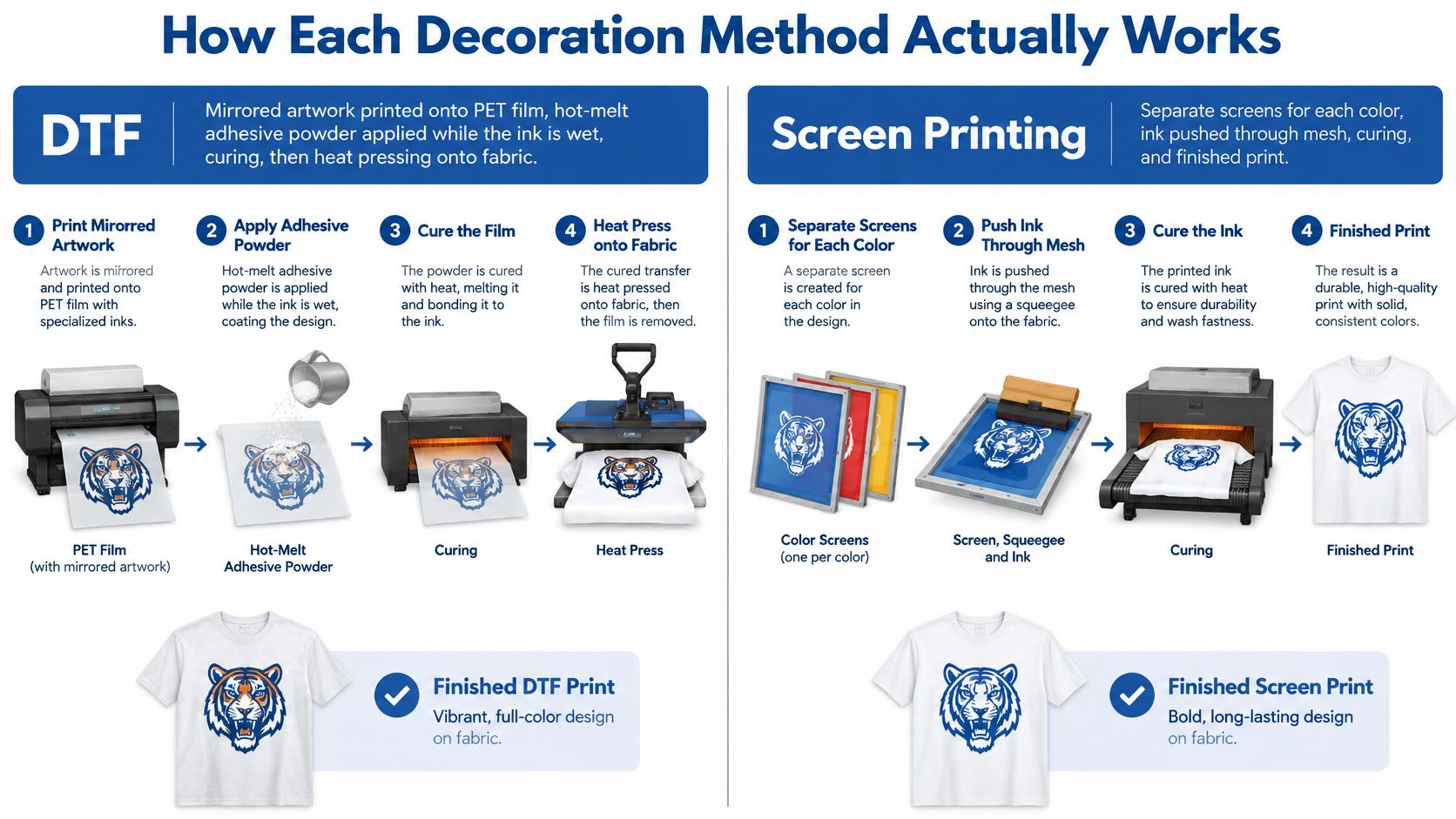
DTF From File to Press
DTF starts as a digital file. The design is printed mirrored onto PET film, then hot-melt adhesive powder is applied while the ink is still wet. The powder sticks where there's ink, the excess is removed, and the film is cured so the adhesive is ready to bond. After that, the transfer goes onto the garment under a heat press, the film is peeled away, and the image stays on the fabric.
Notice what's missing. There's no separate tool built for each color. A design with two colors and a design with full photographic color both travel through the same basic path. Color complexity lives in the file, not in a stack of screens you have to build before the first sellable shirt exists.
That also changes what you can buy instead of build. You can print film in-house, or you can order finished transfers and do only the pressing yourself. For a lot of small shops, that second option is the whole point. The skill you need in your building is consistent pressing, not a full digital print department.
Screen Printing From Separations to Dryer
Screen printing builds the image in layers. You separate the artwork into colors, expose a mesh screen for each color, register those screens on press so the layers line up, and pull ink through the mesh with a squeegee. The printed garment then cures in a conveyor dryer.
Every color adds work before production starts:
- Color separations: Artwork has to be split so each screen carries only its part of the image.
- Screen preparation and exposure: Each color needs its own screen made and ready.
- Registration and test printing: Screens have to align on press or the finished image drifts.
None of that is wasted effort on a long run. Once it's done, you repeat the same print efficiently, garment after garment. But that labor exists whether you print 12 shirts or 1,000, and it's why screen printing has a fixed cost problem at small quantities.
This process has deep commercial roots. According to a history of screen printing technology and its commercial development, recognizable methods appeared in China during the Song Dynasty, approximately 960 to 1279 AD, Samuel Simon received a British patent in 1907, and U.S. patent protection followed in 1915. U.S. commercial screen printing was valued at approximately $7.06 billion in 2002 and $8.89 billion in 2007, which tells you how entrenched repeat production became.
Gang-sheet automation widens the DTF side further. Instead of printing one design per run, multiple graphics get arranged into one printable layout. That's what makes artwork that changes shirt to shirt practical instead of chaotic.
Color Quality Fabric Fit and Wash Life
A team order may mix cotton tees, polyester performance shirts, and artwork that changes from one garment to the next. DTF handles that variety well. A long run of identical shirts with the same bold logo often favors screen printing, especially when consistent spot colors matter. Choose for the actual artwork, fabric, and wear conditions, not a blanket claim that one method lasts longer.
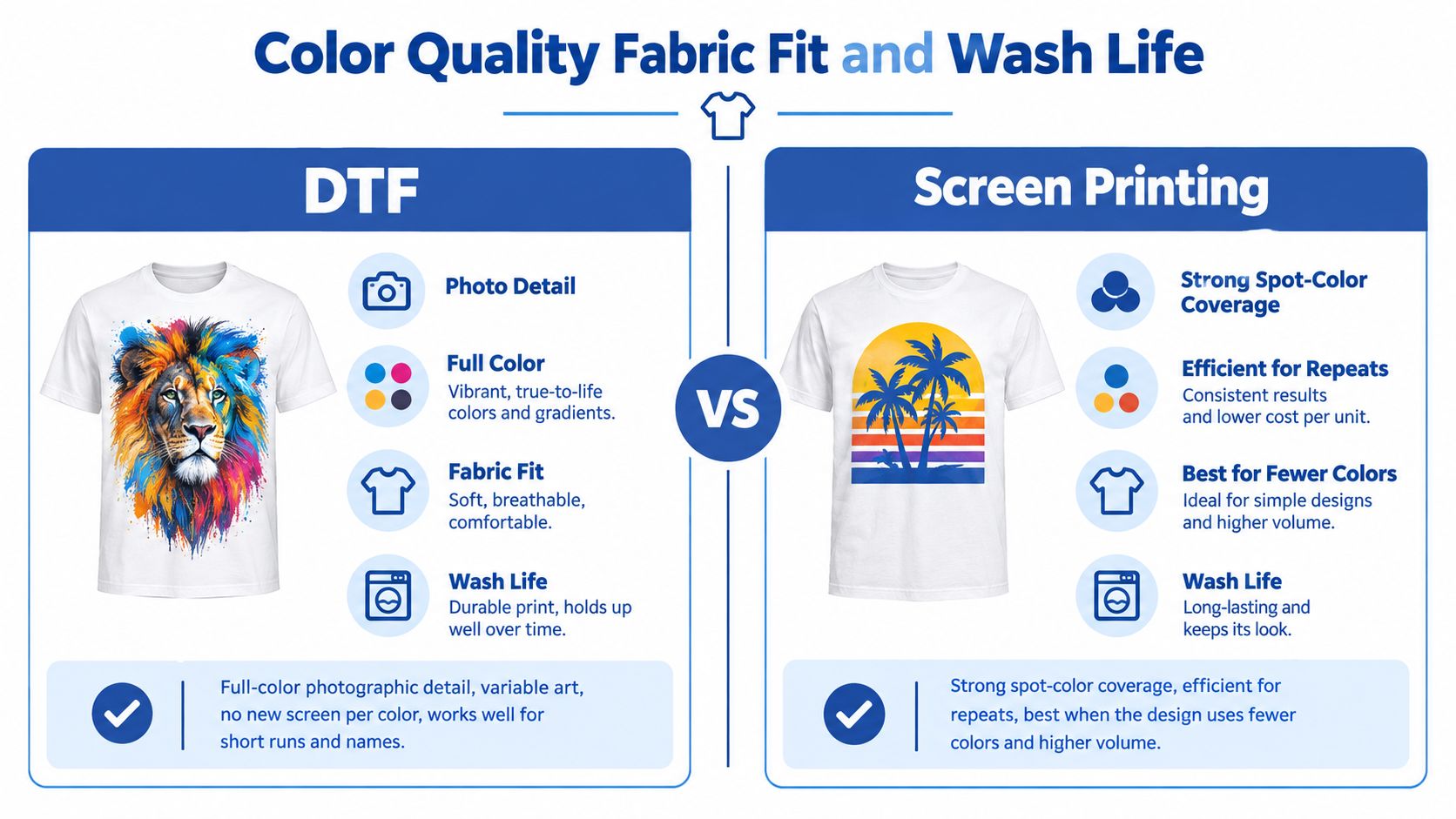
Color and Artwork Fit
DTF reproduces full-color photographic detail and variable artwork without requiring a new screen for every color. Names, numbers, small logos in several versions, and photo-based merchandise fit this workflow. When the design changes from shirt to shirt, the artwork file changes, while the setup can stay the same.
Screen printing gives decorators strong control over spot-color consistency across a large run of identical garments. For a brand ordering the same bold logo repeatedly, that repeatability is worth prioritizing. Photographic art can be costly to reproduce with screens, while a large single-color chest print gains little from digital color handling.
Fabric Fit in Practice
DTF can be applied to cotton and polyester without garment pretreatment, making mixed-fabric orders easier to manage. That suits a team order combining tees, hoodies, and performance shirts. Screen printing is a strong fit when the fabric is consistent and the ink system can be set for a standardized program.
If you need to set customer expectations about wear, review how long DTF transfers last under real wear and washing, then test the actual blank and decoration you plan to ship.
Two Studies That Do Not Agree Simply
A comparative study of QR-code labels tested cotton and polyester for scanability, wash resistance, and color fastness. In that QR-code label comparison on cotton and polyester, DTF labels on both fabrics remained completely scannable after five wash cycles, with color-fastness ratings around Grade 4 to 5, described as good to excellent. Screen-printed labels in the same study failed sooner, on polyester after three washes and on cotton after approximately two to three washes.
Abrasion is a different test. The independent textile abrasion testing of screen-printed and iron-transferred samples examined iron-on heat-transfer samples, not DTF transfers. The screen-printed samples showed barely noticeable color loss after 50 and 100 abrasion cycles, while the iron-transferred samples showed more pronounced color loss by 150 cycles. That result suggests a possible durability direction for heat-applied transfers under abrasion, but it does not establish how DTF performs.
Qualification rule: Don't quote a wash count you haven't tested on the actual garment, ink, film, and press settings you'll ship.
Treat these findings as evidence about specific applications, not a universal ranking. DTF performance depends on film, adhesive powder coverage, curing, press temperature, pressure, and dwell time. Qualify the job against its real wear risks: wash-test garments exposed to frequent laundering, and rub-test prints where straps, seatbelts, tool belts, or repeated friction make abrasion the concern.
Setup Costs and Where the Break-Even Lands
Most bad quotes in DTF vs screen printing happen because someone compares print cost and ignores setup. Setup is the whole argument at low quantity.
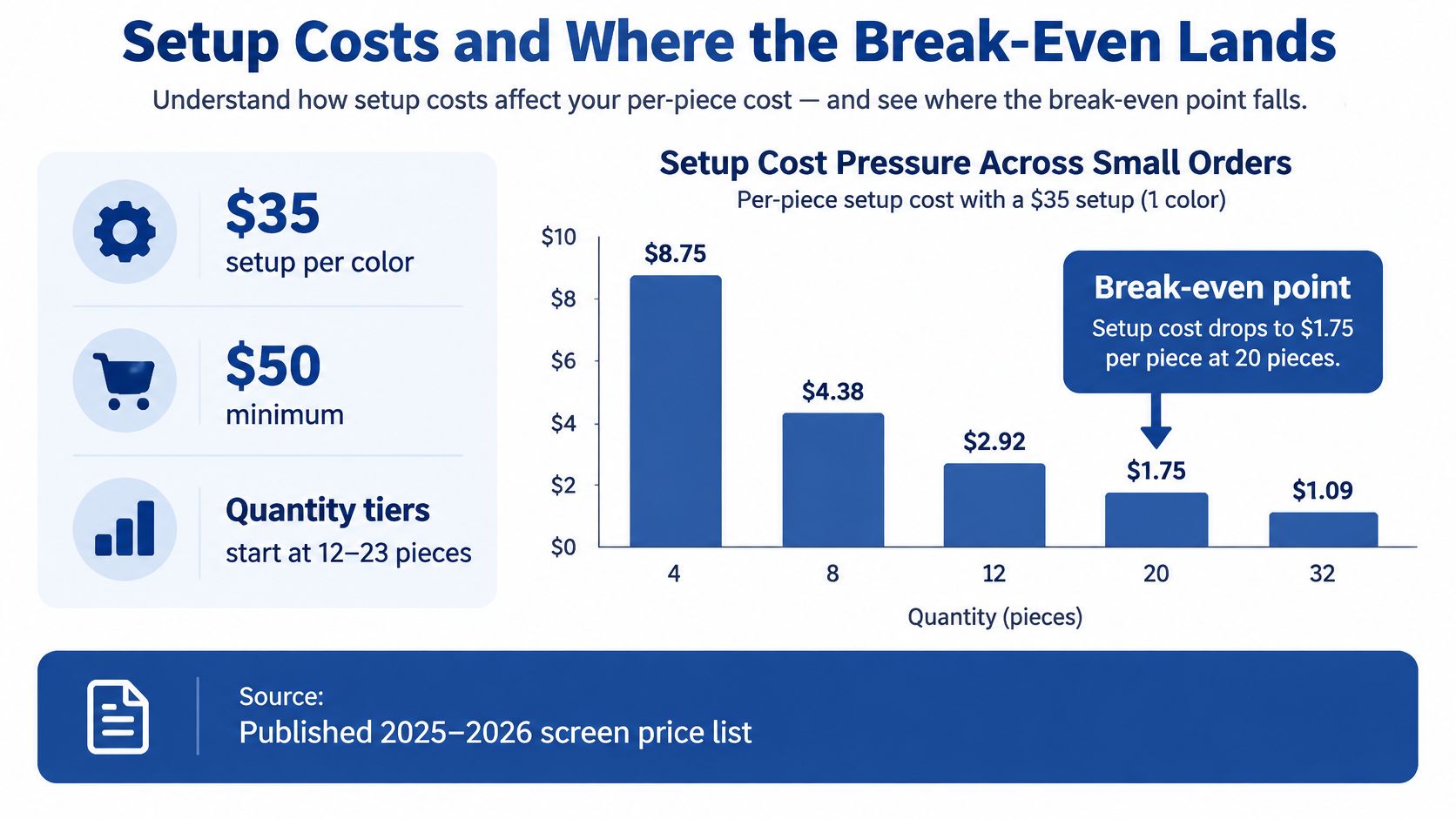
What Screen Setup Actually Charges You
A published 2025 to 2026 screen-printing price list with per-color setup charges specifies a $35 setup charge per color, a $50 minimum order, and quantity price tiers beginning at 12 to 23 pieces. Do the simple math on a two-color design. You're at $70 in screen setup charges before blanks and printing costs enter the quote.
That charge isn't arbitrary. Separations, screen preparation, registration, and a test print take labor whether the run is tiny or huge. On a large run, that fixed cost spreads thin. On a small run, every shirt carries a heavy share of it, and your unit price looks uncompetitive or your margin disappears because you were embarrassed to charge it.
If you're considering bringing digital capacity in-house instead of buying transfers, compare that route against guidance on the best DTF printer considerations for a small business. Equipment changes the math again.
Three Orders Priced Honestly
A single sample. Screen setup makes this nearly impossible to quote sensibly unless the sample is a paid step toward a confirmed large order. DTF wins because the artwork prints digitally onto film. You're paying for a transfer and a press cycle, not screens for every color.
A 25-piece mixed-design run. This is the point where shops bleed. The quantity looks like production, but the art changes across pieces, so screen setup multiplies or the job doesn't fit screens at all. DTF fits, but wasted film becomes your risk. Poorly packed designs leave expensive empty space on every sheet.
That's the specific problem Lion DTF Transfers' Auto-build gang sheet builder is built for. It arranges multiple graphics on one sheet to improve space utilization and cost effectiveness, so mixed designs share film instead of each paying for its own waste. If you're buying transfers rather than running film in-house, pricing as low as $0.017 per square inch makes that packing discipline even more important, because you're paying for area.
A 1,000-piece identical job. Stop forcing DTF here. Screen setup is amortized across the run, and press throughput usually wins on unit cost, as noted in trade guidance comparing screen printing and DTF production economics.
- Small and variable: Your lever is eliminating per-color setup and packing film tightly.
- Large and identical: Your lever is spreading setup across volume and keeping the press moving.
- In between: Quote both routes with real setup included, not wishful unit prices.
The break-even isn't a magic quantity anyone can hand you. It moves with color count, design changes, film waste, and whether you own the equipment or buy transfers. Price those variables and the crossover shows up on your own quote sheet.
Speed Space and How a Shop Scales
A method can win on paper and still wreck your week. Hours, floor space, and cleanup decide whether a profitable quote is producible.
How Screen Printing Scales
Screen printing is slow before it is fast. Separations, exposure, and registration front-load the labor. Once screens are burned and registered, a press and conveyor dryer move many identical garments quickly, and that throughput is why high-volume shops keep the method at the center of the building.
Scaling that route means capacity you can see. Screens need storage and reclaim space. A multi-station press and dryer need floor room, power, and cleanup discipline. Misregistration costs you test prints and press time. Screen reclaim is unglamorous labor that doesn't disappear just because the order shipped.
None of that argues against screens. It argues for feeding them the repeat work they repay. A screen department starving on 12-piece jobs isn't under-equipped. It's mis-routed.
How DTF Scales Differently
DTF compresses color setup into a file, so you reach the first press cycle faster on short and variable work. That favors on-demand production, reorders of a few pieces, and art that's different on every garment. But be honest about the bottleneck. Every transfer still needs a press cycle. Treat a single heat press like an automatic screen press on a long identical run and you'll create a queue of unpressed garments.
Your equipment footprint depends on the route you choose:
- In-house film production: Printer, powder handling, curing, and a heat press, plus the discipline to maintain them.
- Bought-in transfers: No printer at all. Your floor needs a press, blank storage, and a packing area.
That second route is how a screen shop, embroidery shop, or home-press maker takes short-run full-color work this week without building a new room. If labor is your constraint, look closely at where hours go, as explored in practical ways to reduce labor costs in a print shop.
DTF has its own slowdowns. Poor powder coverage, wrong dwell, or a bad cure can force reprints, and a mistake on film can mean reprinting more than one design if several shared a sheet. Standardize your press settings and test before the run, not during it.
Adding press capacity beats adding a printer when your backlog is unpressed garments. Adding outsourced transfers beats both when your backlog is jobs you shouldn't be setting up at all.
Scale isn't about owning every machine. It's about knowing which constraint you're relieving. Screens relieve unit cost at volume. Transfers relieve setup and equipment burden at low volume. Buy relief for the bottleneck you have, not the one a salesperson describes.
Ink Film and What Green Claims Miss
Green claims in this industry are usually half a comparison dressed as a whole one. Digital decoration has real process advantages. DTF also has materials that marketing pages conveniently skip.
What the Digital Evidence Actually Says
Available evidence on broader digital textile printing points to substantial reductions in process water, dye waste, and effluent compared with screen printing. One review reports up to 70% water savings and 55% energy savings, while a 2025 textile study found more than 90% water reduction and over 85% lower chemical oxygen demand in a digital process, as summarized in research on the environmental scope of digital textile processes/t230098.pdf?sfvrsn=b238c179_1).
Read those numbers carefully. They describe digital processes broadly. They are not universal DTF results, and you shouldn't put them on a customer quote as if your specific transfer order earned them.
What DTF Adds to the Ledger
DTF adds PET transfer film and a polyurethane adhesive to every print. A recent study specifically notes that the adhesive limits environmental performance, and that a full life-cycle assessment was outside its scope. That missing scope is the honest center of the sustainability question.
For a particular order, a fuller accounting would include:
- Film and adhesive: Materials consumed for every transfer, including layout waste.
- Curing and pressing electricity: Energy used in your shop or your supplier's.
- Packaging and shipping: Especially relevant when transfers travel to you before garments travel to the customer.
- Rejected transfers and misprints: Waste that never becomes a sellable shirt.
- The blank garment itself: Often the largest footprint in the order, and separate from decoration.
That last item matters most for honest conversations. Separate the shirt's footprint from the decoration method's footprint. Otherwise you're crediting or blaming a print process for a garment you were going to buy either way.
A Better Question for Three Order Sizes
At one sample, avoiding screens, cleanup, and setup waste can make a transfer route look sensible. At 25 pieces, film packing efficiency and rejected prints start to matter more. At 1,000 pieces, per-shirt film and adhesive consumption compete against a screen setup that's already paid and spread across the run.
I won't hand you a single eco score for those scenarios, because the life-cycle evidence to support one isn't there. Measure impact per sellable shirt for your order size, count your waste accurately, and reject blanket claims from both directions. DTF isn't automatically eco-friendly because it's digital. Screen printing isn't automatically greener because it's established at scale.
Which Method Fits Each Real Order
You've heard the criteria. Now match them to orders you'd take on a sales call, because customers don't buy criteria. They buy team shirts by Thursday.
| Order type | Better fit | Why |
|---|---|---|
| Identical high-volume spot color | Screen printing | Setup spreads across the run and press throughput drives unit cost down |
| Full-color art, names, numbers | DTF | Art changes per piece without new screens or new setup |
| Mixed cotton and polyester blanks | DTF, after testing | No garment pretreatment simplifies mixed-fabric orders |
| Standardized fabric program with reorders | Screen printing | A known ink system repeat-produces the same result |
| Wash-critical scannable labels | DTF, based on the QR study | Labels stayed scannable after five washes in that controlled test |
| Abrasion-heavy uniforms and workwear | Screen printing, properly cured | Friction testing favored screen-printed samples under repeated rubbing |
Orders I Would Route Without Debating
School and team gear with many small designs. Different names, numbers, grade levels, and sponsor logos across small quantities. That's transfer work. Trying to screen it turns a simple order into a setup inventory.
E-commerce drops and seasonal merch. You don't know which design sells until it sells. Transfers let you press to demand instead of printing inventory and hoping. Dead stock is the most expensive print you'll ever make.
Event shirts at hundreds of pieces in one or two colors. Screen print them. The artwork is identical, the colors are few, and the quantity repays setup. Pressing hundreds of individual transfers to prove a point about digital printing is just slow.
Promo agencies on a one or two day deadline. This depends on the art and quantity, but short, full-color, and urgent usually points to transfers you can press on arrival rather than a screen schedule you don't control.
Where a Transfer Supplier Fits the DTF Rows
For the DTF side of that table, Lion DTF Transfers supplies hot-peel DTF transfers and gang sheets, UV DTF stickers, and an online gang sheet builder, with order-by-size and print-ready upload options. Ready-to-press collections cover repeat themes so you're not designing from zero for common seasonal and school work. The operation also lists color matching, prints tested to last 100+ washes, prices from $0.017 per square inch, 24-hour printing with 1 to 2 business day shipping, same-day pickup, and next-day air. Design, vectorization, and a done-for-you gang sheet service are available when art preparation is your bottleneck.
Use those specifics where they solve the order in front of you. A supplier doesn't make DTF right for a 1,000-piece one-color run. It makes DTF practical for the short, variable, deadline-driven work your screens shouldn't absorb. Keep the recommendation situational and your customers will trust it, because they'll see you steering some jobs away from transfers too.
How to Add DTF Without Replacing Screens
You're not replacing a screen department. You're giving it a filter, so repeat spot-color work stays on press and everything else stops clogging the schedule.
The transfer route starts with ordering correctly, as shown below.
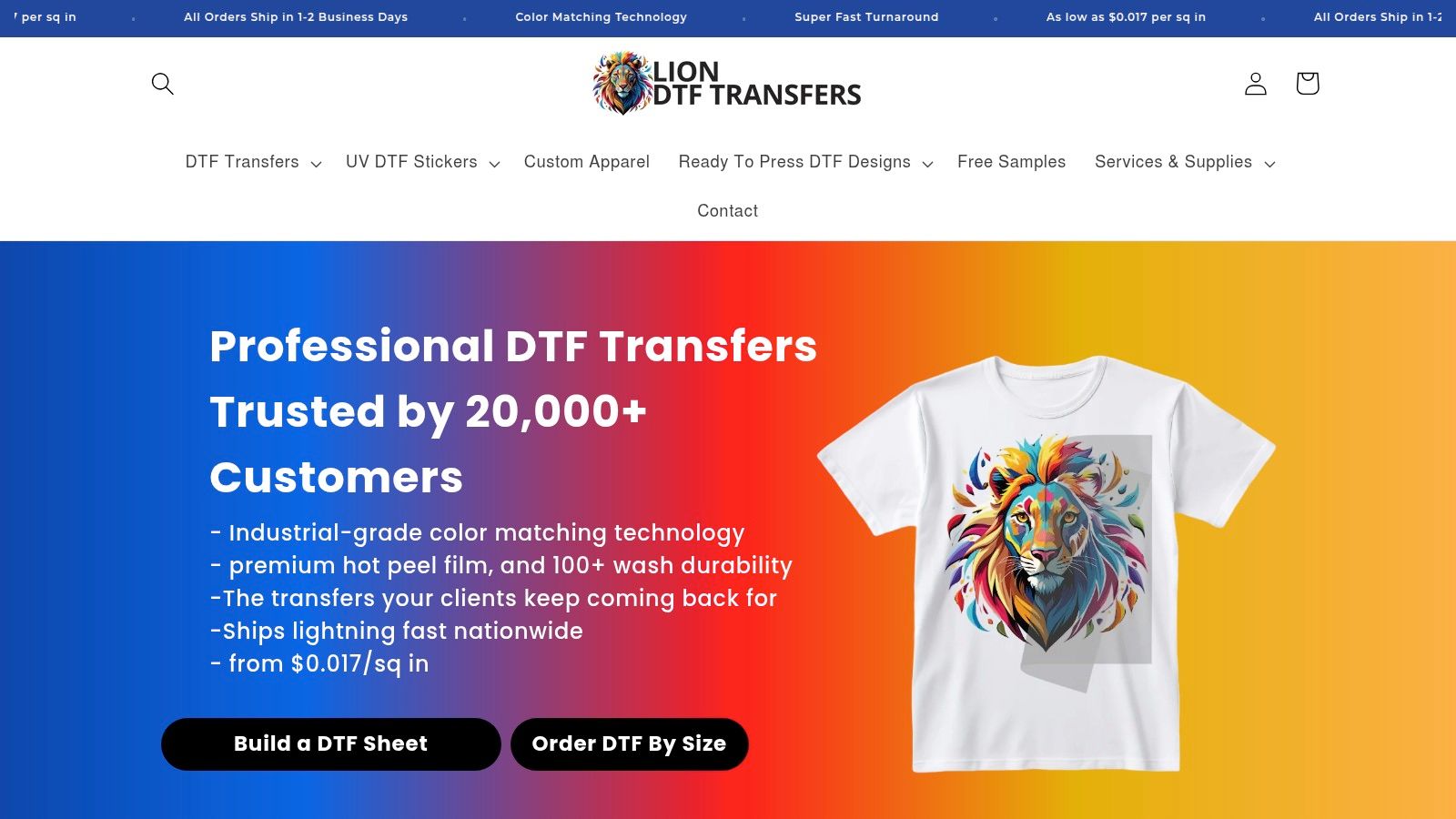
A Simple Intake That Routes the Job
Ask four questions before you quote anything:
- How many pieces: Quantity tells you whether setup can spread or will dominate.
- How many colors, and is it photographic: Color complexity tells you how painful screens get.
- What fabric: The blank decides your ink or transfer testing needs.
- Does the art repeat exactly: If names, numbers, or designs change per garment, screens are fighting the job.
If the job is variable, full-color, or below the point where screen setup pays for itself, don't burn screens out of habit. Build or order a gang sheet. The Auto-build gang sheet builder on liondtf.com is the practical next step for packing mixed designs onto shared film, cutting waste, and keeping small orders cost effective without you manually nesting every graphic. You can upload a print-ready file if your layout is done, order DTF by size for single designs, or use We Build a Gang Sheet for You when layout time is the bottleneck.
Before you standardize your own pressing routine, watch a full transfer application so your team shares one method.
Standardize the Press, Then Prove Durability
Pressing is the in-shop skill that decides whether bought-in transfers perform. Set temperature, pressure, and dwell for the actual blank you're shipping, write those settings down, and use them every time. Then run a wash check and a rub check on that garment and artwork before you promise a customer workwear toughness or a long wash life. Your earlier qualification habit applies here, on your floor, with your press.
Support matters when you're learning a new route under deadline pressure. Pressing guidance, supplies, and blanks are available alongside transfers, with contact by phone, text, email, or chat when a job needs a quick answer. With 1 to 2 business day shipping available, turnaround is a planning question, not a reason to default every urgent job to whatever machine is closest.
Price tomorrow's mixed job both ways, gang sheet beside screen quote, with setup included in both. Send each job to the method that wins that quote.
Do that for a month and you'll stop having the DTF vs screen printing argument entirely. You'll have routing data from your own orders, which beats anyone's opinion, including mine.
Ready to route your next mixed order instead of forcing it through screens? Lion DTF Transfers offers hot-peel transfers, gang sheets you can build online, and fast turnaround for the short-run, full-color, and name-drop jobs your press shouldn't absorb. Build your first gang sheet and get pressing at Lion DTF Transfers.