










You're comparing transfer quotes, checking garment colors, and wondering whether a supplier's “durable” promise will still mean anything after the first wash. DTF prints can simplify that decision, but only when you understand what the transfer contains, which parts of the process the supplier controls, and which parts become your responsibility at the heat press.
Direct-to-film has grown beyond a specialist technique. One recent industry estimate valued the global direct-to-film printing market at USD 2.85 billion in 2025 and projected USD 4.46 billion by 2032, with a projected 6.57% CAGR from 2026 to 2032. Those figures describe a commercial category, not a passing craft trend. For a first-time buyer, though, the practical question is simpler: will DTF give you the detail, fabric flexibility, and repeatable results your orders require?
What DTF Prints Are and Why Creators Use Them
A custom-tee maker has three quotes open on the desk. One method requires more setup than the small order justifies. Another looks attractive for simple lettering but can't reproduce the colorful artwork the customer supplied. The third is a ready-to-press DTF transfer, and it offers a practical middle path for a short run.
DTF prints, or direct-to-film prints, are full-color designs printed onto a coated film, covered with hot-melt adhesive powder, cured, and heat-pressed onto fabric. The design doesn't go directly into the garment during printing. Instead, the film carries the image until heat activates the adhesive and bonds it to the textile.
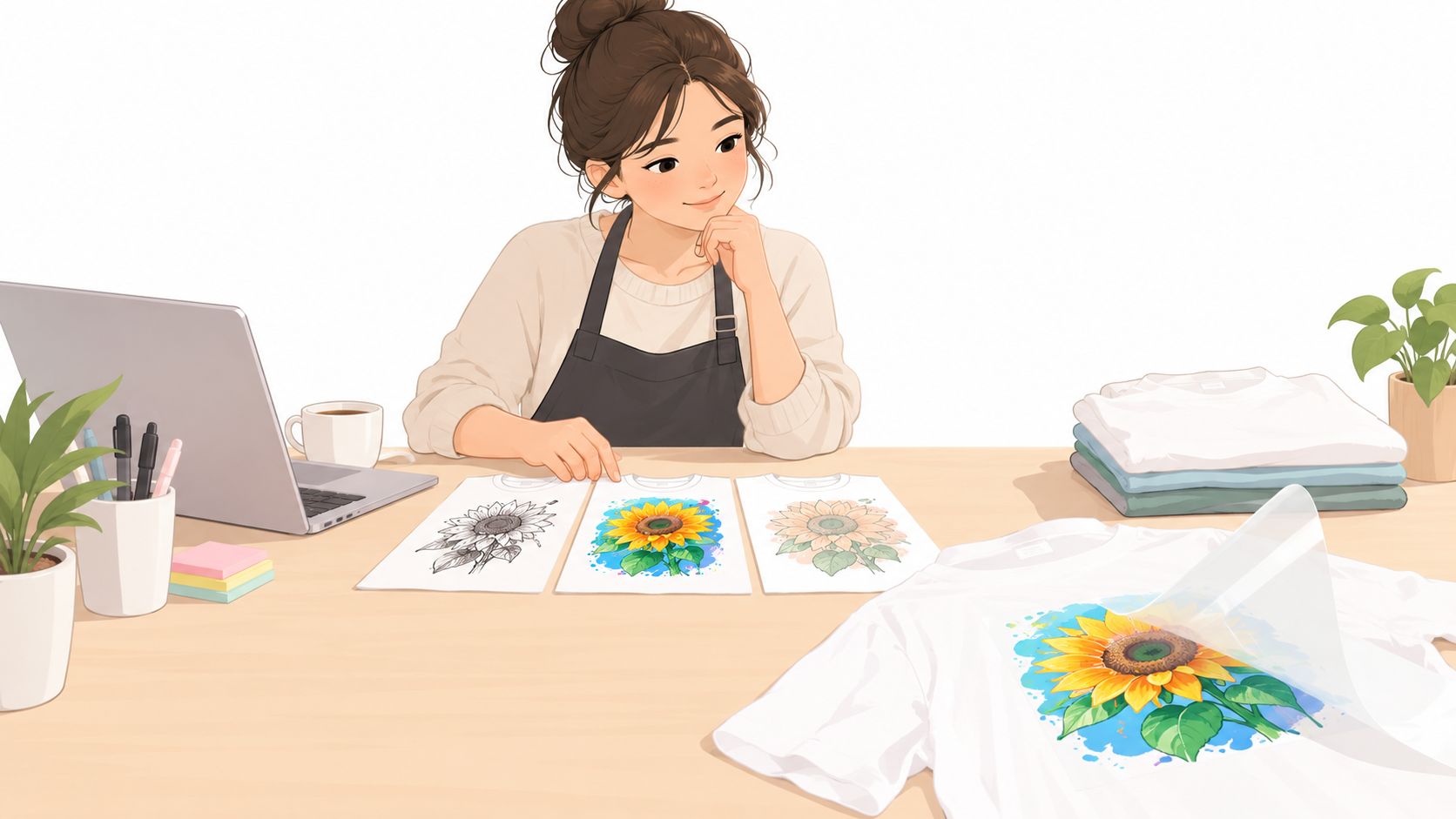
Traditional direct-to-garment printing places ink onto a prepared garment. Screen printing pushes separate layers of ink through screens. DTF takes a different route. It separates image creation from garment application, so a supplier can print the transfer first and the buyer can press it later.
Why the method suits small orders
Creators often choose DTF because it handles detailed, multicolor artwork without requiring them to own a DTF printer, curing equipment, powder unit, or large screen-printing setup. A finished transfer arrives flat and ready to press, which fits the workflow of an Etsy seller making occasional orders, a print shop adding a new decoration method, a sports team ordering varied names, or a small brand testing a design before committing to inventory.
The method also works across cotton, polyester, and blended fabrics, which gives one transfer workflow more flexibility than a method designed for a narrower textile range. DTF can reproduce photographic color, gradients, logos, and fine artwork. The trade-off is that the design remains as a bonded layer on top of the fabric, so a broad solid area may feel more noticeable than ink absorbed into the textile.
Buyer's rule: Choose DTF when artwork complexity and fabric variety matter more than achieving the softest possible print surface.
The technology is relatively new beside older apparel-decoration methods. Industry references place its emergence in the late 2010s, followed by a broader demand surge around 2020 as many small businesses moved into home-based apparel printing. A 2024 to 2025 market analysis reported that dedicated DTF printers held 45.0% of the category in 2024, a sign that purpose-built equipment had become an established part of the market.
How the DTF Printing Process Works Step by Step
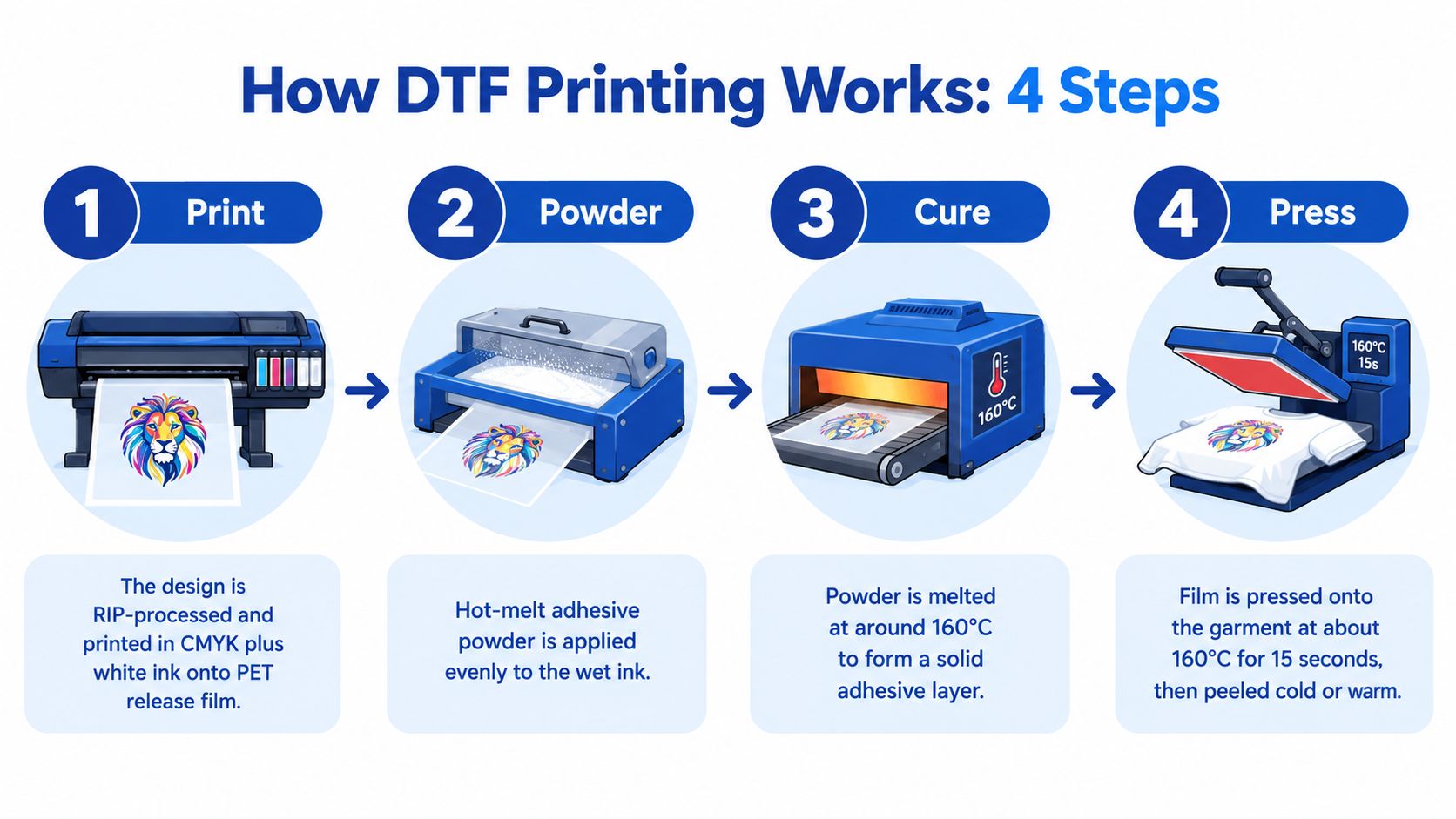
A DTF transfer is only as consistent as the least controlled stage in its production. The process has four practical stages: print the image, apply the adhesive powder, cure the transfer, and press it onto the garment.
1. Print the design onto film
A RIP system prepares the artwork for the printer, including color separation and white ink management. The printer lays down the design in CMYK plus white ink onto PET release film. The white layer gives colors a foundation on dark garments, while the film provides a temporary surface that releases after pressing.
The RIP stage can create problems if transparency, sizing, or white ink settings are wrong. A color may look correct on screen but print with a different visual weight if the white underbase is uneven. For repeat orders, the supplier should preserve the same artwork dimensions and production settings rather than treating every upload as a new experiment.
2. Apply hot-melt powder
The wet ink receives a layer of hot-melt adhesive powder. The powder must cover the printed area evenly, and excess powder needs to be removed before curing. Too little adhesive can leave weak edges. Too much can create a heavier surface or a sticky finish.
3. Cure the adhesive
Curing and pressing aren't the same operation. A technical DTF curing guide describes cure temperatures that can vary from roughly 110 to 180°C, with cure times around 2 to 5 minutes, generally without pressure. The correct setting depends on the equipment, film, powder, and ink system.
The curing unit melts the powder and forms an adhesive layer attached to the printed ink. Undercuring leaves the powder insufficiently activated. Overheating can soften the adhesive too much or distort the film. Both errors can reduce the bond achieved later on the garment.
4. Press the transfer onto fabric
After curing, the transfer is positioned on the garment and applied with a heat press. The same technical guidance places transfer application commonly around 130 to 160°C for 10 to 15 seconds under medium pressure, but the supplier's tested instructions should take priority for a particular film and powder combination.
Fabric moisture, platen pressure, temperature accuracy, and peel timing all affect the result. A press that displays a target temperature may still have uneven heat across its platen. A buyer should test a transfer on each important garment family before selling a large run.
For a more visual explanation, this DTF transfer process guide offers another walkthrough of the film, powder, curing, and pressing sequence.
The process is easier to repeat when the operator records the garment type, press settings, peel method, and any post-press step. That record becomes valuable when a customer reorders the same design months later.
DTF Prints vs DTG, Vinyl, and Screen Printing
No decoration method wins every job. DTF is strongest when a buyer needs detailed artwork across varied fabrics and doesn't want a complex setup. Another method may be better when the design is extremely simple, the fabric is narrowly defined, or the order is large and repetitive.
| Method | Best Fabric Range | Detail and Color | Setup Cost | Ideal Run Size |
|---|---|---|---|---|
| DTF | Cotton, polyester, blends, and many common garment types | Strong for photographic detail, gradients, and multicolor designs | Moderate when ordered as transfers, with no need to own production equipment | Short to mid-sized runs and mixed designs |
| DTG | Primarily prepared cotton garments | Very soft surface feel and detailed color | Requires garment preparation and specialized equipment | Short runs centered on suitable cotton |
| Vinyl | Many common garments, depending on vinyl type | Effective for simple lettering, names, numbers, and limited-color graphics | Low for basic cutting workflows | Small runs with uncomplicated artwork |
| Screen printing | Broad apparel use, selected according to ink and textile | Strong for bold graphics, with color and setup considerations | Higher preparation because screens and separations are involved | Larger repeat runs with consistent artwork |
DTG can produce a soft result because the ink is absorbed into the garment, but the process requires suitable preparation and is less flexible across synthetic fabrics. Vinyl works well for a team name or a clean one-color mark, yet it isn't a natural fit for photographic shading or intricate gradients.
Screen printing remains compelling for high-volume repetition. Once the setup is complete, the unit economics can improve as the same design is printed across a larger run. The buyer accepts more preparation, color planning, storage, and inventory commitment in exchange for that scale advantage.
DTF changes the decision by moving preparation away from the garment. The supplier creates a ready-to-press transfer, and the buyer applies it when needed. That makes DTF especially useful for small brands carrying varied designs, decorators working with cotton and polyester orders, and creators who need detailed art without purchasing a full production line.
A DTF and DTG comparison can help buyers examine the difference in more detail, but the practical test is straightforward:
- Choose DTF for short to mid-sized runs, full-color art, mixed fabrics, and made-to-order work.
- Choose DTG when the softest feel matters and the garment is well suited to direct printing.
- Choose vinyl for simple names, numbers, and limited-color shapes.
- Choose screen printing when a repeat design justifies setup and production scale.
Durability depends on the complete process in every category. Don't judge a method only by the sample's appearance immediately after pressing. Ask how the decoration was cured, applied, washed, and tested.
Durability, Washing, and Care for DTF Prints
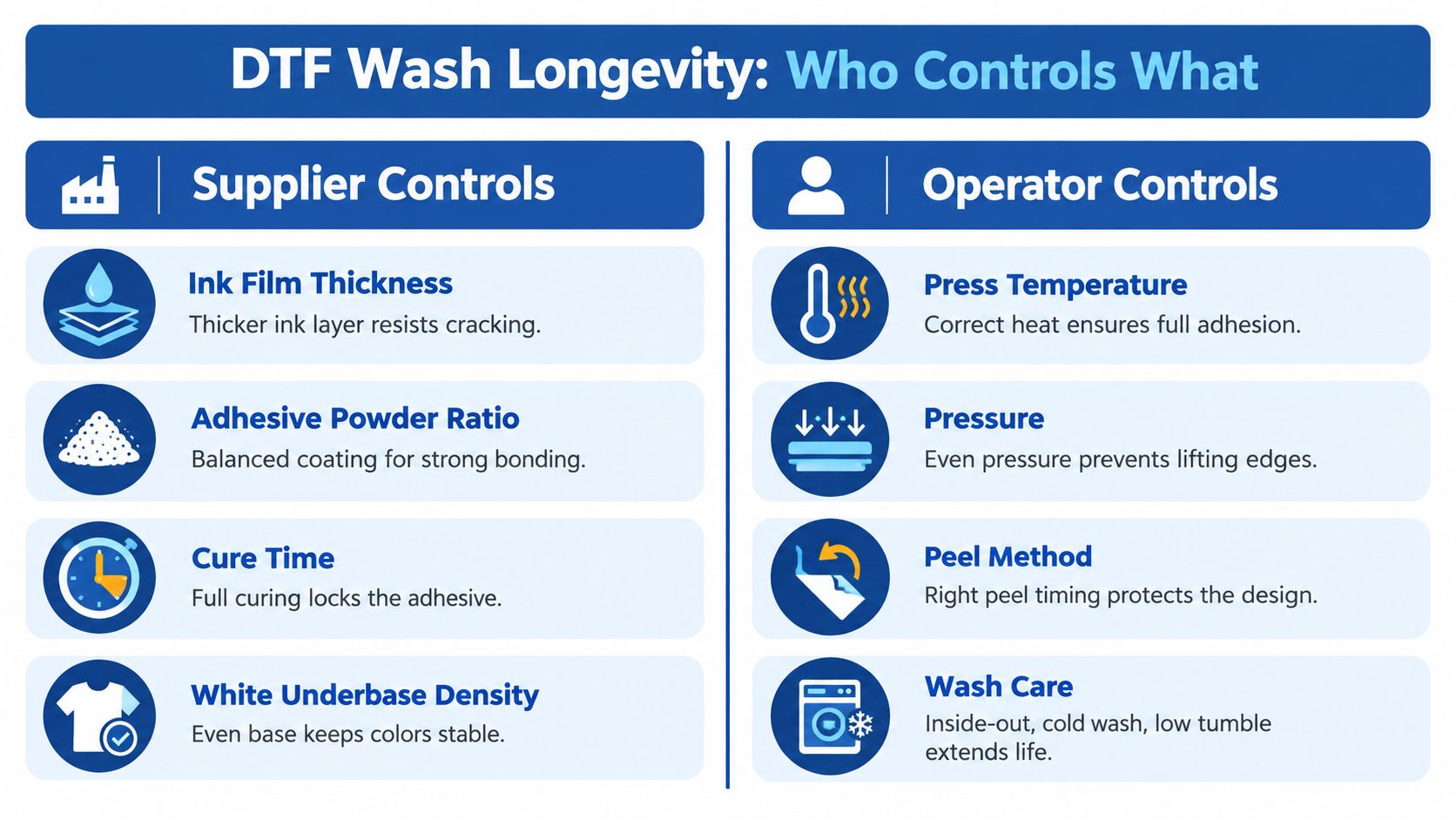
A DTF print doesn't have one universal lifespan. Its performance depends on two linked jobs: the supplier must make a sound transfer, and the operator must apply it correctly.
The supplier controls the printed film system. That includes ink film thickness, adhesive powder coverage, cure quality, and the density of the white underbase. The operator controls the garment side of the bond, including press heat, dwell time, pressure, moisture removal, peel timing, and laundering instructions passed to the customer.
Separate the two responsibilities
A textile durability study found that DTF samples ranked among the most wash-resistant decorations tested. The strongest DTF specimens retained color without significant loss after 15 wash cycles, while the top-performing DTF and screen-printed samples reached 20 wash cycles under the same testing framework, as reported in the textile durability study.
Another DTF quality guide notes that a well-made transfer can survive around 50 or more wash cycles, while also describing poor curing as a cause of early failure. These results aren't contradictory. They show why a wash claim needs a defined transfer, garment, cure, press, and laundering protocol.
Diagnose the symptom before blaming the supplier
Peeling edges can result from insufficient pressure, low application heat, moisture, or an undercured adhesive layer. Cracking may reflect a weak bond, an overly rigid print, or excessive stress from the garment. A washed-out appearance can involve color, underbase, curing, or laundering.
Neutral troubleshooting guidance for DTF transfers identifies recurring problems such as peeling, cracking, banding, washed-out color, and sticky finishes. The important lesson is that the same visible symptom can have different causes.
A fair warranty conversation starts with evidence. Keep the transfer packaging, note the press settings, photograph the garment before washing, and record the wash method.
For care, turn garments inside out, use a mild cycle, avoid bleach, and limit high heat from washing and drying. Iron the garment inside out rather than placing direct heat on the printed surface. If a supplier gives different tested instructions for its film, follow those instructions and test them before making a durability promise to customers.
Pricing, Turnaround, and Order Size Considerations
The cleanest way to compare DTF quotes is to separate artwork area, sheet utilization, quantity, and speed. A large empty film area can make a seemingly low transfer price expensive, while a well-packed gang sheet can spread the material cost across several designs.
Suppliers may price individual transfers by their measured area, by size category, or by a gang sheet. The quote can also change when you choose rush production, expedited shipping, or a pickup option. Ask whether the listed price includes printing, film, powder, artwork preparation, and shipping before comparing vendors.
Read the quote through four questions
- How is area measured? Some vendors charge by the transfer's bounding box, not only by the visible ink.
- What happens with unused space? A sheet with one small design may carry more waste than a packed sheet.
- What does the turnaround include? Printing time and transit time aren't always the same.
- Does the price change with quantity? Volume pricing can make a larger order more efficient, but only if you can use the transfers.
| Factor | Typical Range | Cost Impact |
|---|---|---|
| Individual transfer pricing | Varies by supplier, size, and quantity | Larger artwork generally uses more film area |
| Gang sheet utilization | Depends on design sizes and spacing | Better packing can reduce unused material |
| Standard production | Supplier-specific | Usually costs less than rush handling |
| Rush production | May include a premium | Faster processing increases the order total |
| Expedited delivery | Depends on carrier and destination | Shipping speed adds to landed cost |
For a handful of varied designs, DTF often avoids the setup burden associated with screen printing. For a repeated design at substantial volume, screen printing may become more economical because setup costs are distributed across many garments. The right choice depends on what you can sell, not just what the supplier charges.
A useful business measure is price per wear, calculated as design cost divided by expected washes. That calculation connects transfer quality and pressing discipline directly to customer value. A cheaper transfer that fails early may cost more in replacements, support time, and lost trust.
File Specs, Sizes, and Gang Sheet Ordering Tips
A good DTF order begins before the artwork reaches the supplier. Your file should preserve clean edges, transparent areas, and the intended print proportions. A low-quality logo can still produce a poor transfer even when the printer and press are operating correctly.
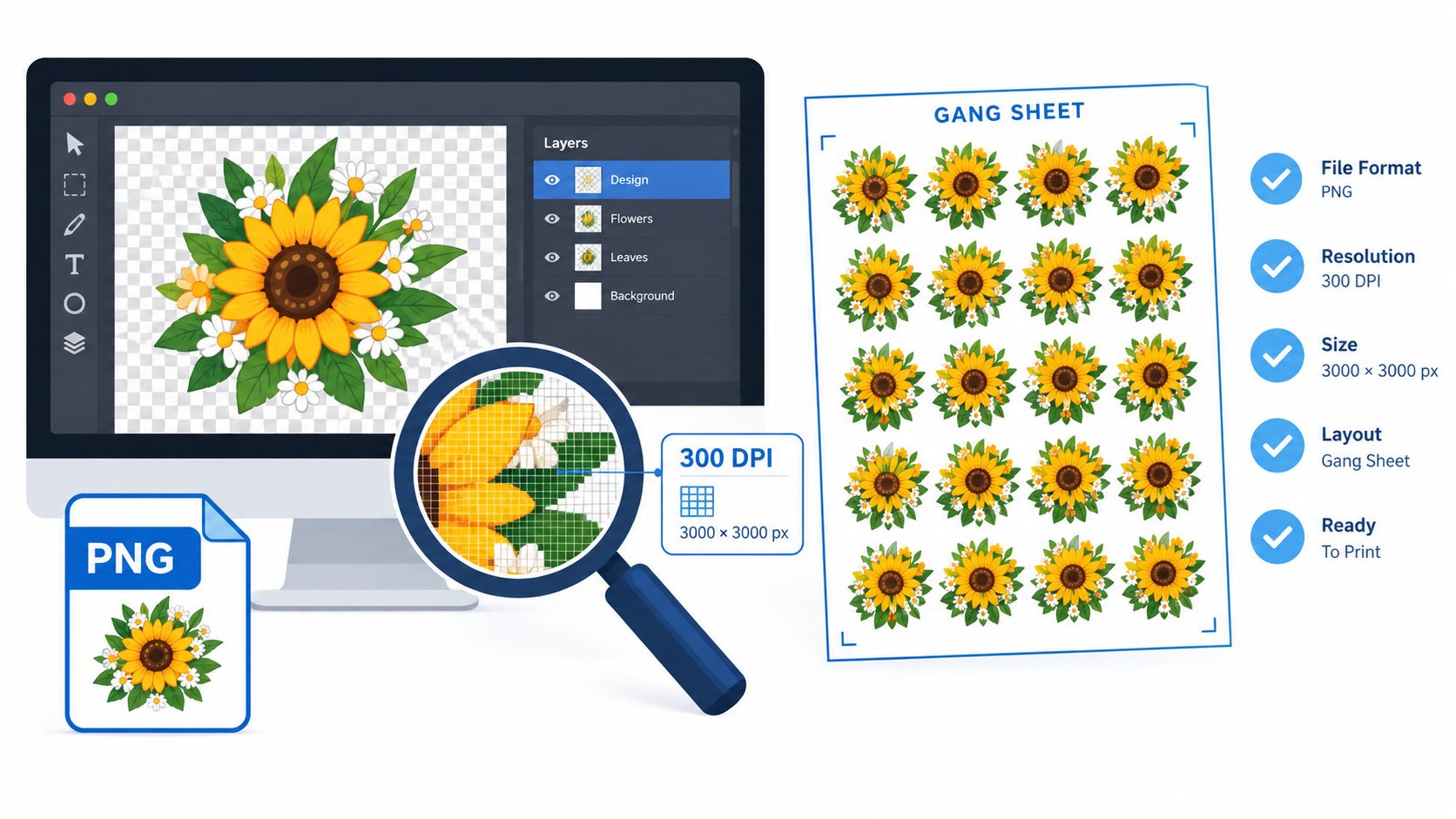
Start with a transparent PNG or a vector file when available. Common gang sheet systems accept formats such as PNG, PDF, SVG, and AI, as described by a DTF gang sheet builder. Keep the artwork at its intended output size, check the color appearance against the garment, and tell the supplier whether the design is going onto a light or dark textile.
Build the sheet around the garment
Measure the printable area rather than guessing from a mockup. A chest logo, full-front graphic, sleeve mark, and youth-size design may all need different dimensions. Keep important text and thin details away from the cut edge, and inspect the preview at full size before approving the order.
Gang sheets are useful because several designs can share one film sheet. A gang sheet builder explanation describes how these tools arrange multiple designs into a print-ready layout, reducing unused space when the artwork sizes fit together.
The Auto-Build gang sheet builder makes that packing step easier. Upload multiple designs, let the tool auto-sort, rotate, and place them with minimum spacing, then review the layout before ordering. This approach saves manual arranging time and can improve material use, especially when a brand has several small logos or seasonal graphics to print together.
Check the layout before payment
Use a checklist rather than trusting the first preview:
- Artwork background: Remove unwanted backgrounds and confirm transparency.
- Design scale: Match each graphic to the actual garment placement.
- Spacing: Leave enough separation for clean cutting and handling.
- Orientation: Confirm whether the supplier requires a mirrored file or handles orientation during production.
- Text detail: Enlarge small lettering and inspect thin strokes before approval.
- Fabric note: Identify cotton, polyester, or a blend so the supplier can advise on application.
If you don't want to arrange the artwork yourself, choose a We Build a Gang Sheet for You service and provide the design files, quantities, and desired sizes. For repeat orders, save the approved layout as a master gang sheet template. That makes reordering faster and gives the supplier a stable reference for consistent placement.
How Lion DTF Transfers Supports Creators
A first-time buyer may think the hard part ends when the order is submitted. In practice, the questions often arrive earlier and later: Is the logo sharp enough? Should the artwork be larger? Which gang sheet size fits the order? Why did one corner lift after pressing?
Supplier support can reduce those decisions before they become wasted transfers. Artwork preparation may include vectorization for a low-resolution logo, layout assistance for a mixed gang sheet, color-matching guidance, and advice on sizing a design for a particular garment. The buyer still needs to provide accurate artwork and fabric information, but a knowledgeable support contact can identify problems before production.
The We Build a Gang Sheet for You option suits buyers who have several files but don't want to manage spacing and placement. A design team can also help with layout, color, and sizing decisions. That human review is useful when the order contains small text, dark garments, unusual proportions, or artwork that has only been viewed on a screen.
Prepare for the pressing stage
Support shouldn't stop at shipment. Pressing instructions, cure-time guidance, and reorder assistance give the operator a better chance of reproducing the intended result. If a transfer fails, the useful conversation is specific: What fabric was used? What temperature and pressure did the press apply? How long was the dwell? Was the film peeled hot, warm, or cold? How was the garment washed?
Use this checklist before uploading:
- File quality: Confirm that the artwork has clean edges and a transparent background.
- Sheet choice: Select a gang sheet size that matches the number and dimensions of your designs.
- Garment type: Note whether the order uses cotton, polyester, or a blend.
- Application plan: Confirm that your heat press can apply even heat and pressure.
- Test order: Press and wash a sample before promising a result to customers.
- Repeat reference: Save the approved artwork and layout for future orders.
These steps divide responsibility clearly. The supplier must produce and cure a properly coated transfer. The buyer must apply it with validated settings and communicate suitable care. That partnership is what turns DTF prints from a convenient purchase into a repeatable production process.
Lion DTF Transfers offers ready-to-press DTF transfers, gang sheets, an Auto-Build gang sheet workflow, artwork support, and a “We Build a Gang Sheet for You” service for creators who want help preparing their files. Visit Lion DTF Transfers with your artwork, garment details, and preferred sheet format ready, then request guidance before placing a larger order.