










You're staring at a half-finished order, a Friday deadline, and a stack of shirts that still need names, logos, or a fresh merch drop. Maybe you're a shop owner in Houston trying to keep a customer happy, maybe you're organizing church shirts, or maybe you just need one clean transfer that won't crack after the first wash. DTF Houston becomes a practical decision in that moment, not a buzzword, because the core question is simple, who can turn your artwork into press-ready transfers fast, with the least guesswork.
Houston buyers often want the same things at once: speed, color, and flexibility across different fabrics. A local provider matters because pickup, shipping, and fast turnaround can solve problems that a distant queue can't. The useful part is knowing what DTF does, what a fair quote looks like, and how to spot a vendor that's set up for real production instead of just polished marketing.
The Houston DTF Moment Most Buyers Walk Into
A Houston buyer usually does not start with printing theory. They start with a text from a coach, a pastor, a customer, or a quick look at inventory. The order is short, the deadline is close, and the garments are mixed, maybe cotton tees, a polyester jersey, or a blend that needs to look clean without a large setup bill.
DTF Houston gets attention in that moment because it fits the messy middle, not just the huge run or the single one-off. A local source also fits Houston's real rhythm, where school events, streetwear drops, sports gear, and branded work shirts can all land in the same week.
Practical rule: if the art is full color, the fabric mix is messy, and the deadline is close, DTF is often the first method worth pricing.
The local angle matters too. A Houston-focused provider can support pickup or shipping, and local fulfillment avoids the out-of-state queue that slows reorders and last-minute fixes (Houston DTF transfer provider details). That speed matters more than polished language when someone needs shirts by the weekend.
The useful way to think about this topic is not “What is DTF?” but “Which vendor can get me press-ready transfers without wasting my time?” That is the buying question this guide answers, step by step, in plain language.
What DTF Printing Actually Does Step by Step
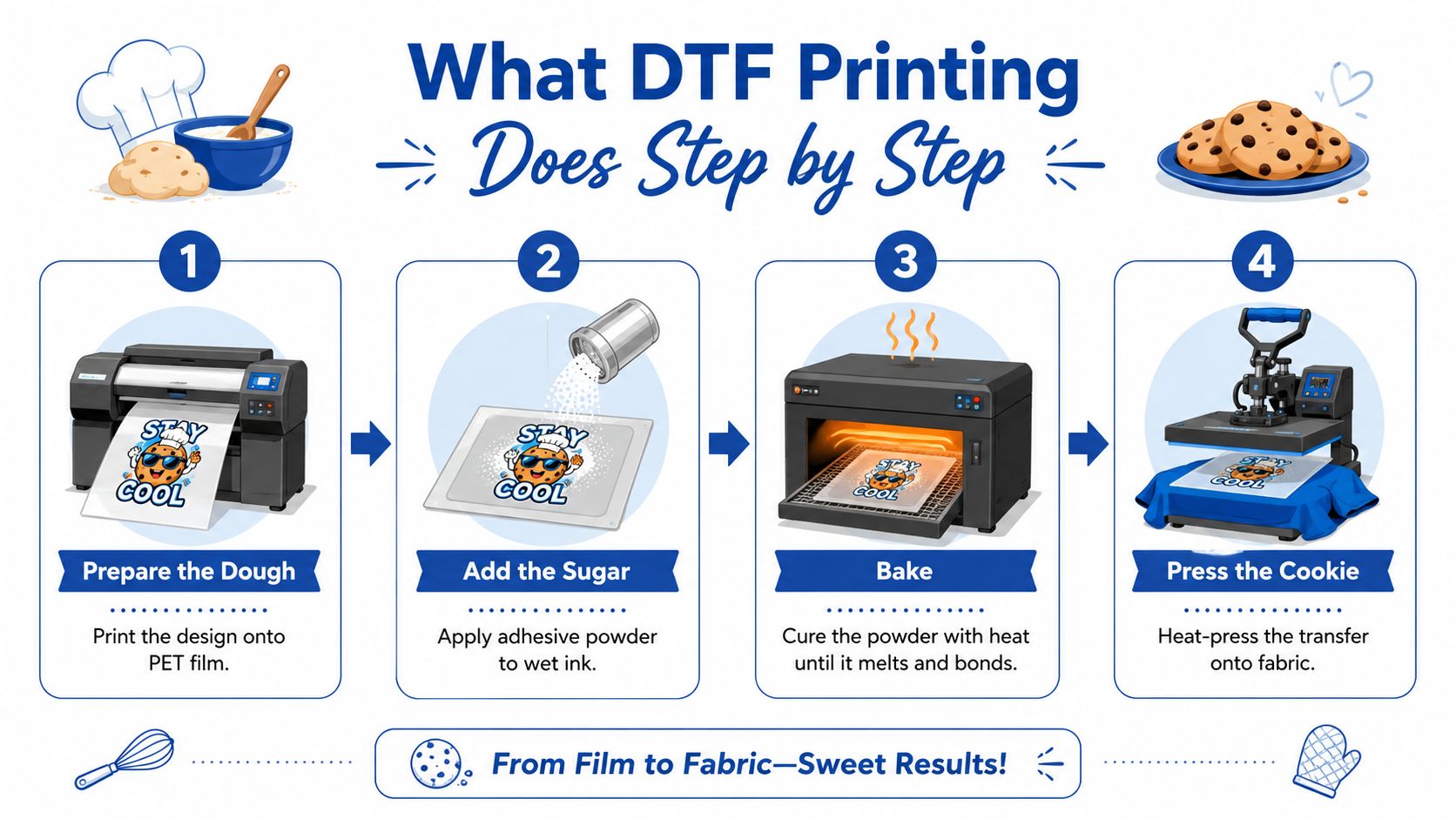
A Houston buyer usually sees the finished shirt first, then has to figure out what happens between the file on a screen and the transfer on fabric. DTF keeps that workflow fairly direct. A design is printed on PET film, adhesive powder is applied while the ink is still wet, the powder is cured, and the transfer is then pressed onto the garment. The press range as about 240°F to 280°F for 7 to 10 seconds.
The film works as the carrier, the powder gives the print its bond, and the press finishes the job. If the heat is too low, too high, or held for the wrong amount of time, the print can lose edge sharpness or wear down faster than expected. That is why shop owners talk so much about press settings, they are not being fussy, they are protecting the final result.
Why the process works on different fabrics
DTF is useful because it can move across cotton, polyester, blends, and tri-blends without forcing a buyer into a fabric-only lane. That matters in Houston, where one order may include tees, hoodies, and performance wear, and the garment choice is not always under the buyer's control. Once the transfer is pressed, the art sits on the fabric and stays crisp without requiring the same color separation work that screen printing often needs.
Peel method changes the workflow too. A hot-peel transfer is removed while it is still warm, which is common in DTF and helps when you are pressing several shirts in a row. A vendor should be able to tell you whether the transfers ship as hot peel or cold peel, because that changes how you press and how the finished print looks.
If you are comparing methods for a shop order, a DTF vs. DTG printing comparison can help you separate cotton-only direct print jobs from transfers that need more fabric flexibility.
Plain rule: if a supplier cannot explain peel method, press temperature, and the cure step in simple language, keep asking questions.
DTF Compared to Other Houston Apparel Methods
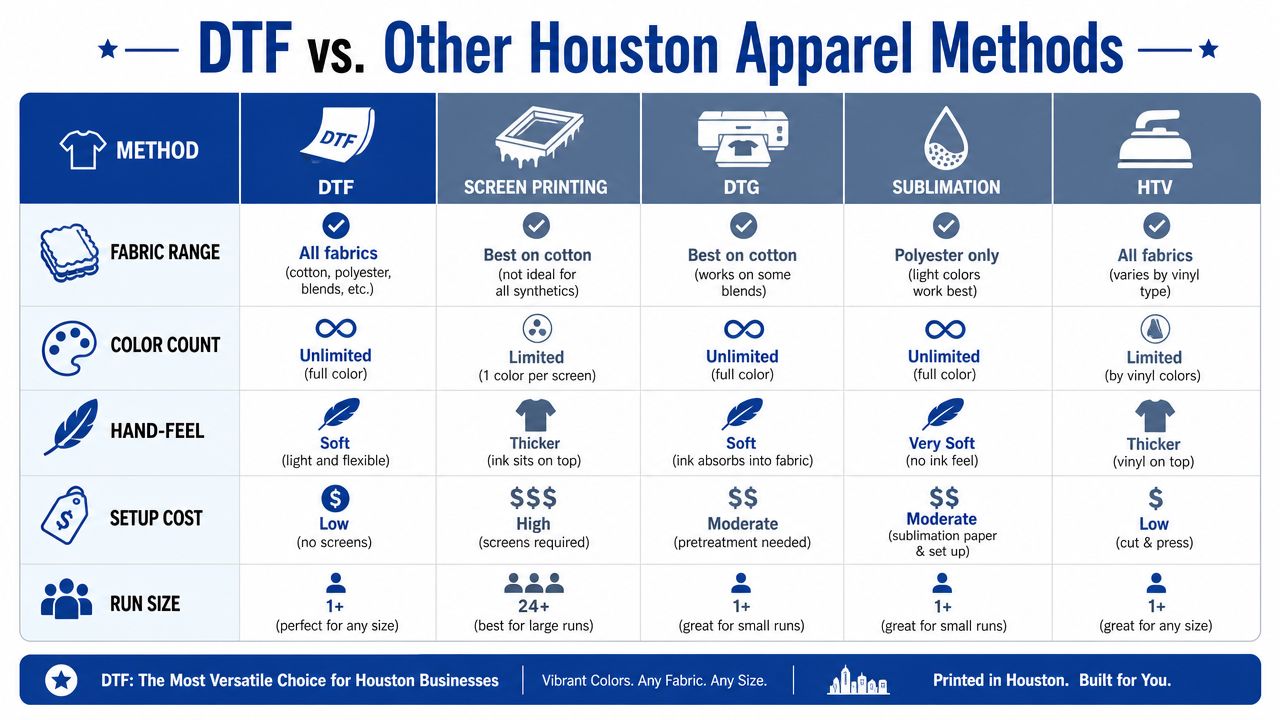
Houston buyers usually compare DTF against a few familiar methods, and that comparison is where decisions get clearer. Screen printing works well for large, simple runs with fewer colors. DTG is useful for direct printing on cotton, especially when photo detail matters. Sublimation stays in its lane for poly-only apparel. HTV makes sense for tiny one-offs, names, and simple cut vinyl graphics.
DTF sits in the middle for a reason. It handles full color, mixed fabrics, and smaller production runs without asking you to commit to a large setup. That makes it a strong fit for businesses that need flexibility more than they need a single high-volume method.
Quick comparison for a Houston buyer
| Method | Fabric range | Color use | Hand-feel | Setup burden | Best fit |
|---|---|---|---|---|---|
| DTF | Many fabric types | Full color | Soft to the touch | Low | Small runs, mixed fabrics, fast orders |
| Screen printing | Broad, but setup-heavy | Best for fewer colors | Varies | Higher | Large simple runs |
| DTG | Mostly cotton | Full color | Soft | Moderate | Photo-style cotton prints |
| Sublimation | Polyester only | Full color | No heavy layer | Moderate | Poly garments and all-over looks |
| HTV | Many fabrics | Limited by film style | Can feel thicker | Low | Names, numbers, very small jobs |
If you want a deeper side-by-side look at DTF and DTG, see this comparison of DTF vs. DTG printing. The main takeaway is simple, DTF wins when the order is small, mixed, colorful, and time-sensitive.
How Houston DTF Pricing Really Works
A DTF quote makes more sense once you break it into a few parts. The first one is sheet efficiency. If your artwork is packed tightly on a gang sheet, the film cost gets shared across more designs. If the layout leaves a lot of empty space, you pay for wasted film in the form of a higher effective price per transfer.
The next part is how the shop measures the job. Some vendors quote by sheet size, some by the number of designs, and some by how much rush handling the order needs. A small sample sheet with one logo can cost more per piece than a fuller sheet with several names, numbers, or badges because the setup is spread across fewer transfers.
A public pricing point gives a useful reference. Lion DTF offers transfers at prices as low as $0.017 per square inch, with orders shipping in 1 to 2 business days and 24-hour printing plus same-day pickup options available (Lion DTF pricing and turnaround). That does not set every Houston quote, but it shows how tight sheet packing and faster production windows can change the final math.
Typical Houston DTF Order Pricing Tiers
| Order Type | Typical Use | Per-Transfer Cost Range |
|---|---|---|
| Single transfer | One shirt, sample, replacement | Highest relative cost |
| Gang sheet | Multiple designs on one sheet | Lower per-transfer cost |
| Full roll or larger batch | Repeats, shop production | Lowest unit cost |
Use that chart as a buying guide, not a promise. A single transfer can make sense for a one-off reorder or a test print, while gang sheets are usually better when you have several small graphics that can share the same film. Larger batch work lowers the unit cost further because the shop spends less time per design once the setup is already in place.
Ask the vendor how the quote changes with size, sheet density, and rush timing. Local pickup can matter just as much as price if you need the prints the same day and want to avoid shipping delay. Also ask whether the quote includes art prep, because charges for vectorization, cleanup, or low-resolution files can change the total more than the base transfer price.
An auto-build gang sheet builder helps because it nests multiple designs efficiently and shows the price as you add art. That matters for a Houston buyer who has a few logos, names, or small icons and wants to keep the order from paying for blank space. The easiest quote to read is usually the one that tells you how much film you are using, what the turnaround looks like, and whether pickup is available when the job is urgent.
Preparing Print-Ready Files the Right Way
Good files save more money than most first-time buyers realize. If the art is clean before it reaches the shop, the vendor can print faster, the transfers land more accurately, and you avoid back-and-forth corrections. The best habit is to prep for the press, not for the screen.
File checklist for Houston DTF orders
- Resolution: Export at 300 DPI at final size so the print stays sharp.
- Background: Keep it transparent unless the design intentionally uses a solid background.
- Format: Use PNG or TIFF for clean transfer workflows.
- Color mode: Work in CMYK unless your vendor tells you otherwise.
- Layers: Don't flatten your layered art too early if you still need edits.
- Layout: Leave bleed and safe zones so important text doesn't get clipped.
- Export settings: Check the software output from Canva, Procreate, or Illustrator before uploading.
The auto-build gang sheet builder is the biggest time saver for buyers who have several designs. It packs uploaded PNGs into a tighter layout, which means less wasted film and better value per order. That matters most when you're juggling logos, names, small icons, and reorder art for different customers.
If your artwork is fuzzy, layered in a way that won't print cleanly, or only exists in a low-quality file, ask about vectorization or design cleanup before you submit. That's a service question, not just a file question, and it can keep a deadline from slipping.
Good rule of thumb: if you'd be embarrassed to zoom in on the file, don't assume the press will hide the problem.
Questions That Reveal a Reliable Houston DTF Vendor
A solid Houston DTF vendor should answer process questions without getting defensive. If they hesitate on the basics, that is a sign to slow down. If they answer clearly, you can usually tell pretty quickly whether they are running real production or just taking orders and hoping the file works.
Start with turnaround. A Houston-focused transfer provider should be able to explain how fast it can move a job, especially if you need local pickup or a short production window. Speed is part of the service buyers are paying for, and local fulfillment should feel different from waiting in an out-of-state queue. That does not mean every order has to be rushed, but it does mean the vendor should be able to say what happens when a deadline is tight.
Ask these questions before you pay
- What peel method do you ship? Hot-peel or cold-peel changes how you press, so the answer should be specific.
- Do you offer sample packs? A sample helps you judge hand-feel, color, and edge quality before you place a larger order.
- How do you handle color drift? Clear reprint policies matter when the artwork is brand-sensitive.
- Do you support design help? Some buyers need vectorization or layout assistance before they can order cleanly.
- Can you build a gang sheet for me? A We Build a Gang Sheet for You service helps when you do not have design software or want the layout handled for you.
- Do you offer UV DTF stickers too? That matters if you need hard-surface branding alongside apparel.
If you want a second point of reference on how nearby buyers compare convenience and turnaround, this guide to custom DTF transfers near you is useful for the questions people usually ask before they order.
A reliable vendor should also be easy to reach. Live phone, text, email, and chat support all matter when a file is wrong, a pickup needs to be moved, or a logo needs a quick correction. The more direct the communication, the fewer surprises you usually get at press time.
Pressing Transfers for Durable, Color-Accurate Results
A transfer is only as good as the press that lands it on the shirt. A clean print can still fail if the garment was not prepped, the heat was off, or the final press never happened. For a first-time buyer, the practical goal is simple, protect the transfer you paid for and give it the conditions it needs to stay put.
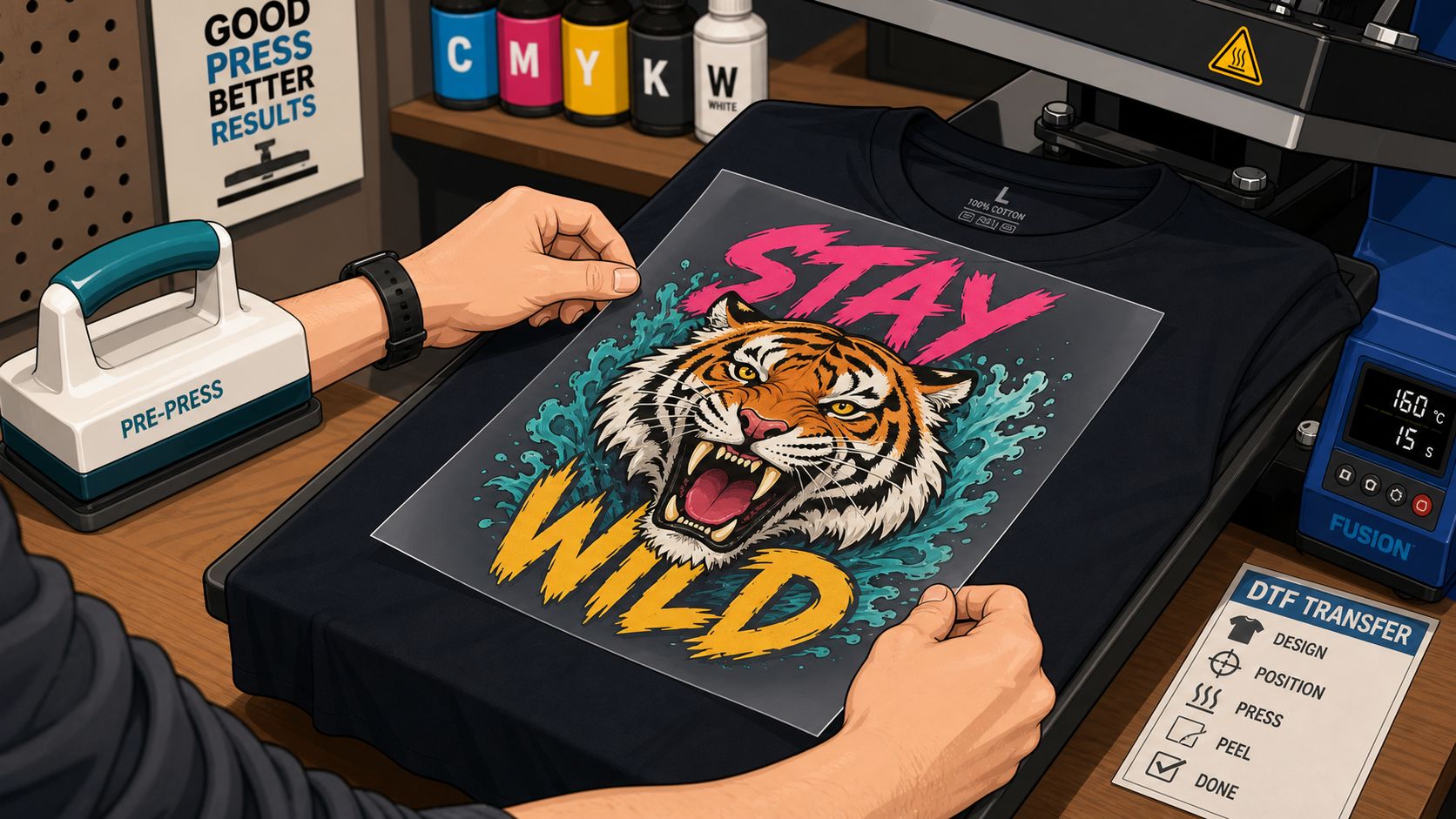
A basic DTF press workflow starts with a pre-press to push out moisture, then you place the transfer, press it in the temperature window the supplier gives you, peel it the way that transfer is meant to be peeled, and finish with a short final press. A practical how-to guide for DTF transfers lays out the pressing steps clearly, and that kind of reference helps when you are setting up your first shirt press. The key is to follow the supplier's instructions instead of guessing, because the press method affects both adhesion and color appearance.
What ruins the result fastest
Under-pressing leaves the adhesive only partly bonded, so the transfer can lift at the edges or wear out faster than it should. Skipping the final press leaves the surface less settled into the fabric, which can reduce durability and make the finish feel less complete. Those are simple mistakes, and they are both avoidable once you know the order of the steps.
Color accuracy can also drift if the shirt is not prepped or if the press settings are inconsistent from one garment to the next. A small change in heat, pressure, or press time can make a dark shirt behave differently from a light one, which is why a first test press matters before you run a full order. If you want the motion broken down before you touch a real shirt, the pressing video below gives you a clear visual reference.
If you want a more detailed shop-style walkthrough, this how-to-press guide for DTF transfers is worth keeping nearby when you are setting up your heat press. The expectation to hold onto is durability, not a rushed result that only looks good for the first wear. A transfer that is pressed correctly should stay sharp, resist cracking, and hold up through normal wear.
Putting It Together and Choosing Your Houston Path
A hobby crafter making one birthday shirt should think differently than a shop owner replacing team polos. The crafter may care most about a simple upload and a small order, while the business owner cares more about pickup, sheet efficiency, and repeatable color. A print shop with mixed jobs usually needs both flexibility and speed, plus a vendor that won't slow the line down.
For one-off orders, a single transfer or a small build makes sense. For several designs, the auto-build gang sheet builder is the most cost-effective habit because it reduces wasted film and keeps the layout tight. For urgent local jobs, pickup or fast local fulfillment is usually the cleaner choice than waiting on a distant queue.
The easiest checklist before checkout looks like this.
- Confirm the peel method so you know how to press it.
- Check the file quality before upload, especially size and transparency.
- Choose gang sheet pricing when you have more than a few designs.
- Ask about 24-hour printing or same-day pickup if the deadline is tight.
- Add design help or UV DTF stickers only if they solve a real need.
Houston buyers don't need to become print technicians. They just need a vendor that gives clear specs, clean turnaround options, and simple tools that prevent waste. When those pieces line up, DTF stops feeling complicated and starts feeling useful.
Lion DTF Transfers offers custom DTF transfers, gang sheets, UV DTF stickers, and build-help options that fit the kind of Houston orders people place when speed matters. If you're comparing pickup, gang sheets, or ready-to-press apparel orders, visit Lion DTF Transfers and check whether your next run fits the way you already work.