










You're probably staring at a half-finished design, a deadline that moved up, and a need for shirts, hoodies, or tote bags that look professional. In Chicago, that usually means you don't just need printing, you need a fast handoff, clean color, and a process that doesn't waste your time. DTF Chicago is the practical answer when you want custom apparel without waiting on a long production chain or fighting with a complicated setup.
Your Go-To Solution for Custom Apparel in Chicago
A Chicago brand launch rarely happens on a perfect schedule. A team order gets pushed to Friday, a market booth opens sooner than expected, or a merch drop starts getting attention before you've even finished packaging it. That's where Direct-to-Film printing fits naturally, because it turns digital artwork into press-ready transfers without the overhead that slows down older decoration methods.
Chicago also gives the phrase local real business meaning. The city has about 2.7 million residents, covers 237 square miles, and the broader Chicago area is about 10 million people; it also draws more than 50 million visitors annually (Chicago market context). That scale matters because a transfer service tied to Chicago isn't just serving a neighborhood order, it's often supporting events, retail, sports, schools, and maker businesses across a huge working region.
Why local speed matters more than marketing language
Online-only printers can look simple on the surface. You upload, you wait, and a box shows up later. In practice, that process can hide delays from shipping, artwork cleanup, and back-and-forth file questions, which is exactly where a local provider can save a project.
Practical rule: If your event date matters, the best print option is the one that lets you control the handoff, not the one that only promises a tracking number.
For Chicago buyers, that means choosing a provider that can support same-day pickup or a verified fast turnaround, not just use “Chicago” as a branding cue. One useful way to think about it is simple. A local partner reduces uncertainty at the exact point where uncertainty is most expensive, after your artwork is finished and before your apparel is in hand.
What Are DTF Transfers and Why Choose Them
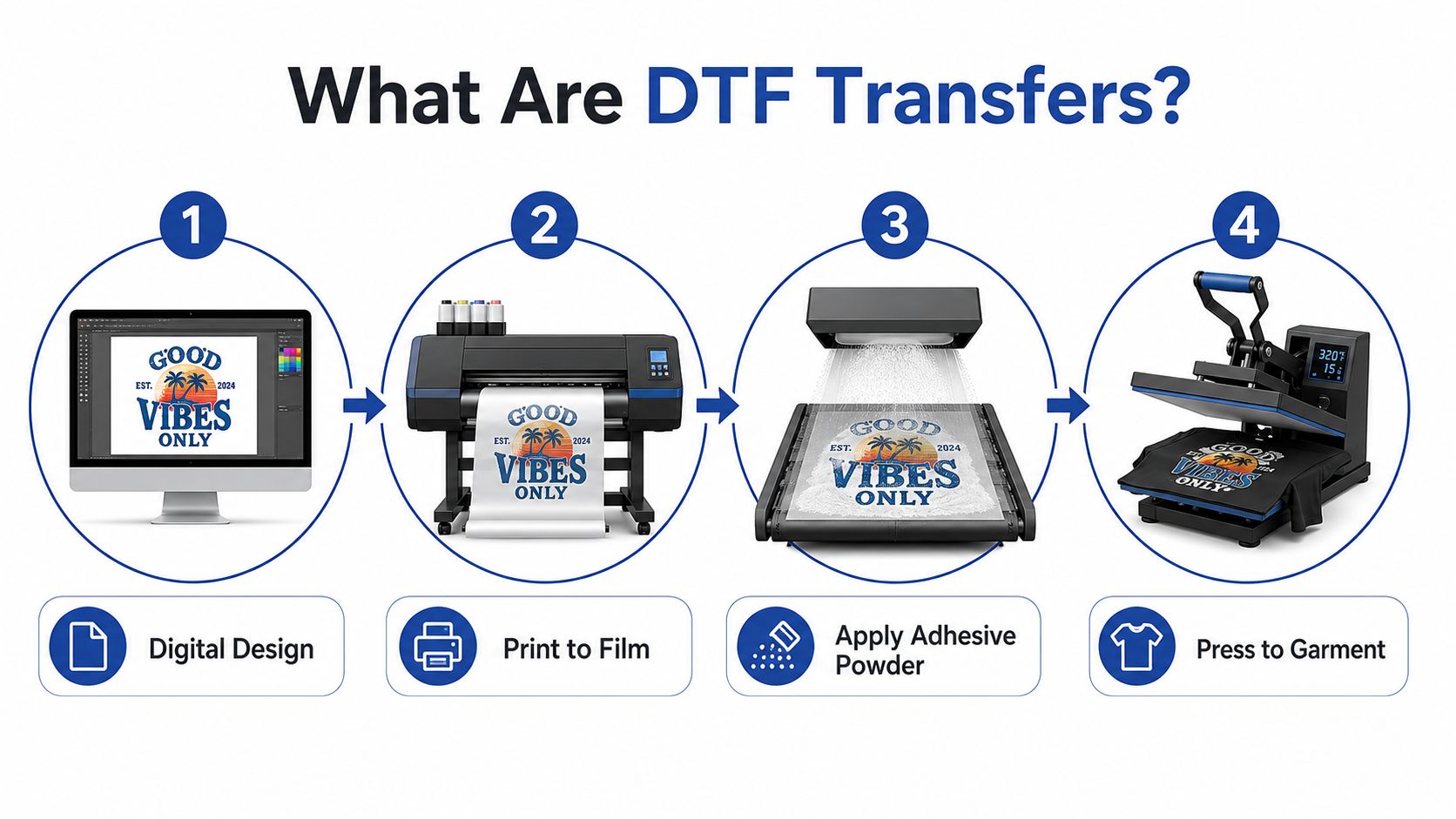
DTF means Direct-to-Film printing. The artwork is printed onto a special film, then transferred to fabric with a heat press, and the process typically uses CMYK layers plus a white underbase on PET film so the image stays opaque and readable on the garment (Direct-to-film printing overview). That setup is why DTF behaves differently from methods that print directly onto the shirt itself.
Why apparel creators reach for DTF first
The main advantage is substrate flexibility. Independent guides note that DTF works on cotton, polyester, blends, silk, and other fabrics, including dark garments, while traditional DTG is more limited to cotton (substrate flexibility comparison). That matters when you're building a merch line, because you don't want your decoration method to force you into one fabric or one color palette.
Another practical strength is ordering flexibility. DTF is built for short runs, mixed artwork, and custom projects that don't justify a huge setup. A Chicago-based DTF service specifically advertises full-color capability, flexible sizing, no stitch count, and no order minimums, which supports gang-sheet workflows and small-batch ordering (Chicago DTF service example).
Why DTF beats the usual pain points
Think of DTF like sending a finished digital design to a transfer layer instead of asking the fabric to do all the work itself. That difference helps with dark shirts, detailed art, logos, and mixed orders that need consistency across several blank types.
For a deeper technical primer, this overview of a DTF transfer can help you compare the process with other decoration methods. The key takeaway is simple. DTF gives Chicago creators a fast, flexible path from file to finished garment without demanding a large run or a narrow material choice.
Preparing Your Artwork for Perfect Prints
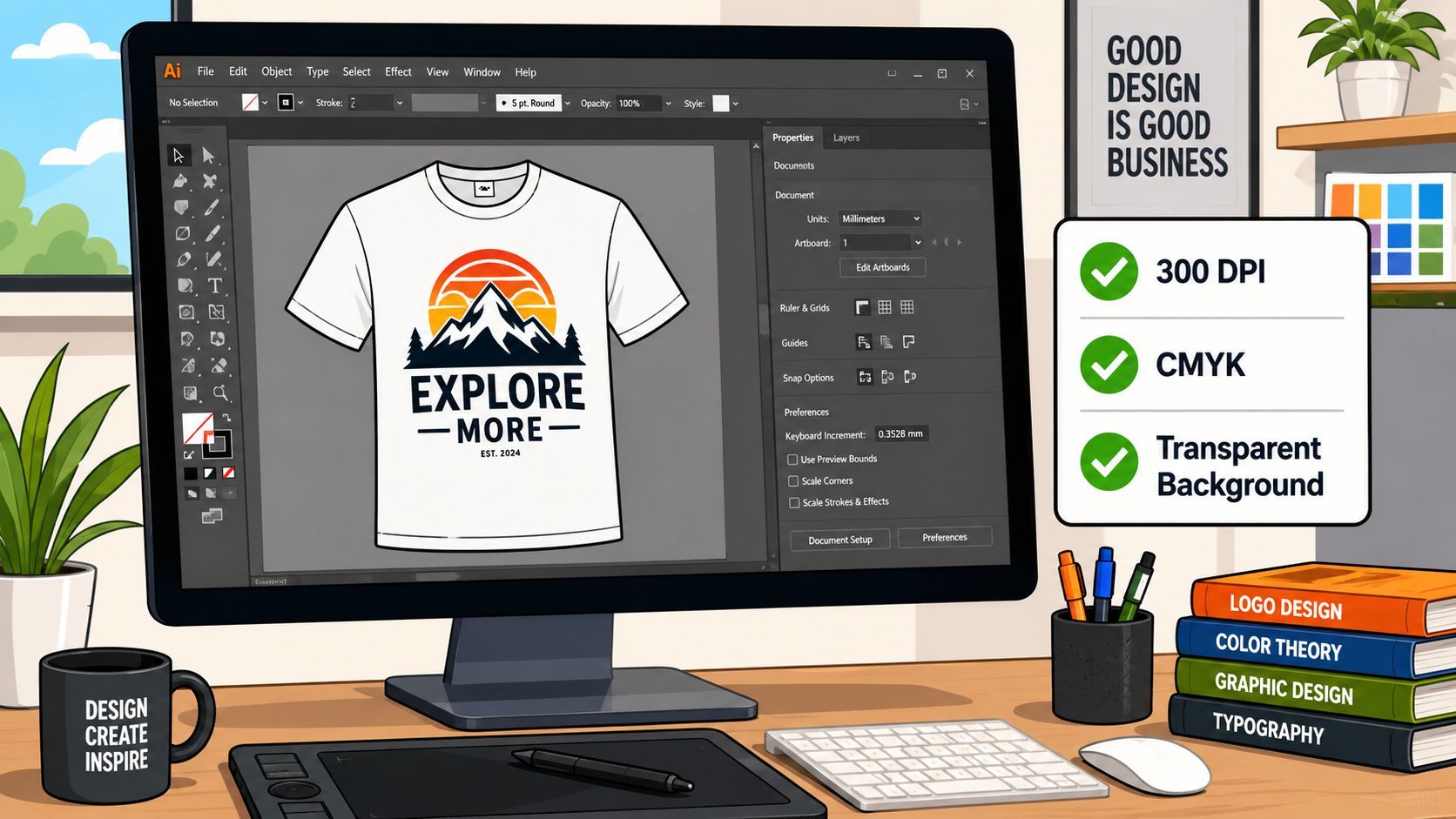
A clean print starts with a clean file, and resolution is the first thing that separates a sharp transfer from a soft one. DTF artwork should be prepared at 300 DPI or higher at final print size; lower-resolution files reduce edge sharpness because the process exposes fine details in both the CMYK image and the white underbase, so scaling a smaller image up before printing can visibly soften text, halftones, and thin linework (DTF artwork resolution guidance). If the design looks fuzzy on your screen before it's printed, it usually looks worse after pressing.
File setup that avoids expensive cleanup
The safest file is usually a PNG with a transparent background and artwork built at the final size you want on the garment. DTF prints exactly what's in the file, so any background color, box, or stray edge can show up on the transfer. If you're pulling a logo from a website, that file often needs cleanup before it's ready for print.
A few habits help prevent avoidable problems:
- Use transparent backgrounds: Any white or colored rectangle in the file becomes part of the printed transfer.
- Keep thin details realistic: Hairline strokes and tiny text can disappear or soften during printing and pressing.
- Match the final placement size: Building the file at the right size is safer than enlarging a small image later.
- Check color-rich art carefully: DTF handles full color well, but muddy source art still prints like muddy source art.
Practical rule: If you wouldn't be comfortable zooming into your design on a projector, don't send it to print yet.
What to do when the artwork is borderline
A customer file doesn't need to be perfect to be usable, but it does need to be honest about its limits. Low-resolution art, screenshots, and tiny social-media exports can sometimes be cleaned up, yet they rarely become crisp without extra work. That's why a good file review process matters before the press ever starts.
If you're rebuilding an old logo or ordering a one-off transfer, keep the design simple enough to survive real fabric texture. That's the difference between artwork that looks great in a mockup and artwork that still looks great after heat and pressure.
How to Order Your DTF Gang Sheet
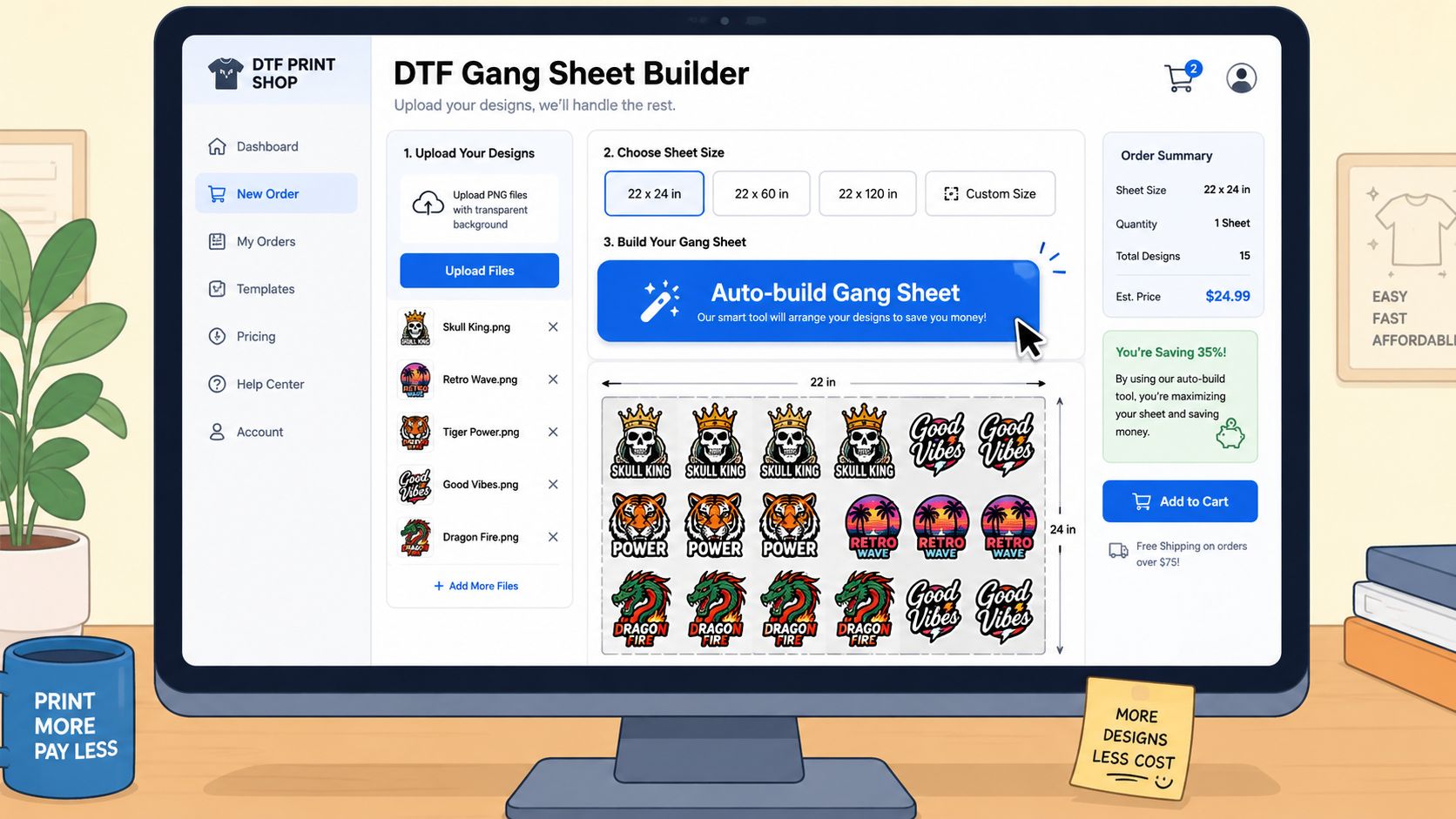
A gang sheet works well when you need several logos, graphics, or sizes on one print run. Instead of buying each transfer separately, you lay the artwork out on a single larger sheet and print it together. For a first order, the Auto-build gang sheet builder is a practical way to do that without guessing at spacing or trying to fit everything by hand.
A simple ordering flow that saves time
Start with print-ready artwork, then choose whether the job needs a gang sheet or a single-size transfer. A good builder lets you upload logos, resize them for different garments, and place them efficiently so you are not paying for unused space. That matters for small businesses, because wasted room on a sheet usually means wasted money on the next reorder too.
Chicago-based DTF services often highlight no stitch count and no order minimums, which fits the way teams, events, and small shops place custom apparel orders (ordering flexibility example). That flexibility is a real advantage when you want to test a design, print a few variations, or keep cash available for the next run instead of tying it up in excess inventory.
For layout help, this gang sheet guide explains spacing, arrangement, and how to get more out of each sheet. The practical goal is simple, buy once with a layout that uses the sheet well, rather than paying again because the first setup left too much empty space.
When a single-size order makes more sense
A gang sheet is not the right answer for every job. If you only need one chest logo or one large back graphic, ordering by size is cleaner and easier to manage. The right choice depends on the garment, the number of pieces you are pressing, and whether you expect to reuse the same artwork later.
The best approach is to match the ordering method to the actual workflow. Several designs point toward a gang sheet. One transfer points toward size-based ordering. That keeps the job simple at the press and helps Chicago buyers avoid paying for more setup than the order really needs.
Chicago Turnaround Times and Local Pickup
A rush order in Chicago is usually less about the print itself and more about the handoff. If the artwork is ready, the next questions are simple: how fast can the file be confirmed, when can the transfer be picked up, and what happens if you need a pressing answer before production starts. DTF Chicago matters here because local orders give you a clearer path from approval to pickup.
The hidden cost of non-local ordering
Online-only providers can slow a job down in ways that do not show up at checkout. If a file needs cleanup, if the upload comes through wrong, or if the order is held for a support reply, the deadline does not change. A Chicago customer loses time in transit, then loses more time waiting for the next response, and that gap can turn a manageable order into a missed window.
Local ordering reduces that back-and-forth. You can confirm artwork details faster, get a straight answer on production timing, and use same-day pickup when the schedule leaves no room for shipping. That gives you a real pickup window, not a broad delivery estimate that may slip if the carrier does.
How local support improves post-order clarity
Local support matters most after the order is placed. A Chicago-based team can review file issues earlier, explain pressing questions in plain language, and help prevent a reorder when something in the artwork or layout was misunderstood. For a first DTF order, that kind of guidance is often more useful than a polished checkout page.
The practical advantage is clarity. You know what was approved, what is still waiting on your side, and what you can pick up without guessing. For buyers who want a nearby option, custom DTF transfers near me fits the kind of order flow that keeps a job moving, especially when you need a local handoff and quick answers on the same timeline.
Practical rule: For urgent jobs, choose the vendor that can answer the file, the timeline, and the handoff without sending you into a generic support queue.
The point is not that every order needs pickup. The point is that Chicago customers gain a real operational fallback when they can collect locally, especially if the job is too urgent for shipping to serve as the backup plan.
Application and Care for Long-Lasting Transfers
A great transfer still needs a careful press. The common teaching for DTF application is about 270°F for 10 seconds, followed by a instant hot peel before removing the film, and many press operators also recommend pre-pressing the blank first to remove moisture and flatten the garment (pressing guidance video). That sequence gives the adhesive a better shot at bonding cleanly.
A reliable press routine
Start with a clean, dry garment. Pre-press it briefly so steam and wrinkles don't interfere with adhesion, then position the transfer and apply even pressure. If the press is too light, the image may not bond consistently. If the heat is uneven, edges and small details can suffer.
After pressing, let the film cool completely if your transfer calls for a cool peel. Rushing that step is a common mistake, and it can lead to lifting or distortion. Once the film is removed, a final follow-up press can help the graphic lay flatter and look more integrated with the fabric.
Care that protects the print
Wash the garment inside out, keep drying gentle, and avoid treating the transfer like a disposable decal. Premium DTF transfers are often tested for 100+ washes, so the print itself is built for repeated use when the application is done correctly. The weak point is usually the pressing method, not the transfer technology.
Practical rule: Most “bad transfer” complaints are actually pressing problems, so follow the heat, time, and peel steps exactly.
If your first press doesn't look right, stop and inspect the setup before blaming the artwork. A garment pressed at the wrong temp or with poor pressure can make even a strong transfer look weak. Careful application is what turns a good transfer into a long-lasting one.
Chicago DTF Frequently Asked Questions
Can I use a home iron instead of a heat press?
Not for reliable results. A home iron rarely gives the even pressure and consistent heat that DTF needs, so the edges and adhesive bond can suffer. A heat press is the safer tool if you want a professional finish.
What if my artwork is low resolution?
Expect softness, especially on text and fine lines. The best next step is to clean the file before printing, or rebuild it at a usable size. If the art is an old logo or a screenshot, file cleanup is often the difference between a usable transfer and a disappointing one.
Should I choose same-day pickup or shipping for a Chicago address?
Choose pickup when the deadline is tight, the order is small enough to carry easily, or you want to inspect the handoff yourself. Choose shipping when the job is larger, less urgent, or you need it delivered to another location. The best choice is the one that protects your timeline.
What if I only need one design?
Order by size instead of forcing it onto a gang sheet. That keeps the process simple and avoids buying more sheet space than you need.
Can one provider handle both apparel and stickers?
Some can. Lion DTF Transfers offers custom DTF transfers, gang sheets, and UV DTF stickers, along with file support and print-ready ordering for creators who need more than one product type.
If you need DTF Chicago transfers that are ready fast and easy to press, visit Lion DTF Transfers to upload your artwork, build a gang sheet, or choose a size-based transfer for your next order. Their Chicago-friendly workflow fits rush jobs, local pickup needs, and small-batch apparel without adding extra complexity.