










Dark Heather's blend varies by Gildan model. The GI5000 Heavy Cotton adult T-shirt is 50% cotton and 50% polyester, but that specification does not define every Dark Heather blank.
Check the style number before choosing press settings. Models differ in fiber blend, fabric weight, and size range: the GL64000 ends at 2XL, while the GI2000 runs to 5XL. Using settings suited to cotton on a different blend can lead you to blame the transfer for a result caused by the blank. Verify the exact model first.
Dark Heather Gildan Specs by Model
The Dark Heather name does not identify a single fabric blend. Check the style number, fabric weight, and available sizes on the specific garment before ordering or setting up a print job. The models below differ in construction, and some sizing details need confirmation from the supplier.
| Model | Dark Heather blend | Fabric weight | Size range |
|---|---|---|---|
| GI5000 Heavy Cotton adult T-shirt | 50% cotton / 50% polyester | 180 g/m² (5.3 oz/yd²) | Confirm current range with supplier before ordering |
| GI2000 Heavy Cotton adult T-shirt | 50% cotton / 50% polyester | 203 g/m² | S to 5XL; confirm availability |
| GL64000 Softstyle ladies T-shirt | 35% cotton / 65% polyester | 150 g/m² | Confirm with supplier before ordering |
| GISF500 Softstyle midweight fleece adult hoodie | 50% cotton / 50% polyester | 285 g/m² | Confirm with supplier before ordering |
| 18500 Heavy Blend adult hooded sweatshirt | 40% US cotton / 60% polyester per one supplier spec; many listings say 50/50 | 8.0 oz/yd² | Confirm with supplier before ordering |
How to Read the GI5000 Row
The Gildan GI5000 Dark Heather specification listing 50% cotton and 50% polyester at 180 g/m² in sizes S through 3XL gives the blend and weight for this specific listing. Its stated size range should not be treated as a universal limit for every GI5000 seller or stock run. Check the supplier's current size chart before committing to quantities.
The GI5000 is described as a classic-fit, preshrunk-style shirt with taped neck and shoulder seams, an unbroken body, and a tear-away label. For print work, confirm the fabric and test your transfer on the actual blank. A 50/50 blend can respond differently from 100% cotton to heat, dye migration, color reproduction, and washing. Cotton settings are not a reliable default.
Where the Other Models Diverge
The GI2000 shares the GI5000's 50/50 blend in Dark Heather and is heavier at 203 g/m². Its listed sizing reaches 5XL, but that does not establish a size difference against every GI5000 listing. Compare the supplier charts for the two exact styles. The heavier fabric can also feel different on the platen and affect how the shirt sits during pressing.
The GL64000 is lighter at 150 g/m² and has a more polyester-dominant 35% cotton and 65% polyester blend. Its size availability should be confirmed for the specific seller. The GISF500 hoodie is 285 g/m² with Dark Heather listed as 50/50. Fleece weight and a brushed surface create a different printing surface from jersey, even when the fiber ratio matches.
The 18500 needs particular scrutiny. Public listings often describe it as 50/50, while one supplier specification lists Dark Heather as 40% US cotton and 60% polyester. Confirm the SKU, sewn label, and supplier's size range for the stock being ordered.
Practical rule: Verify the style number, blend, weight, and size chart before choosing a print method or placing an order.
For a broader comparison of t-shirt materials and how fabric choice affects printing, use the fabric details alongside the garment's current supplier listing. The color name alone is not enough to select a blank or predict how it will press.
What Dark Heather Actually Is
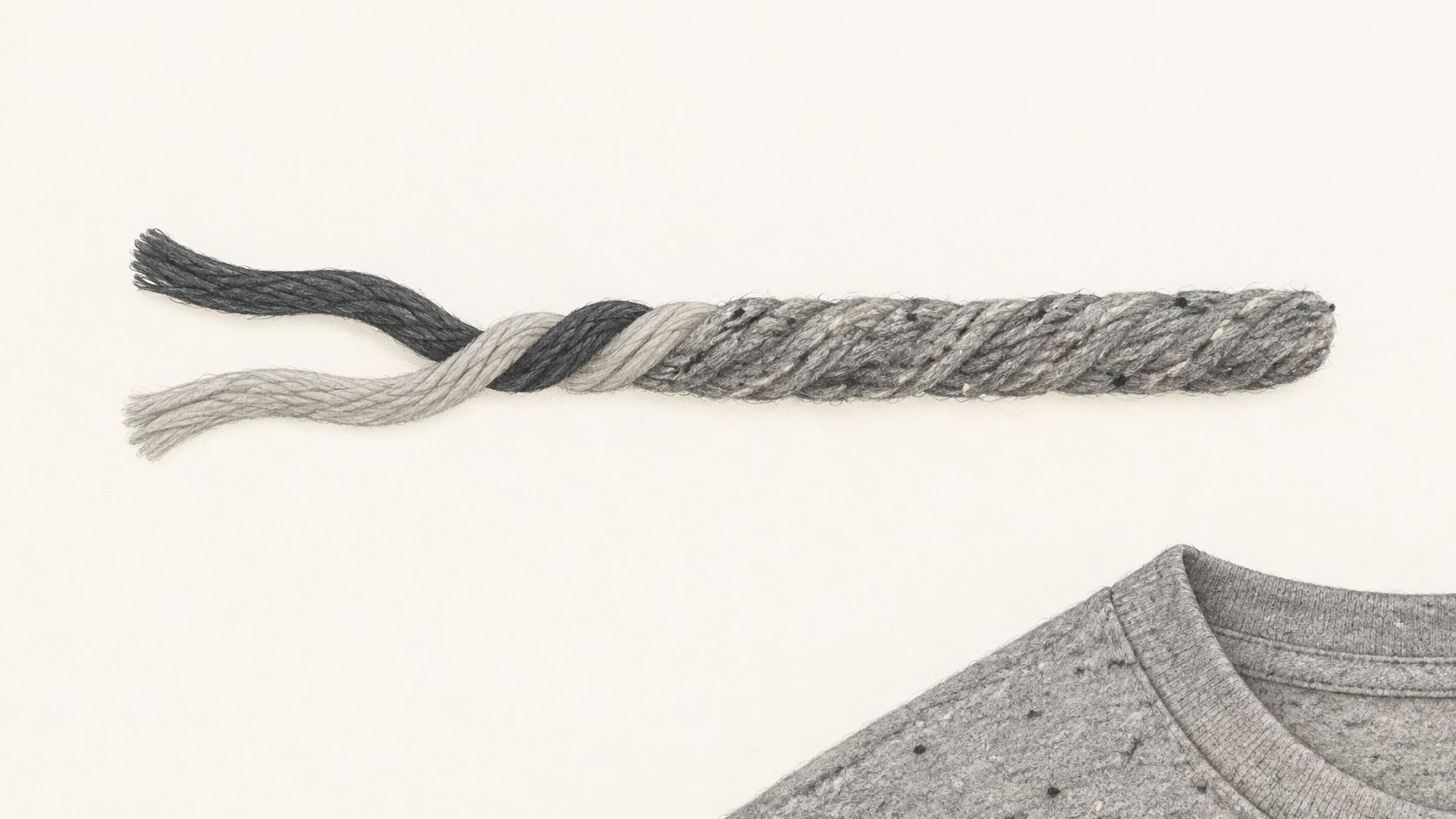
Dark Heather is a textured fabric appearance, not a reliable description of a specific blend. Dark and light fibers are combined to create the flecked gray look, as described in the FullSource Gildan product description of Dark Heather construction and transfer opacity. The variation is part of the fabric, so it remains visible beneath a print wherever the transfer does not fully cover the surface.
The yarn and fabric are easier to understand up close than in a product listing.
What That Flecked Surface Does
For the wearer, the mottled surface disguises minor wear and lint differently from a solid gray. On a fleece hoodie, the brushed face adds softness and affects how the color appears under direct light.
For the printer, those flecks are part of the surface beneath the ink. A logo can look crisp on black but softer on Dark Heather when a thin or partly opaque transfer lets the garment color show through. Small text and pastel artwork can lose saturation first.
On Dark Heather, the shirt's texture is part of the design.
A full-opacity white underbase can separate the artwork from the gray fibers, but it adds coverage and may make the print feel heavier. Choose it when color accuracy matters more than a lighter hand. For distressed artwork, letting some heather show through may be the better choice.
Three Checks You Can Do by Eye
- Hold it under daylight: Check the chest for uneven flecks instead of judging the shade under shop fluorescents.
- Compare it with a solid gray blank: Side by side, the difference between a flat shade and a mixed-fiber appearance is easier to see.
- Check front against sleeves: Look for a consistent fleck pattern across panels before approving the garment.
These quick checks help set expectations, but they do not identify the blend. A flat gray screen mockup also cannot show how the fabric texture will affect thin artwork.
For ordering and pressing, verify the exact Gildan model rather than relying on the Dark Heather name. The model number sets the fiber blend and fabric weight; the shade indicates a blend difference only within a given product line. Use the spec table to confirm the details for each model before choosing a print method.
Dark Heather Versus Other Gildan Heather Shades
A shade name is not a fabric specification. The same Dark Heather label can refer to different fiber blends across Gildan styles, so compare the exact model and sewn label before choosing a print approach. For the Heavy Cotton 5000, the manufacturer specification lists Dark Heather as 50% cotton / 50% polyester and gives the shirt's weight as 5.3 oz/yd². Those figures apply to that model, not automatically to other Gildan shirts or colors. Gildan Heavy Cotton 5000 specification showing different fiber formulations by color
| Shade or blank | Fiber blend | Weight | What to verify before printing |
|---|---|---|---|
| Dark Heather, Gildan Heavy Cotton 5000 | 50% cotton / 50% polyester | 5.3 oz/yd² | Use the model's listed blend as a starting point, then check the garment label and test your transfer. |
| Sport Grey, Ash Grey, or another Gildan shade | Unverified here | Unverified here | Confirm the exact style and color on the sewn label or current SKU specification. |
Compare the Blank, Not Just the Shade
The GI5000 specification supports the Dark Heather blend and weight shown above. It does not establish a universal fiber split or weight for Sport Grey, Ash Grey, other heathers, safety shades, or solid colors. Those details can vary by model, so don't carry a blend or weight from one Gildan shirt over to another just because the shade name matches.
The polyester share is one factor in dye migration risk. As a general shop guideline, a polyester-rich blank calls for more caution with heat-sensitive transfers than a cotton-rich one. That is a reason to test, not a confirmed ranking of Gildan shades. Don't assume Dark Heather is always riskier than Sport Grey, or that Sport Grey is safe at a familiar cotton setting, until you have confirmed the fabric and pressed a sample.
For a production choice, check the style number, color, sewn label, and manufacturer specification together. If those don't agree, pause before setting a print profile. A familiar shade name can save time on ordering, but it cannot confirm the blend or predict how the transfer will behave.
The Cross-Model Complication
Blend is only part of the comparison. Garment weight and surface texture also affect how an edge or fine detail looks on the finished shirt. A fleece blank and a jersey tee can present the same artwork differently, so compare the actual garment when appearance matters. This guide to charcoal heather color and how it compares as a blank can help set expectations for tone, but it does not replace checking the specific style's fabric details.
Choose the shade for the customer's preferred look, then confirm the model before committing to print settings. A test on the actual blank gives you more useful evidence than a successful press on a different gray.
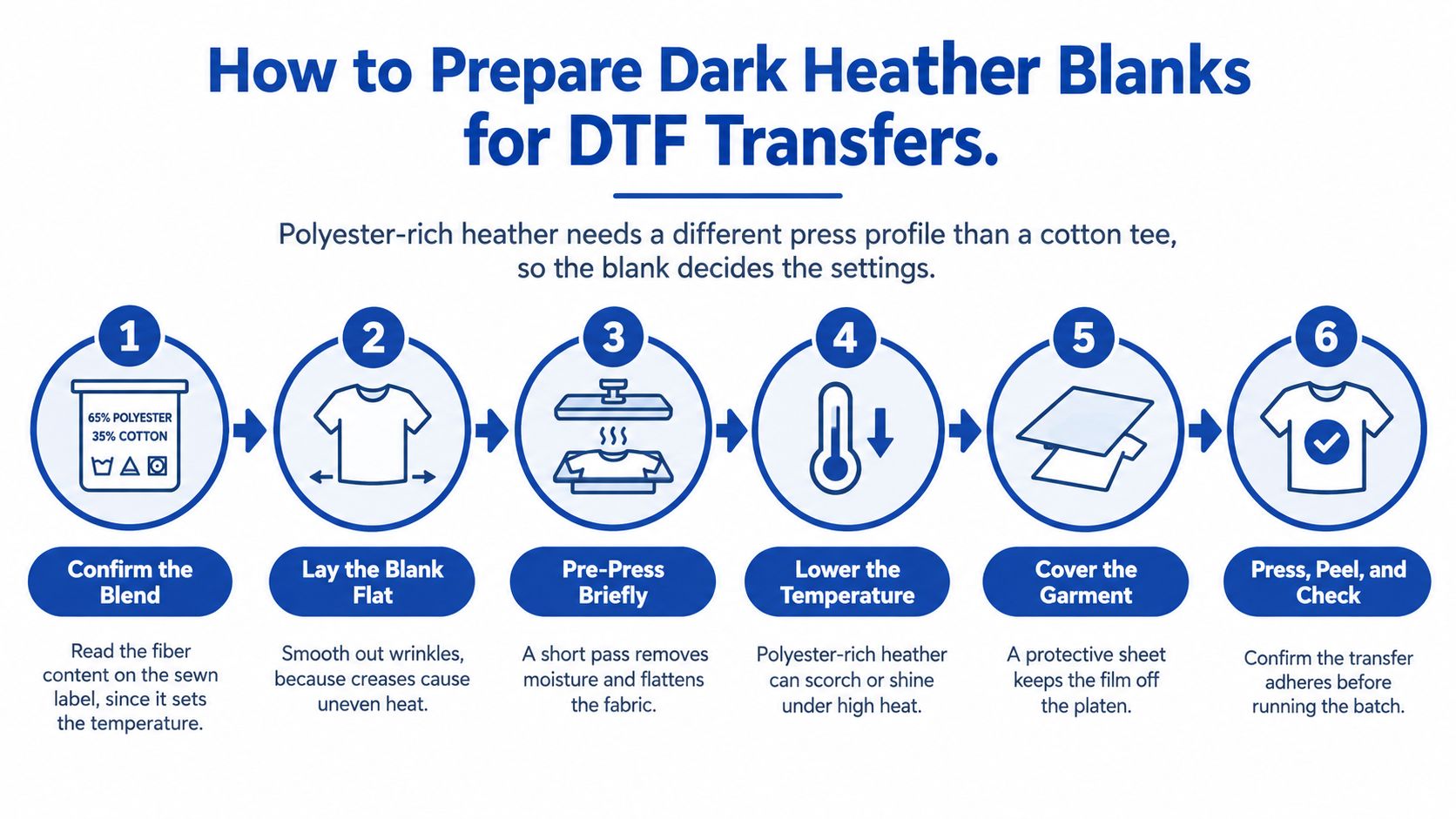
How to Prepare Dark Heather Blanks for DTF Transfers
Dark Heather is a color name, not a fiber specification. Gildan styles can use different blends and fabric weights, so verify the garment before setting up the press. A profile that worked on one Dark Heather blank may not suit another.
The graphic offers a preparation overview; follow the eight written steps below for the full procedure.
The Eight-Step Preparation Procedure
- Confirm the exact style, SKU, and fiber blend: Check the sewn label and manufacturer specification before ordering. Dark Heather can refer to blanks with different blends, and the wrong assumption can lead to the wrong press profile.
- Choose a system rated for polyester blends: Check the film and ink maker's stated temperature and time window. Keep the process within that range rather than adjusting beyond it to chase adhesion.
- Press a test on a scrap or sacrificial blank: Use the same Dark Heather garment, not a cotton offcut. Begin at the lower end of the recommended window.
- Choose the underbase deliberately: Use a full white underbase when color accuracy matters, or a reduced underbase when the design should show some heather texture.
- Set temperature, dwell time, pressure, and peel behavior: Keep each setting within the system's rated window. Changing one setting to compensate for another can produce inconsistent results.
- Complete the specified post-press step: Follow the transfer system's instructions; skipping post-press can weaken adhesion after washing.
- Wash and stretch the test shirt: Check color and adhesion after handling the garment as a customer would.
- Record a production profile: Log the style, size, color lot, temperature, dwell time, pressure, peel method, and post-press method so the approved result can be repeated.
Review these heat press settings for DTF transfers and how to dial them in before testing. The film's specified window sets the limits; the test press helps establish a working profile for the exact blank.
The 18500 Hoodie as the Worked Example
The supplier listing for the Gildan 18500 describing standard Dark Heather as 8.0 oz/yd² fleece with 40% U.S. cotton and 60% polyester gives one supplier's specification. Other listings describe the blend as 50/50, so confirm the sewn label before applying a profile. The color name alone cannot resolve that difference.
On fleece, check how the transfer sits against the brushed surface. The texture can make edges appear less sharp than on smooth jersey. A press sequence demonstration can also help operators track dwell, peel, and post-press timing before running a hoodie.
The 18500's stated 8 oz/yd² mass provides a substantial fleece substrate, but it does not make a cotton profile suitable. Run the wash-and-stretch test, inspect the result, and record settings only after confirming the blend and approving the test garment.
Printing Problems on Dark Heather and How to Fix Them
The most common failure shows up as a gray or reddish halo around a white underbase or light graphic. It's polyester dye migrating under excess heat, or ink that isn't suited to the blend, and it often appears after the shirt looked fine coming off the press.
| Symptom | Likely cause | Fix |
|---|---|---|
| Gray or reddish halo around a white underbase | Polyester dye migration from excess heat or ink unsuited to the blend | Lower press temperature within the film window, switch to a low-bleed system and retest |
| Light or pastel art looks dull | Heather flecks show through thin or partial ink coverage | Use a full white underbase or a bolder palette, then re-proof |
| Small text looks soft | Brushed fleece or mottled field competes with thin strokes | Enlarge the text, thicken strokes and use a solid underbase |
| Color misses the approved proof | Pantone is only the closest reference and fiber content varies by shade | Approve a physical test press on the same blank |
| Print lifts or cracks after washing | Under-pressing or weak post-press on a polyester-rich blend | Adjust dwell or pressure within the window, complete post-press and run a wash test |
Fixes a Single Test Press Can Confirm
The halo is a setting and system problem first. Lower temperature within the film maker's window, move to a low-bleed system if the cast persists, and retest on the same blank. Don't lower heat so far that adhesion fails, which just trades migration for lifting.
Lifting or cracking after washing also points to settings. Under-pressing and a weak post-press on a polyester-rich blend leave edges vulnerable, so adjust dwell or pressure inside the window, complete the post-press properly, and prove the change with a wash test.
Fixes That Need New Artwork or a New Proof
Dull pastels aren't usually a press fault. Heather flecks show through thin coverage, so the fix is a full white underbase or a bolder palette. That changes hand feel and color, so it needs a fresh customer proof rather than a quiet operator adjustment.
Soft small text works the same way. A brushed fleece surface and a mottled field compete with thin strokes, and more pressure won't sharpen letters the substrate is swallowing. Enlarge the text, thicken strokes, and support it with a solid underbase.
Color misses deserve honesty with the customer. A coated Pantone code is only the closest reference for printing on fabric, fiber content varies by color, and a Dark Heather base stays visible around any area that isn't fully opaque. Screen proofs can't settle that argument.
A physical test press on the same blank beats any screen mockup for these problems.
Classify each symptom before you react. Setting changes get one controlled test. Film or artwork changes need a new proof and, where color matters, customer sign-off on the actual shirt. Guessing across both categories at once leaves you with no idea what fixed anything.
Care and Quality Expectations After Washing
Set expectations before the first wash, not after a customer complains. A heather shirt softens with washing, fleece can show light pilling, and the flecked look can shift slightly after several cycles as fibers settle and surface fuzz changes how light hits the garment.
| Care step | Recommended | Why it matters |
|---|---|---|
| Wash temperature | Cold to warm, around 30°C (86°F) | Lower heat reduces stress on the print film and the polyester content |
| Garment orientation | Turn inside out | Reduces abrasion on the print and pilling on fleece |
| Drying | Low or medium heat, or line dry | High heat can soften transfer adhesion and shrink cotton-rich shirts |
| Bleach | Avoid | Breaks down ink and alters the heather color |
| Ironing | Iron inside out, never directly on the print | Direct heat and pressure can re-melt film edges |
| Pre-approval wash test | Three washes on a test print before the run | Confirms adhesion and color hold for the production profile |
Shrinkage and Fit Checks
Preshrunk-style construction on a Heavy Cotton blank reduces surprises, but it doesn't eliminate them. Cotton-rich blends still tend to shrink more than polyester-heavy ones, so check the test garment for fit and print placement after washing, not just straight off the press.
That matters most on fitted styles and youth or ladies cuts, where a small dimensional change moves a chest print noticeably. If the design sits close to a seam or pocket, washed placement is the placement the customer really bought.
The Three-Wash Test Is the Quality Check
- Edges lifting: Your dwell, pressure, or post-press needs adjusting within the rated window.
- Color shifting: Reassess dye migration risk and whether the underbase is doing enough work.
- Uneven heather appearance: Compare against an unwashed blank from the same lot before blaming the transfer.
If the print still looks clean after the third wash, you've got a defensible production profile. If it doesn't, you've spent one blank learning that instead of a full run. Give customers the care instructions from the table in writing, because a hot dryer and a direct iron can undo careful press work in one laundry cycle.
Confirm the Blend and Order a Test Press
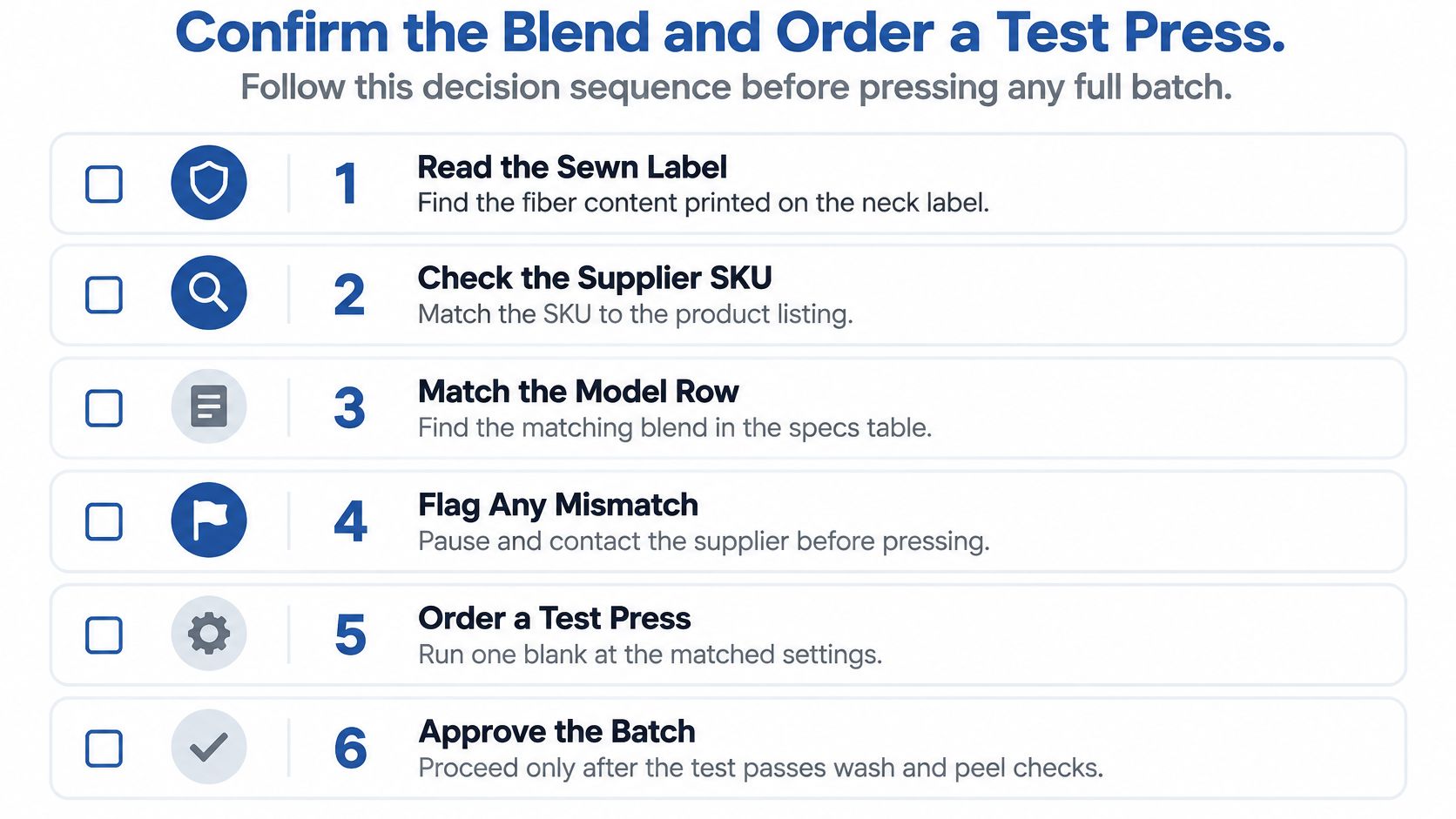
“Dark Heather” is a color name, not a fiber specification. Gildan models and weights can use different blends, so check the exact style and supplier listing before choosing a press profile or ordering production quantities. A test on the wrong blank proves little.
The Three-Step Decision Sequence
- Read the sewn label and supplier SKU: Match the blend to the correct model row in the specs table. If the label and listing disagree, resolve the mismatch before buying more stock.
- Order one test blank and press it: Use the preparation profile intended for the job, then wash the test three times. Check edges, color, and adhesion against the unwashed garment.
- Lock and record the profile: Keep the style, lot, and press settings together. On reorders, confirm the blank still matches before reusing those settings.
Making the Test Order Cost Effective
A gang sheet combines multiple designs, sizes, and placements on one sheet. Packing a test this way can reduce material waste and avoid ordering separate sheets for each graphic. The trade-off is that each version still needs a clear label, so you can match the pressed and washed sample to its artwork and blank.
The Auto-build gang sheet builder arranges uploaded artwork to use sheet space efficiently. For a Dark Heather test, combine the intended graphics, size variations, and a spare underbase version, then press and wash each on the exact Gildan style you plan to sell. That comparison helps identify whether the blend or artwork version needs a different setup before the full run.
Verify the blank, approve the press on one garment, and record the result. That routine makes future reorders easier to reproduce and reduces the risk of discovering a blend mismatch after pressing a batch.
Order your Dark Heather test graphics on one efficiently packed gang sheet with Lion DTF Transfers, using the Auto-build gang sheet builder to arrange multiple designs and sizes before you commit to a full run. You'll get vibrant, ready-to-press DTF transfers you can proof, wash, and approve on the exact Gildan blank your customers will wear.