










When you punch "printing t shirt near me" into a search bar, you're not just looking for a machine. You're looking for a local partner—someone who can take your design and make it real, fast. The best services these days actually blend the speed of online ordering with the convenience of a local shop, giving you a serious edge without cutting corners on quality.
What to Look for When Printing T Shirts Near Me
Finding the right printer is about more than just proximity. It’s about finding a service that nails the balance between speed, quality, and genuinely useful tools. Sure, traditional print shops offer face-to-face service, but a modern hybrid approach often gives you a much faster and more cost-effective path from design to finished product. The trick is knowing what to prioritize.
The custom tee market is absolutely exploding. Valued at roughly USD 5.1 billion in 2026, it's projected to hit a massive USD 12.4 billion by 2036—that's a compound annual growth rate of 9.3%. Even with all the online players, offline channels still make up 58% of sales. That tells you people still want local services that offer quick turnarounds, like same-day pickup or 1-2 day shipping.
Core Qualities of a Great T-Shirt Printer
Your search for a printing partner should really come down to three key things. Nailing these will help you sidestep the usual headaches and find a provider who actually gets it.
Here’s what really matters:
- Print Quality and Consistency: You need a printer who guarantees vibrant colors and prints that won't crack or fade after a couple of washes. Don't just take their word for it—look for verified customer reviews with photos to see what their work looks like in the real world.
- Turnaround Times: How quickly can they get your order done? For events, business launches, or last-minute gifts, services offering same-day pickup or rapid shipping are a lifesaver.
- Ease of Use and Support: The ordering process shouldn't feel like a chore. The best printers have powerful online tools like an Auto-build gang sheet builder, which makes it incredibly simple to cram multiple designs onto one sheet for maximum cost effectiveness. When that’s backed by customer support you can actually reach, the whole process becomes painless.
A top-tier t-shirt printing service combines the precision of an online specialist with the accessibility of a local shop. This hybrid model delivers professional results without the typical delays, giving you control over your project from start to finish. You can also learn more by exploring our detailed guide on finding custom DTF transfers near you.
Choosing the Right Print Method for Your Project
So, you've found a few local shops that look promising. Now for the big question: which print method is actually right for your project? This isn't just a technical detail—it's the choice that defines the look, feel, durability, and cost of your shirts.
Getting this part right is what separates a killer t-shirt from one that feels cheap. The three main options you’ll run into are Direct-to-Film (DTF) transfers, old-school screen printing, and Heat Transfer Vinyl (HTV). Each has its place, and knowing the difference will save you a lot of headaches and money.
Direct-to-Film Transfers for Vibrancy and Detail
Direct-to-Film, or DTF, is the modern workhorse of the custom apparel world. It's a pretty slick process: your design gets printed onto a special film, coated with an adhesive powder, and then heat-pressed onto the shirt. The result is a stunningly vibrant, full-color print that feels soft and flexible, almost like it's part of the fabric itself.
DTF really shines when you need:
- Complex, multi-color designs: Got gradients, photos, or fine details? DTF handles it all perfectly without charging you extra for each color.
- Small to medium-sized orders: Since there are no screens to set up, DTF is incredibly cost-effective for one-off prints or smaller batches. Perfect for a small business, event, or online store. For even greater cost-effectiveness, you can fit multiple designs on one sheet using an Auto-build gang sheet builder.
- Fabric versatility: Cotton, polyester, blends, you name it—DTF transfers stick to almost anything without losing their punch.
The industry is leaning hard into this kind of digital quality. A similar technology, Direct-to-Garment (DTG) printing, is growing at an 11% CAGR and is expected to hit USD 9.1 billion by 2035. DTF takes that DTG-like quality and cranks up the durability and speed, making it a favorite for everyone from e-commerce brands to DIY creators.
Screen Printing for Bulk Orders
Screen printing is the OG, the tried-and-true method for big t-shirt runs. It works by pushing ink through a mesh screen onto the fabric, one color at a time. That means every color in your design needs its own custom screen.
This is where you go when you need a lot of shirts. Think 500 tees for a charity 5K or a big corporate giveaway. The upfront setup costs get spread so thin across a large order that the price per shirt becomes incredibly low.
But for a small order with, say, four or five colors? Those setup fees add up fast and can make it way too expensive. Screen printing is best for simple, bold graphics with just a few solid colors.
If you're stuck, this little decision guide can help point you in the right direction based on what matters most to you—quality, speed, or hands-on support.
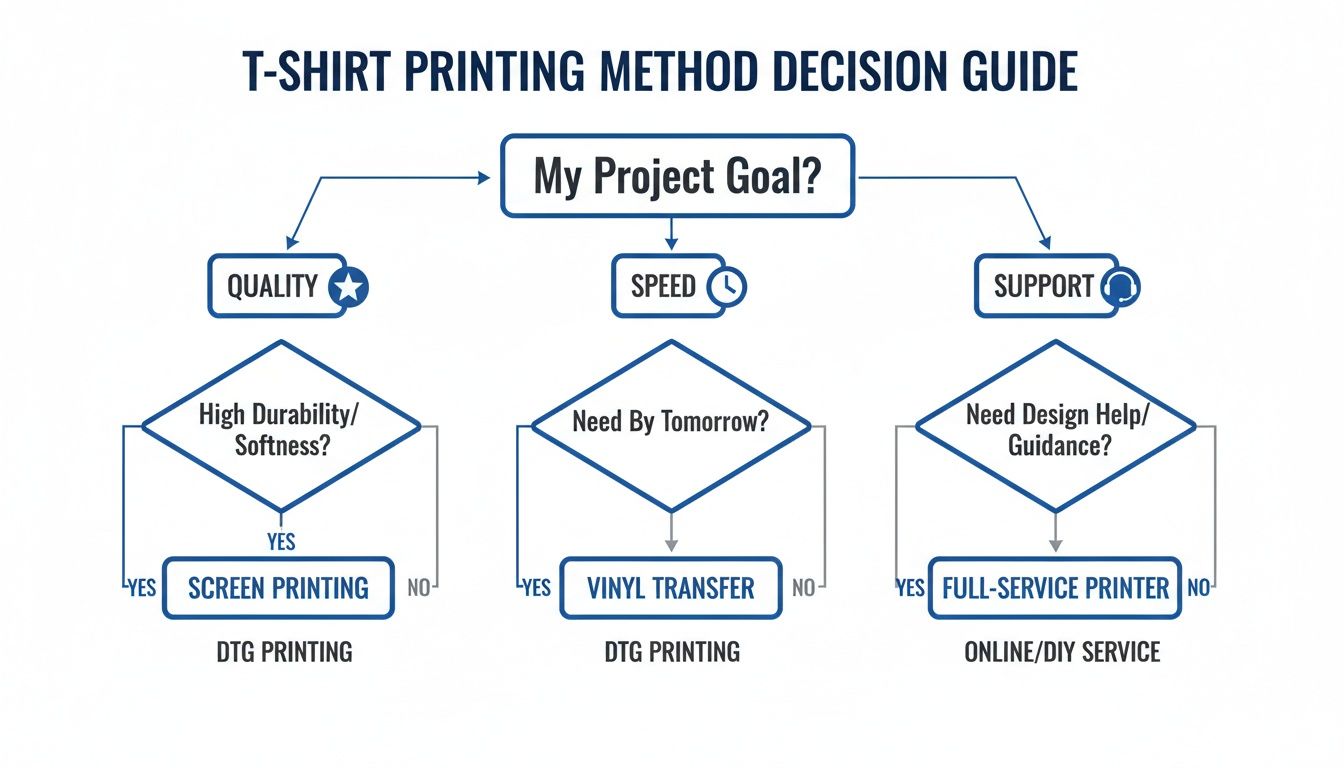
As you can see, if you're chasing high-quality, detailed designs, modern methods like DTF are often the most direct path to getting exactly what you want.
Print Method Comparison Guide
To make things even clearer, here’s a quick side-by-side look at how these three methods stack up against each other.
| Feature | DTF Transfers | Screen Printing | Heat Transfer Vinyl |
|---|---|---|---|
| Best For | Full-color, detailed designs; small to large orders | Simple, bold designs; large bulk orders (50+ shirts) | Simple text, numbers, one-color logos; very small orders |
| Color Limit | Unlimited; perfect for photos and gradients | Limited; each color adds cost | Limited; designs are layered with different colored vinyl |
| Durability | Excellent; soft, flexible, and crack-resistant | Very high; ink bonds deeply with the fabric | Good; can feel stiff and may crack over time with improper care |
| Cost | Low setup, cost-effective for small runs | High setup cost, very cheap per shirt in bulk | No setup cost, but material costs are high per piece |
| Feel on Shirt | Soft and lightweight, almost part of the fabric | Can be slightly thick, depending on the ink and design | Often feels like a plastic layer on top of the shirt |
Ultimately, the best choice depends entirely on your project's specific needs—your design's complexity, your order size, and your budget.
The right print method isn’t just about the final look; it's about efficiency and cost. For multiple designs or logos, our Auto-build gang sheet builder lets you combine everything onto a single DTF sheet, drastically reducing your cost per print and making high-quality results more accessible than ever.
If you want to dive even deeper, our comprehensive guide on different t-shirt printing methods breaks down the pros and cons even further.
Getting Your Artwork Ready for Flawless Printing
The final quality of your shirt lives and dies by the quality of the file you send your printer. Seriously. Getting your artwork prepped correctly from the get-go is the single most important thing you can do to avoid blurry lines, weird colors, or print jobs that just look off. Think of your file as the blueprint for the final product—if the blueprint is flawed, the shirt will be too.
One of the most common rookie mistakes we see is submitting a low-resolution image. This almost always leads to a pixelated, unprofessional mess. To dodge this bullet, your artwork must be created or exported at 300 DPI (dots per inch). This is the gold standard for high-quality printing, making sure every detail looks sharp and crisp on the fabric. Anything less, like a 72 DPI image you snagged from a website, is guaranteed to look blurry.
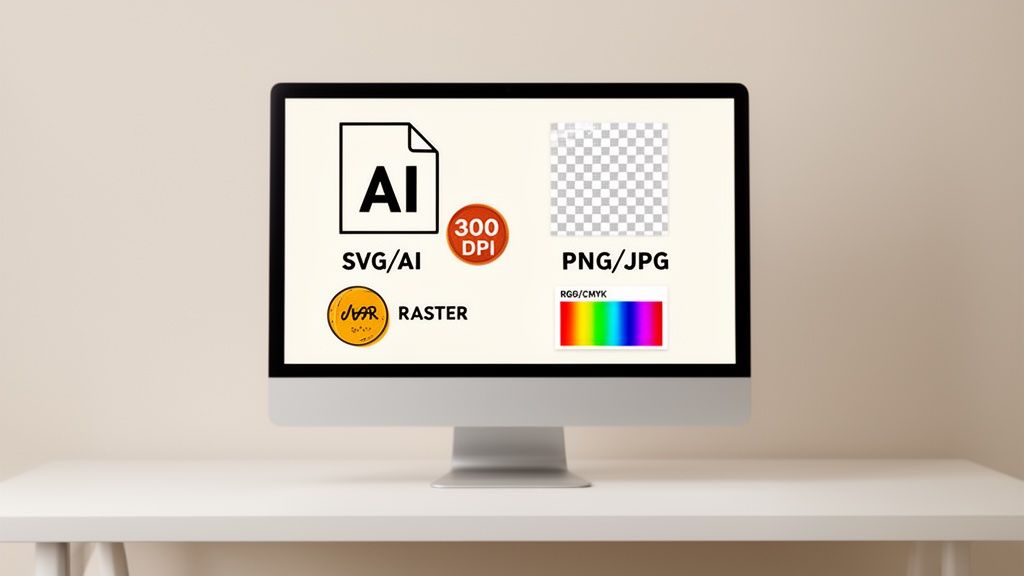
File Types: Vector vs. Raster
It's super important to understand the two main types of image files, because they behave very differently.
- Raster files (like PNG or JPG) are made up of tiny squares called pixels. They work great for photographs but turn into a blocky mess if you try to make them bigger than their original size.
- Vector files (like AI, SVG, or EPS) are built from mathematical paths and curves. This means you can scale them up to the size of a billboard or shrink them to fit on a pin, and they'll never lose an ounce of quality.
For most t-shirt designs, especially anything with logos, text, or clean graphics, vector is king. If your design is a raster file, just make sure it’s high-resolution and saved with a transparent background—usually as a PNG. A transparent background is non-negotiable, otherwise, you'll end up with a big, ugly box printed around your design.
Color Modes and Transparency
Another detail that trips people up is the color mode. Your computer screen shows colors in RGB (Red, Green, Blue), which is perfect for digital stuff. But printers use a different language: CMYK (Cyan, Magenta, Yellow, Black).
When you design in CMYK from the start, you get a much more accurate preview of how the colors will look on the actual shirt. This simple step helps avoid any disappointing surprises when you unbox your finished tees.
Don't let file prep stress you out. If you're wrestling with a fuzzy logo or have no idea how to convert a file, services like vectorization support can be a real lifesaver. It’s a small step that ensures your artwork is perfectly dialed in for printing, guaranteeing a professional result.
Trying to manage a bunch of different designs can also feel like a headache, but there are tools to make it way easier and cheaper. Our intuitive Auto-build gang sheet builder, for example, lets you arrange multiple designs onto a single sheet. You get to maximize every inch of your print area, which dramatically drops your cost per print. It's one of the smartest, most cost-effective moves you can make for your "printing t shirt near me" project.
And if you're looking for some ideas on what to print, check out our guide on creating awesome custom heat transfer designs that are guaranteed to turn heads.
Using Gang Sheets to Maximize Value and Efficiency
If you're printing more than one design, gang sheets are the secret weapon for slashing costs and getting the most out of every single order.
Think of it like this: a gang sheet is one big canvas where you can cram all sorts of graphics together—logos, sleeve designs, neck tags, and full-size images—all onto a single transfer sheet. It's hands-down one of the smartest ways to lower your cost per print.
Instead of paying for each design to be printed separately, you just pay for the sheet itself. By packing it with as many graphics as you possibly can, you're making every square inch of that film work for you. This is the perfect move for small businesses managing merch drops, crafters creating a whole variety of items, or anyone who needs to produce multiple shirt designs without blowing their budget. An easy-to-use Auto-build gang sheet builder makes this process simple and highly cost-effective.
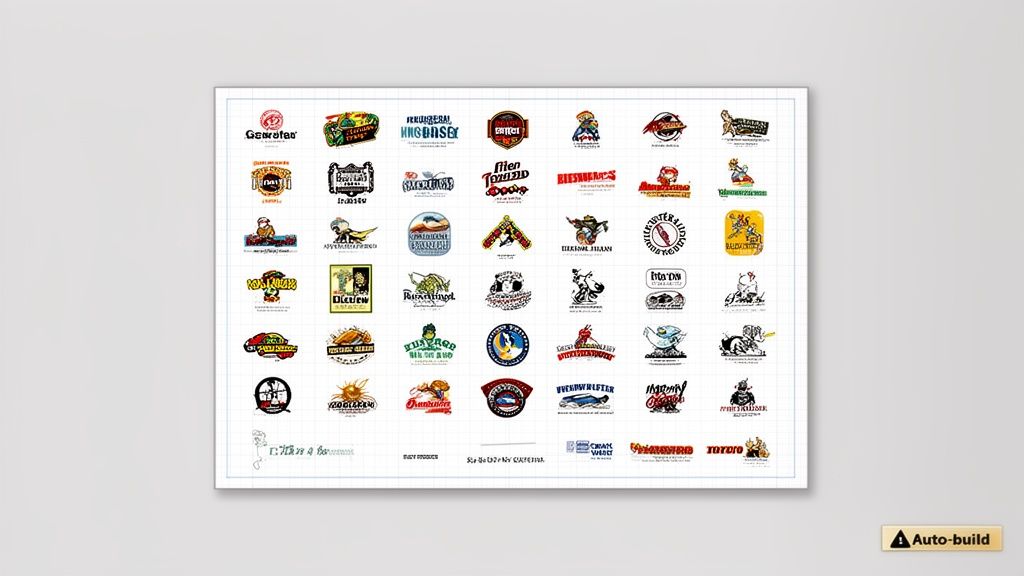
Making Gang Sheets Simple and Cost-Effective
Not too long ago, laying out a gang sheet was a real pain. It meant firing up design software and having a ton of patience to manually arrange, rotate, and nest every single image just right to avoid wasting space. Thankfully, modern tools have made this process incredibly straightforward, even for total beginners.
Many services now offer an Auto-build gang sheet builder that does all the heavy lifting. You just upload your artwork files, and the software automatically arranges them in the most efficient layout possible. It turns what was once a tedious task into a simple, automated process that saves you both time and money. It’s a complete game-changer when you're looking for an efficient way of "printing t shirt near me."
The whole point of a gang sheet is efficiency. Using an auto-builder lets you confidently fit more designs onto a single sheet than you probably could by hand, which directly translates to lower costs for your entire project.
This kind of efficiency is critical in a booming market. The global appetite for t-shirts is massive, with consumption projected to hit 25 billion units by 2035. In a competitive space like this, providers offering smart, cost-saving solutions like gang sheets at rock-bottom prices—some as low as $0.017 per square inch—give small businesses and crafters a huge advantage. You can dig into more insights on the global t-shirt market on indexbox.io.
Practical Scenarios for Using Gang Sheets
So, when does using a gang sheet really make sense? Here are a few common situations where they deliver serious value:
- Launching a New Clothing Line: Print your main front graphic, a smaller sleeve logo, and a custom neck tag all at once for a professional, cohesive look. An Auto-build gang sheet builder makes this incredibly easy.
- Creating Team Uniforms: Combine player names, numbers, and team logos for an entire sports team onto just a few sheets.
- Stocking an Etsy Shop: Produce a variety of your most popular small and medium-sized designs in a single run, keeping your inventory fresh without having to place a bunch of tiny orders.
By bundling your print needs this way, you streamline your workflow and knock down your expenses, making professional-quality custom apparel more accessible than ever before.
How to Find the Right T-Shirt Printer for Your Project
Knowing what you need is half the battle. Finding the right partner to bring your vision to life is the other.
Whether you're looking at a traditional print shop down the street or a dedicated online specialist, vetting them properly is the key to avoiding costly mistakes and getting the results you expect. It all comes down to asking the right questions before you place an order.
Your first search for "t-shirt printing near me" will probably give you a mix of local shops and online providers. Local shops are great for face-to-face service, but online specialists often bring better scale, consistency, and powerful tools to the table. The goal is to find a partner that lines up perfectly with your project's needs for quality, speed, and budget.
The Must-Ask Questions for Any Printer
Before you commit your hard-earned cash, you need to have a real conversation with any potential printer. Their answers will tell you everything you need to know about their process, their reliability, and whether they’re the right fit.
Here are the questions I always ask:
- What's your minimum order quantity (MOQ)? This is a big one. Screen printers often have high minimums (50+ shirts), which just doesn't work for small projects. On the flip side, most DTF specialists have no minimums at all, making them perfect for grabbing a single sample or running a small batch.
- Can you give me a full cost breakdown? Don't settle for a single number. Ask for a detailed quote that spells out any setup fees, per-color charges, or artwork assistance costs. Hidden fees can blow up your budget, so transparency here is non-negotiable.
- What’s your standard turnaround time? Get a clear timeline for production and find out if they offer rush options. A good printer will be straight with you about how long things take and will let you know about any potential delays.
- Can I get a physical sample? This is the only way to truly judge quality. Seeing and feeling a printed shirt lets you check color accuracy, print texture, and durability with your own hands. Any printer who is confident in their work will be happy to provide one.
A printer's willingness to give you clear, upfront answers is a huge green flag. If they're cagey about pricing or hesitate to send a sample, you might want to look elsewhere.
Local Shops vs. Online Specialists: What's the Real Difference?
Choosing between a local shop and an online specialist usually comes down to a trade-off: hands-on service versus efficiency and cost.
A local printer gives you that face-to-face interaction, which can be great for peace of mind. But they often have limited equipment, slower turnaround times, and higher overhead costs that get passed right on to you.
Online specialists, on the other hand, are built from the ground up for speed and scale. They deliver consistent, high-quality results backed by thousands of real customer reviews. More importantly, they offer powerful tools that most local shops simply can't match.
For instance, our Auto-build gang sheet builder makes it incredibly easy and cost-effective to print multiple designs at once, squeezing maximum value out of every single order. It's this blend of proven quality, serious speed, and smart efficiency that makes an online specialist such a reliable partner for any t-shirt project.
Your T-Shirt Printing Questions, Answered
Even after you’ve found a few potential printers, there are always a handful of last-minute questions that pop up. Let's clear them up. Getting straight answers to these common questions will help you sidestep rookie mistakes and order with confidence.
"Do I Have to Order a Ton of Shirts?"
This is probably the biggest question people have, and the answer comes down to the print method. If you're going with traditional screen printing, then yes—you’re almost always looking at a minimum order of 25-50 shirts. The setup is just too labor-intensive for a small batch.
But with modern methods like DTF transfers, that's a non-issue. There are no minimums, which is a game-changer for anyone needing a one-off sample, a small team order, or a limited-edition drop.
How Fast Can I Get My Shirts?
Turnaround time can make or break a project. A local screen printer might tell you a week or more, but specialized online services are often built for speed. For DTF transfers, a standard production time is usually just 1-2 business days.
And when you're really in a pinch, there are even faster options:
- Rush Printing: Some printers can turn your order around in 24 hours.
- Same-Day Pickup: If you're local to their facility, you can often grab your order the same day you place it.
- Next-Day Air Shipping: This gets your transfers in your hands as fast as humanly possible, no matter where you are.
These options give you incredible flexibility, especially when you're up against a tight client deadline or a last-minute event.
The most common delay in any t-shirt order isn't the printing itself—it's issues with the artwork file. A low-resolution image or a design with a background that needs to be removed can add days to your timeline. Always double-check your files before submitting.
What If I Need Help With My Design?
Not everyone is a graphic design wizard, and that’s totally fine. A common worry is what to do when your artwork isn't quite print-ready. Maybe your logo looks a bit fuzzy, or you have a bunch of different images you need to cram onto one sheet.
This is where a great printing partner really proves their worth. Look for a service that offers real support, like:
- Vectorization: They can take a low-quality raster image (like a JPG) and professionally convert it into a crisp, infinitely scalable vector file.
- Gang Sheet Building: If arranging all your designs feels like a painful game of Tetris, find a service that helps build the sheet for you. It's a lifesaver.
Our Auto-build gang sheet builder, for example, completely automates this process. It makes preparing multiple designs for print incredibly simple and cost-effective. This kind of support removes the technical hurdles, so you can focus on the fun part—your designs.
Ready to bring your t-shirt ideas to life with unmatched quality and speed? At Lion DTF Transfers, we make professional printing easy and accessible. Explore our powerful Auto-build gang sheet builder to maximize your value and get started today