










You've got jars ready to fill, a logo that looks sharp on screen, and a sticker order waiting in your cart. Then the practical questions start: will the oval fit the glass, will the small lettering print clearly, and will the edges stay down after refrigeration?
Personalized oval stickers work when the artwork, material, adhesive, and application method match the product. A bath bar needs a different specification from a shipping-box seal. Before buying a larger quantity to lower the unit price, make sure you're ordering something you can use in practice.
Oval Sticker Sizes and File Specs at a Glance
Oval sticker sizes, pixel counts and bleed
| Finished oval size | Pixels at 300 DPI | Bleed to add | Typical use |
|---|---|---|---|
| 50 × 27 mm (about 1.97 × 1.06 in) | Approximately 591 × 319 px | 3 mm per side | Jar, bottle and packaging labels |
| 3 × 2 in | 900 × 600 px | 0.125 in (approximately 3 mm) per side | Business stickers, laptop decals and giveaways |
| 4 × 2.7 in | 1,200 × 810 px | 0.125 in (approximately 3 mm) per side | Logo and event decals |
| 135 × 90 mm (about 5.3 × 3.5 in) | Approximately 1,595 × 1,063 px | 3 mm per side | Team, vehicle and large brand decals |
Multiply inches by 300 to calculate the pixel dimensions before bleed, using the final-size resolution recommended by ManyPixels' sticker sizing guide. The table's pixel counts use that calculation, with metric dimensions converted before rounding.
The metric sizes and bleed allowance align with Printed.com's oval sticker roll specifications, which include finished formats from 50 × 27 mm through 135 × 90 mm and a minimum 3 mm bleed. Treat the other formats as practical layout options, then confirm your printer's available cutting sizes.
What actually fits inside an oval
An oval doesn't offer the same usable text area as a rectangle with matching outside dimensions. The curved ends remove space precisely where a long business name or product description wants to extend.
Keep small designs focused on a logo, a name, or a short product identifier. If you have to compress lettering to fit, enlarge the sticker or remove secondary copy rather than squeezing everything toward the edge.
Bleed is background artwork extending beyond the cut. The safe area sits inside the cut and protects essential text and graphics from trimming variation. Neither is additional usable space for your headline.
Measuring rule: Measure the usable flat or gently curved panel, not the total package. Choose the smallest oval that holds your longest word or logo at a comfortable reading size.
Cut a paper mock-up and hold it against the product before opening your design software. This catches collisions with shoulders, seams, handles, and neighboring labels without wasting printed stock.
How to Design an Oval Sticker File
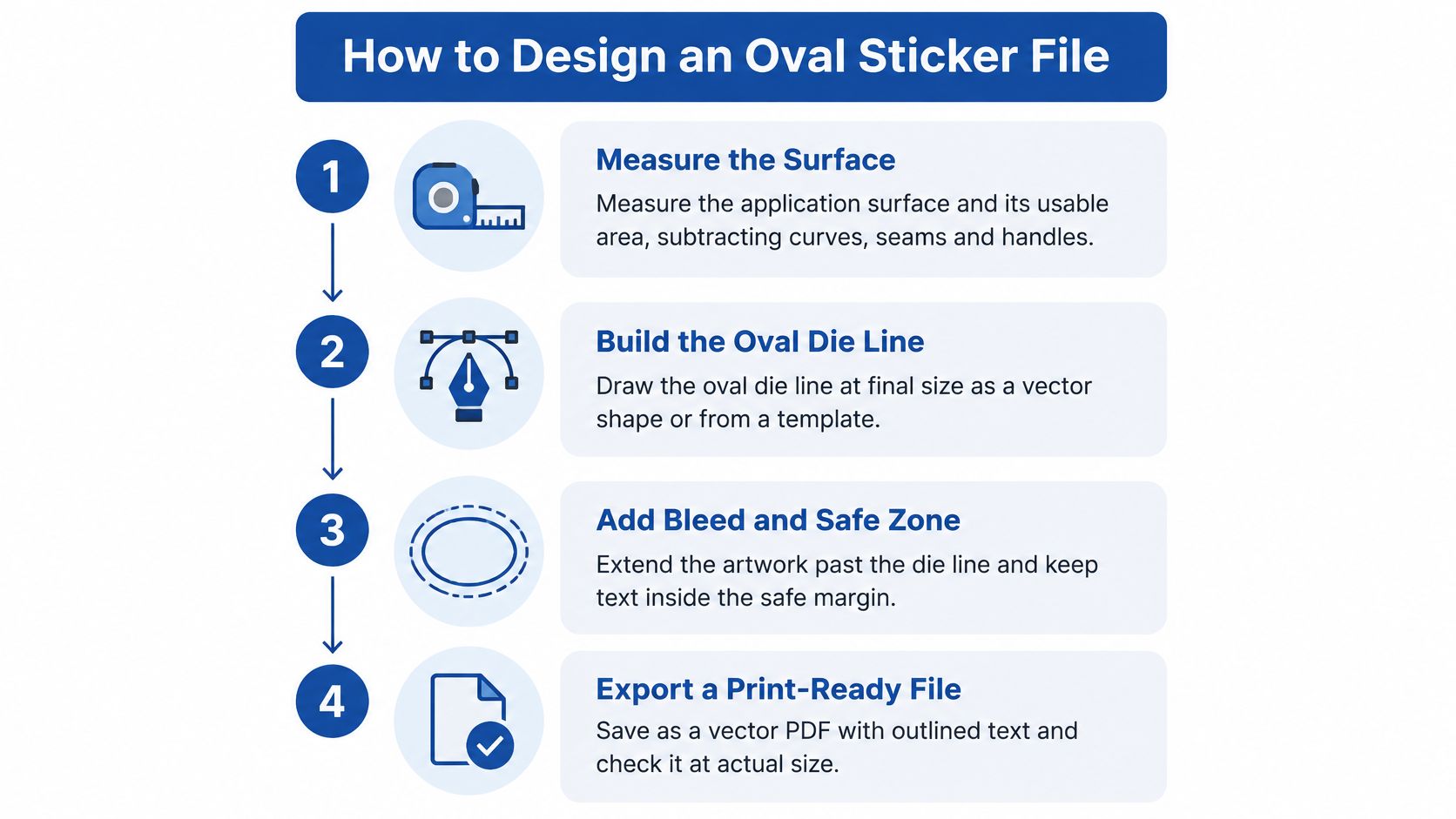
Build the file around the finished product, not around a logo pasted into an arbitrary canvas. The workflow below keeps artwork size, cutting geometry, and personalization under control.
- Measure the application surface. Use a flexible ruler or paper strip to identify the usable panel, excluding tight curves, seams, and handles. A label that fits across the container's widest point may still bridge an unsuitable shoulder.
- Build the oval die line at final size. Use the printer's template or draw a vector ellipse in Adobe Illustrator, Affinity Designer, or similar software. Keep the cutting path on a separate, clearly named layer so it doesn't accidentally become printed artwork.
- Extend the background beyond the die line. The 4OVER4 label preparation guide supports a practical benchmark of 0.125 in (3.175 mm) bleed with an equivalent internal safety margin. Follow the printer's exact template rather than treating rounded metric and imperial measurements as interchangeable.
- Protect the important content. Keep names, logos, and complete QR codes inside the safe zone, including the code's required blank surroundings. Avoid a narrow decorative border hugging the cut because small registration shifts make an otherwise centered design look crooked.
- Check image resolution and export settings. Prepare raster artwork at final output resolution, but retain vector logos and lettering wherever possible. Outline fonts in the production copy, save an editable master separately, and export the PDF format your printer accepts.
- Lock the personalization template. Change only designated fields, such as the customer name, serial number, or QR code. Preview the longest name and widest character combinations so the difficult versions don't overflow while the sample looks fine.
- Keep repeated artwork at identical scale. When preparing a sheet, duplicate the approved master rather than resizing each version independently. If the printer handles imposition, submit consistent individual files and let its production team arrange them.
The essential geometry is easier to check when you separate measuring, cutting, margins, and export.
Judge the print, not the zoomed preview
Say a candle maker places a two-colour logo on a 3 × 2 in oval, with a 0.5 pt rule following the curved ends. If that rule breaks up on the physical proof, increase its weight or simplify the detail instead of assuming the production run will improve it.
Inspect the proof at actual size under ordinary viewing conditions. Check the narrowest border, small type, thin strokes, and alignment around the entire ellipse, not only its top and bottom.
A digital proof can confirm spelling and placement. Only a physical proof shows whether the chosen stock, print process, and finishing preserve your design.
Matching Material and Finish to Your Use Case
Material and finish by use case
| Use case | Face stock and finish | Adhesive | Main risk |
|---|---|---|---|
| Refrigerated jars and sauces | White vinyl or clear BOPP with gloss laminate | Permanent acrylic | Condensation and freezer cycles; paper wets out and lifts |
| Bath products and soap | BOPP or laminated vinyl, matte or gloss | Permanent acrylic | Wet hands and standing water; apply to a dry surface |
| Candles and glass jars | Thinner white vinyl or clear BOPP | Permanent acrylic | Curved glass causes wrinkles on larger ovals |
| Outdoor laptop or vehicle decals | Laminated vinyl with UV protection | Permanent outdoor-rated | Sunlight fading; confirm the product's exposure rating |
| Shipping box and packaging seals | Paper for dry packs; white vinyl for rough handling | Removable or permanent, selected for the intended removal | Paper fails in damp transit |
| School and name labels | White vinyl or paper, matte | Permanent or removable | Repeated washing; test on the actual item |
Use these as starting specifications to discuss with a printer, not guarantees for every product sold under those material names.
The same artwork can suit several surfaces, but the construction underneath it must change with the exposure.
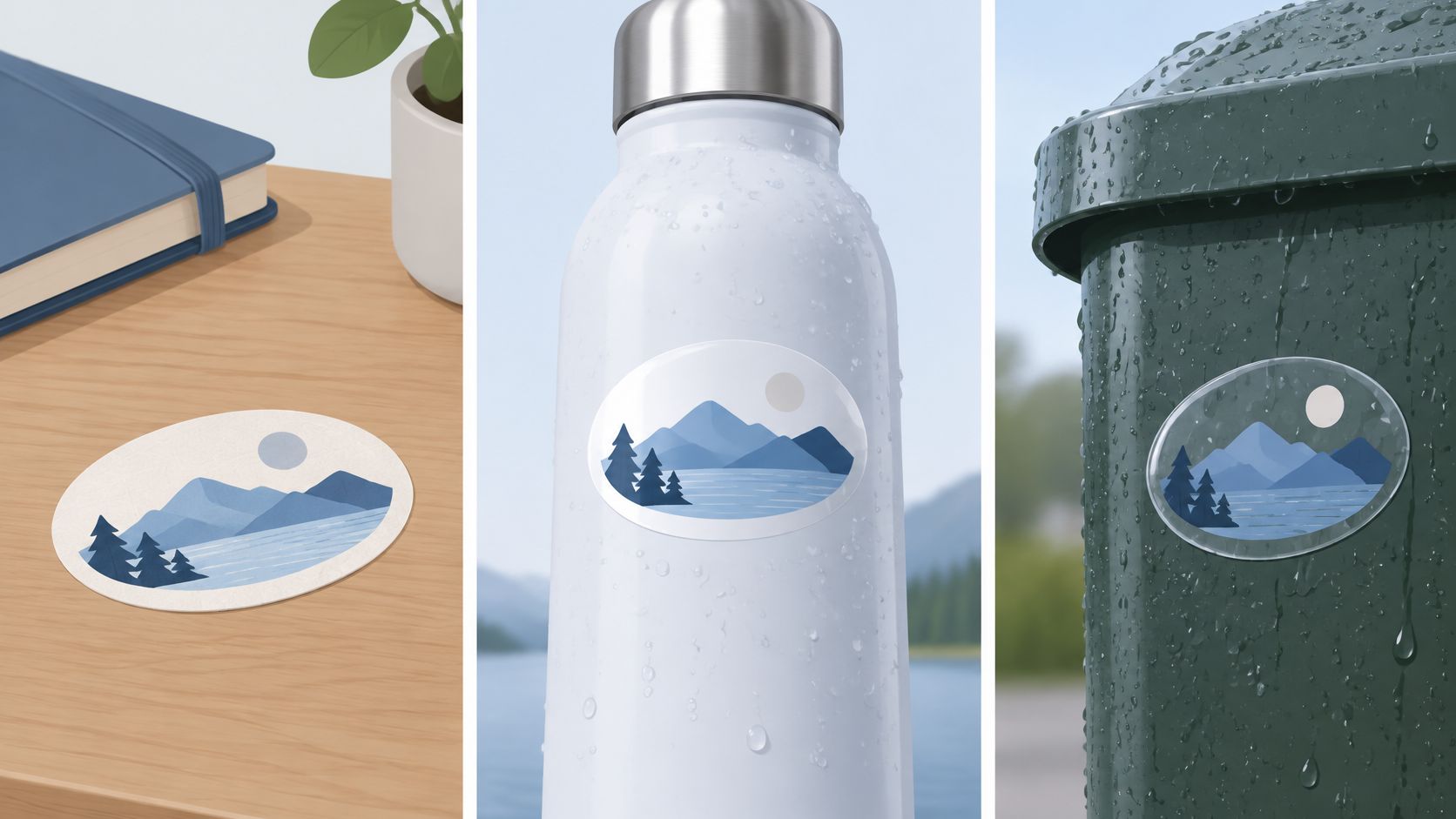
Match exposure before choosing appearance
Paper is a sensible choice for dry indoor packaging. White plastic and clear BOPP are more appropriate starting points for moisture, refrigeration, and freezer storage, while StickerApp's vinyl material guidance describes laminated vinyl as water-, weather-, and UV-resistant, with roughly 2–4 years outdoors before fading begins under ordinary conditions.
That guidance also includes a polypropylene construction with permanent acrylic adhesive and an after-application temperature tolerance of −65°F to 200°F. That's a product-specific service range, not permission to apply any plastic label to a frozen container.
Gloss emphasizes colour and offers a wipeable surface. Matte reduces visible fingerprints and glare; laminate or an appropriate protective coating helps shield the printed image from abrasion and exposure.
Water resistance isn't adhesive performance. A film can survive water while its adhesive releases from condensation, oil, or dust, a distinction emphasized in Cubit Packaging's oval sticker guide. For a refrigerated jar, qualify both the face stock and the bond.
For hard-surface decoration, compare conventional film labels with UV DTF stickers. They're different constructions, so don't assume identical application, removal, or washing behavior.
This video offers another visual reference while you compare sticker options.
Check environmental claims as carefully as durability
The EU Packaging and Packaging Waste Regulation 2025/40 addresses substances of concern, microplastics, and how labels and adhesives affect secondary raw-material quality. Ask suppliers to identify the face stock, ink, adhesive, and liner, and to support claims about the decorated package.
A paper face doesn't automatically make a laminated label recyclable. Nor does removable adhesive guarantee clean recovery.
The most expensive film isn't automatically the right material. Pay for the exposure your product will actually face.
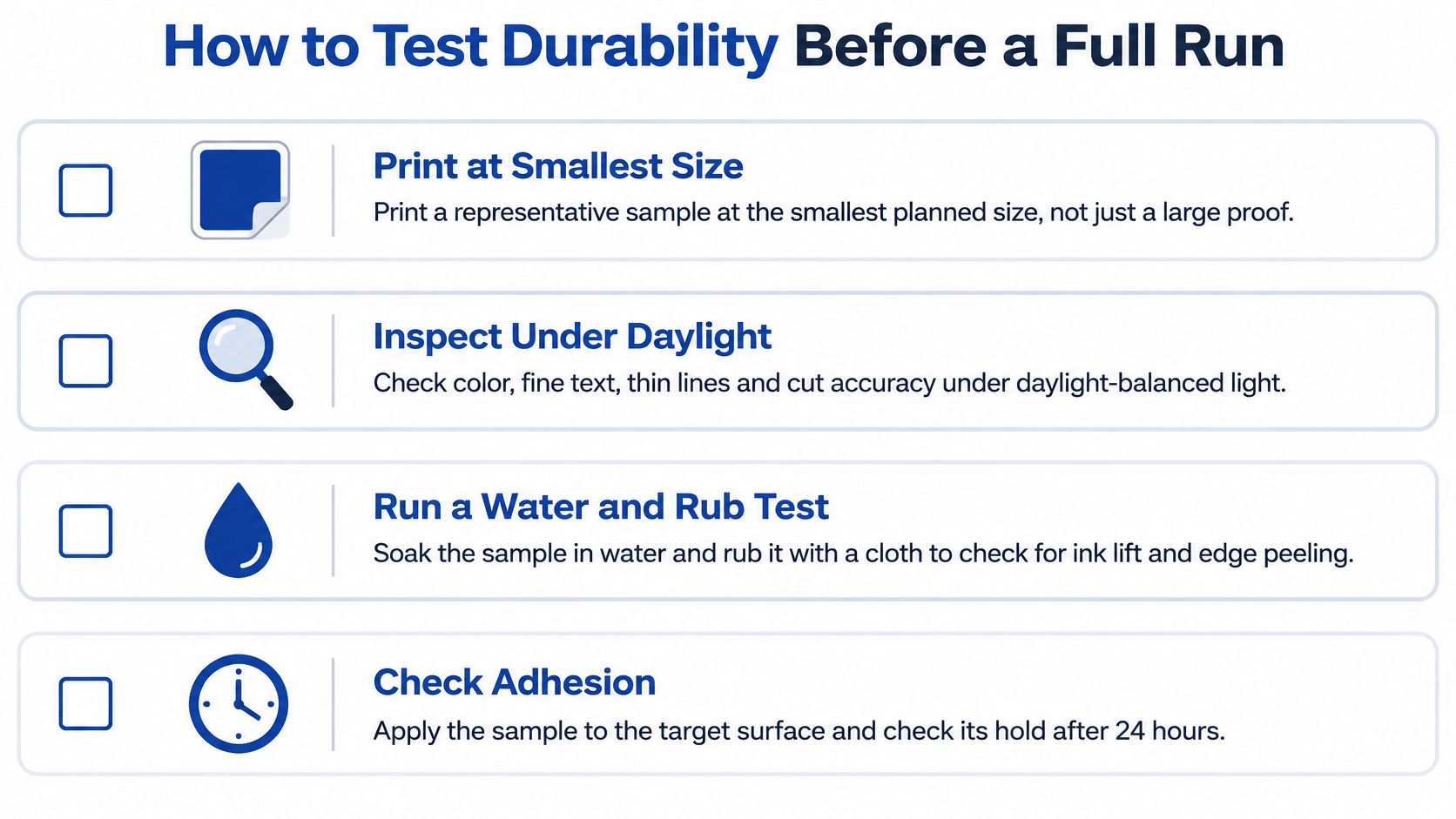
How to Test Durability Before a Full Run
- Print the difficult version. Use the smallest planned size and a representative personalized design, including long names and fine details. A large presentation proof won't reveal whether the production-size artwork remains readable.
- Inspect colour, small lettering, thin lines, and cut accuracy under daylight-balanced light. Keep an unexposed control sample beside the test pieces so subtle damage is easier to identify.
- Recreate the product's environment. Wipe or soak samples where water exposure is expected, refrigerate or freeze the appropriate products, and handle them with dry and oily hands. Test contact with the actual cleaner or product residue rather than an unrelated household liquid.
- Recheck the bond and printed surface after exposure. Look for edge lift, wrinkles, whitening, ink transfer, fading, and softened lettering, not just a sticker that remains attached.
- Scan every code configuration that could be difficult. Test the smallest code and lowest-contrast colour pairing on the finished product. Curvature and decorative artwork can compromise scanning even when the flat file looks acceptable.
- Record the substrate, adhesive, coating or laminate, printer settings, exposure duration, and failure mode. Keep photographs and a sample from the approved construction so a later substitute can be compared meaningfully.
Set pass and fail conditions before testing
ASTM D7932 provides a framework for evaluating printed pressure-sensitive labels under severe distribution conditions, including chemicals, weather, temperature extremes, and physical exposure. A documented screening benchmark is no colour bleeding after 48 hours of water contact under load; using a screening checklist alone doesn't establish formal ASTM compliance.
Use practical acceptance criteria alongside the exposure record:
- Image quality: The print stays clean and legible, without unacceptable loss of fine detail.
- Code function: The intended scanner or phone reads the finished code reliably.
- Cut and dimensions: The supplied label matches the approved geometry without damaged edges.
- Adhesion: Edges remain flat through the intended handling and environmental cycle.
- Surface integrity: Rubbing doesn't remove ink or expose an unprotected printed layer.
Keep the testing checklist beside the sample tray so every version gets the same treatment.
An indoor sample on a desk proves little about a cold glass jar or a frequently handled bath container. Test on the actual surface, using the intended application conditions and adhesive dwell time.
If something fails, change a defined variable and repeat the test. Switching the film, adhesive, and coating together may produce a passing sample, but you won't know which change solved the problem.
Ordering Quantities and Real Per-Label Costs
A soap maker filling a seasonal run faces a different cost decision from a brand buying warehouse stock. $322.98 divided by 100 labels is approximately $3.23 per label, using the starting roll-label price listed by 4OVER4 in 2026, while the same listing gives approximately $0.07 each at 25,000 labels. Compare those as separate inventory commitments; the larger order only works if you can use the labels before the artwork, product, or packaging changes.
Oval sticker provider quantities and price benchmarks
| Provider and product | Quantity range | Price benchmark | Turnaround or proof |
|---|---|---|---|
| Print Magic custom oval labels (2026) | 250 to 25,000 labels | Request a configured quote | 1–2 or 2–4 business days |
| 4OVER4 roll oval labels (2026) | From 100 labels | From $322.98 for 100; about $0.07 each at 25,000 | Confirm with the configured order |
| Paperlust personalized oval labels, one listed size (2026) | 500 and 20,000 labels listed | $0.31 each at 500; $0.04 each at 20,000 | Confirm before checkout |
| RacetopPrint custom oval labels (2025 listing) | Request the quantity attached to the starting price | From $22.65 | Artwork proof within 1 business day |
These listings use different quantities, configurations, and buying terms. Material, size, finish, shipping, and personalization can move the total, and older starting prices need confirmation in the configured order.
Compare the order you'll actually place
Start with the exact batch you can use. For the soap maker, the meaningful figure is the landed cost at that batch quantity, including proofing and delivery. A bulk price only matters when the larger order fits real production and storage needs.
Calculate total delivered order cost divided by usable labels. Include setup or artwork charges where applicable. Excess labels left in storage do not lower the cost of the labels you apply.
Ask each provider to quote the same specification:
- Construction: Identical finished size, face stock, adhesive, and protective finish for the intended exposure.
- Artwork: The same colour requirements and number of personalized versions.
- Delivery: Production time after approval, shipping method, and arrival expectations.
- Proofing: Digital review, physical sample availability, and correction charges.
A refrigerated jar, bath container, and laptop need different constructions, so matching the specification is the only meaningful way to compare unit costs.
For makers arranging oval designs alongside other hard-surface graphics, Lion DTF lets you build custom gang sheets online to place multiple designs on one sheet; review the custom UV DTF gang sheet workflow and confirm the transfer construction suits the product before treating it as an alternative to roll labels.
Buy the quantity you can use while the artwork, product, and packaging remain current. A lower unit price doesn't rescue obsolete inventory.
Before paying, request a proof, a material specification sheet, and written evidence supporting environmental claims.
How to Apply Oval Stickers Without Bubbles
- Clean the surface and let it dry completely. On compatible hard surfaces, use a lint-free cloth with isopropyl alcohol after checking that it won't damage the finish. Don't label over dust, oily residue, or condensation.
- Bring the product and labels to a stable room temperature. Follow the adhesive's minimum application temperature, which is different from its service temperature after bonding, and don't label a jar straight from the fridge.
- Expose part of the adhesive and establish alignment. Peel back a portion of the liner, line up the oval with a removable placement mark, and tack an edge lightly. Leaving the rest supported helps prevent an accidental full-face grab.
- Smooth progressively from the centre toward the edges with a felt-edged squeegee or a card wrapped in a clean cloth. Work across the label without forcing the entire adhesive face down at once.
- Burnish the perimeter. Apply even pressure around the ellipse, especially at the curved ends. Check that you haven't left a channel where moisture or handling can start lifting an edge.
- On curved containers, use a smaller oval or a thinner, suitable film rather than stretching the label into position. Compound curves need particular care because a flat sticker can't conform indefinitely without distortion.
- Give the adhesive time to develop its bond. Keep newly labeled products away from wet handling, washing, and refrigeration for the dwell period specified by the supplier. Don't use immediate tack as proof that the bond has finished developing.
Recover carefully, or replace the label
If a wrinkle starts while the adhesive remains repositionable, lift the affected area gently and lay it down again without stretching. Replace a creased or contaminated label rather than pressing a hard fold into the package.
Don't push a trapped bubble repeatedly across the print with excessive pressure. You can damage the finish while leaving the underlying application problem unresolved.
For transfer-style decoration on drinkware, follow the construction-specific handling described in this UV DTF decal application guide for tumblers. Conventional liner-backed film labels and adhesive transfers shouldn't be installed as though they're interchangeable.
Machine-applied labels need a separate trial on the actual applicator. Validate liner release, unwind and peel direction, dispensing, and edge behavior before increasing speed.
For example, a bath-product maker preparing 200 bars could start with 10 test pieces rather than committing the whole batch. Apply them to the actual package, expose them to expected handling, and inspect them the following day before continuing.
Confirm the Proof and Place Your Order
Approve the full run only when every production check passes. A sticker that looks attractive but lacks a confirmed material specification is still an unqualified purchase.
- Artwork approval: The physical proof shows clear small type, intact thin strokes, balanced borders, and correct personalized fields.
- Material approval: The face stock, finish, and adhesive suit the actual container and expected exposure.
- Durability approval: Test pieces retain a readable image, functional codes, and flat edges without unacceptable print damage.
- Commercial approval: The delivered cost makes sense at your required quantity, and the schedule includes proof approval and transit.
- Documentation approval: You have the construction details and written support for any recyclable, compostable, or environmental claim.
Stop the order when a requirement fails
Don't accept a different adhesive because the supplier says the replacement is similar. Ask what changed and whether the replacement has been qualified for your surface and exposure.
Likewise, don't approve unreadable lettering on the assumption that customers won't notice. Enlarge it, simplify the design, or increase the finished size before production.
A passing sample should become an identifiable production specification. Save the approved artwork filename, material description, finish, personalization rules, and proof confirmation together so the printer can reproduce the order without guessing.
Make the next purchase a test order
Start with test pieces on the actual product rather than another screen preview. Put them through the conditions that matter, inspect the result, and release the larger order only when you're satisfied with both appearance and performance.
For mixed-design small runs, Lion DTF's Auto-build gang sheet builder offers an easy-to-use, cost-effective way to arrange artwork together. Confirm whether UV DTF is appropriate for your application before choosing that route instead of a conventional oval label.
For proof questions, contact orders@liondtf.com or 833-350-5466 with your artwork, product surface, intended exposure, and required quantity. Ask for help resolving the specific production question before placing the full order.
Lion DTF Transfers offers UV DTF stickers for hard-surface decoration and online gang sheet tools for arranging multiple designs. Visit Lion DTF Transfers to prepare your oval artwork, discuss the right construction for your product, and start with a test order before committing to the full run.
Email orders@LionDTF.com or Text or Call: 833-350-5466