










You've got the design. The event is tomorrow, the launch order is due, or the team shirts need to be ready before the weekend rush, and now the question is how to turn artwork on a screen into something that prints cleanly on fabric. For DTF Seattle orders, the fastest path is usually a local transfer partner that can review files, catch production issues early, and get you from upload to finished press without the guesswork that slows down first-time buyers.
Local ordering matters because it solves the part most online guides skip, the handoff between a good design and a printable one. Lion DTF Transfers can support that workflow with custom transfers, gang sheets, and pickup or shipping options, which makes it a practical fit when you need speed without sacrificing control. If you're comparing providers, start with the basics, file quality, production speed, and whether you need same-day pickup or can wait on shipping. For a quick overview of the ordering flow, see custom DTF transfers near me.
Finding Your Seattle DTF Printing Partner
A lot of first orders start the same way. You've got a logo, a family-run brand mockup, or a stack of event shirts, and you need a provider who can tell you whether the design will print well. That's where a local DTF Seattle partner earns its keep, because they can answer the practical questions before you pay for a run that's too small, too detailed, or built around the wrong material.
What local support really changes
A good transfer shop doesn't just take a file and send it down the line. It checks whether your artwork has enough clarity, whether your dimensions make sense, and whether the order should be built as individual pieces or on a gang sheet. That matters because the right setup saves time at press and cuts waste, especially for small businesses and teams that don't have room for reprints.
A local provider also helps with the logistics that become headaches fast. Same-day pickup can matter more than fancy packaging when you're solving a last-minute event problem, while shipping makes sense when your schedule is looser or your team is spread out. If you're trying to decide between the two, think about where the final press happens, who is applying the transfers, and whether a missed delivery window would wreck your timeline.
Practical rule: if the order needs human judgment, not just upload-and-wait automation, local support is usually worth more than shaving a tiny bit off the price.
Lion DTF Transfers fits that role as one option for people who want direct ordering plus pickup or shipping, and its custom transfer workflow is built around getting print-ready files into production without extra friction. If you're still figuring out whether DTF is the right route for your project, the key advantage is simple, you can keep color-rich artwork and flexible placement without locking yourself into one garment type.
Preparing Perfect Print-Ready Files
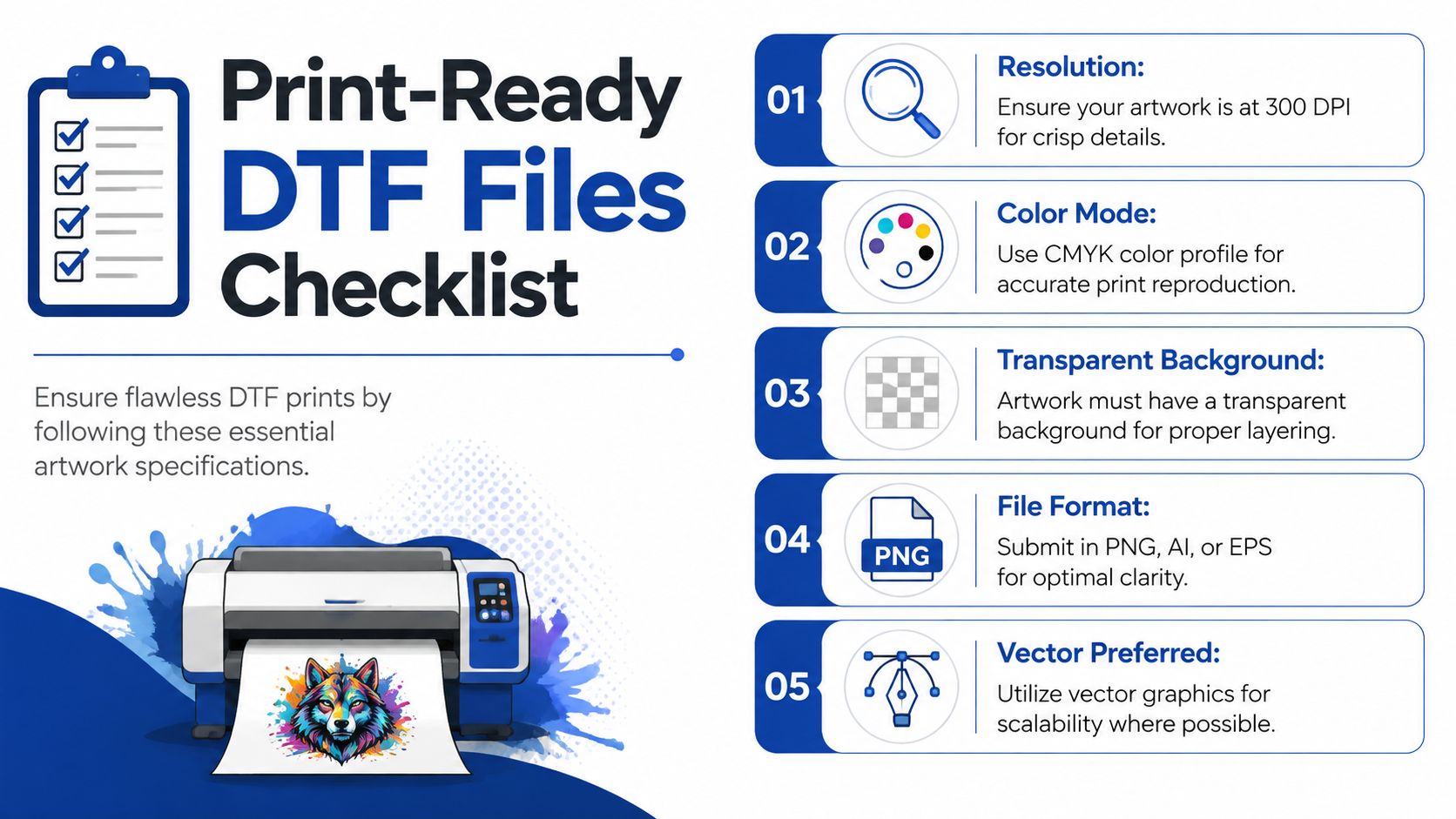
Bad files cause most delays. The shirt may be fine, the idea may be strong, but if the artwork is fuzzy, flattened, or packed with tiny details that cannot survive the press, the order stops being simple. For DTF production, a practical benchmark is 720 DPI minimum for basic logos and text, and 1440 DPI or higher for detailed artwork, gradients, and photographic designs, according to MTU Tech's printer-spec guidance. MTU Tech's DTF printer specification guide
The file should look ready before anyone prints it
Resolution affects what the press can hold onto. If the pixels are stretched too far, the edges look rough, and that roughness gets worse once ink, film, and heat come into play. Transparent backgrounds matter for the same reason, because a white box around your art looks like a mistake on most garments and can ruin an otherwise solid design.
The safest file types are usually PNG, AI, or PDF, with vector art preferred whenever possible because it scales cleanly. For a quick check on artwork prep, see what file format is best for printing. If you're submitting raster artwork, zoom in before you upload it. If the edges blur or the text breaks apart at 100 percent on your screen, the printer will probably see the same problem.
Fine details need room to survive
Seattle-area DTF file prep guidance says artwork should have a minimum thickness of 0.025 inches to avoid fragile details, and gang sheets should stay within a 22-inch maximum width. That is a production limit, not a style preference, because thin strokes disappear, tear, or lift when the film is removed. PNW Print Co's DTF artwork requirements
A design that looks elegant on a laptop can still fail on a press if the lines are too delicate.
Local ordering helps here because a shop can catch problems before they become reprints. If you are planning same-day pickup in Seattle, the file has to be ready for production as soon as it lands. If you are shipping, the same standards still apply, but there is more room to correct a file before it leaves the shop. Lion DTF Transfers also points buyers to a file-format guide, and that kind of support matters because a clean file is about more than appearance, it keeps the order moving without extra back-and-forth.
Placing Your Order and Choosing Options
Once the file is ready, the key decision is how to buy the transfer. You can order by size, you can build a gang sheet, or you can mix multiple designs into one layout for a better use of space. For most small runs, the gang sheet route is the smarter move because it packs more artwork into one print area and reduces wasted material.
Why the gang sheet usually wins
The manual way is tedious. You drag each design around, guess at spacing, and hope nothing gets cropped. The easier way is to let the layout tool handle it, especially if you're trying to combine left-chest logos, sleeve art, and larger front graphics for the same order.
That's where our Auto-build gang sheet builder becomes the practical choice. You upload the files, let the builder arrange them efficiently, and skip the trial-and-error that costs time and space. For a customer placing a mixed order, that can mean one clean sheet instead of several separate prints, which is usually easier to press and easier to manage at pickup.
The best part is that the builder also helps customers who aren't designers. If you don't know how to space a logo and a name stack, the system does the layout work for you, and you can focus on the garment choice instead of fiddling with boxes on a screen. That's a lot easier than sending back revisions over and over.
Choosing the right print style
If the shirt is dark, a white underbase is often what keeps the artwork from disappearing into the fabric. On hard goods, UV DTF stickers are the better fit because they're meant for different surfaces than apparel. That distinction matters, since a transfer that looks perfect on cotton won't always behave the same way on a bottle, tumbler, or other rigid item.
For teams that want a single shop to handle the whole process, Lion DTF Transfers offers custom DTF, gang sheets, and UV DTF stickers, plus the option to build layouts online. If you're trying to keep the order simple and the cost under control, that combination is usually easier to manage than juggling three separate vendors.
Pricing Turnaround and Getting Your Transfers
DTF pricing usually makes the most sense when you think about space used, not just the number of designs. Gang sheets reward efficient layouts because you're squeezing more value into the same print area, which is why a clean build matters so much before checkout. A messy layout can turn a cheap-looking order into a wasteful one fast.
Speed matters more when the deadline is fixed
The other half of the decision is timing. Seattle customers often need a path that doesn't depend on cross-country shipping delays, especially for events, retail drops, and replacements. That's why a local supplier with a standard 1 to 2 business day print schedule is useful, and why Next-Day Air can be a sensible backup when shipping is unavoidable.
Same-day pickup changes the equation entirely. Instead of waiting for transit, you can place the order, confirm the file, and get the transfers into production for immediate handoff. For urgent work, that's often the difference between meeting a deadline and refunding a customer.
If the shirts are for a one-day event, pickup usually beats shipping every time.
There's also a broader Seattle fit here. Downtown Seattle's recovery has been visible in foot traffic and spending, with more than 3.2 million unique visitors downtown in June 2026, which the Downtown Seattle Association said was 98% of June 2019 visitation and 4 points higher than June 2025. The same dashboard reported downtown workers averaging more than 147,000 per day in June 2026, and consumer spending downtown reached more than $138.9 million in May 2026, including a 26.12% month-over-month increase in clothing and accessories spending. Downtown Seattle Dashboard
That doesn't change print quality, but it does show why speed and pickup options matter in a city where retail and event activity still move quickly. If your order has a hard date, plan around that date first, then decide whether shipping is a convenience or a risk.
Pressing for Durability and Troubleshooting
A transfer only performs as well as the press behind it. If the temperature, pressure, or dwell time is off, even a good file can fail at the edges or lift after the first wash. For DTF and related transfer workflows, a common starting point is 160 to 170 °C, or 320 to 338 °F, for 10 to 15 seconds, and artwork should have a minimum thickness of 0.025 inches so fine details hold up during application.
A simple pressing sequence
Start with a flat, clean garment. Pre-press if needed to remove moisture and wrinkles, then place the transfer exactly where you want it, because small misalignments stand out once the film is down. Use steady pressure instead of guessing, and follow the film's peel instructions, since peel behavior changes with the material.
Hot-peel film can save time, but it still needs consistency. Light pressure can let the print lift. Low temperature can weaken adhesion. Too much heat can change how the film releases and leave you fixing defects instead of finishing the order.
For a step-by-step reference, see how to press DTF transfers. That kind of guidance helps when you are pressing your first Seattle order and want fewer surprises at the heat press.
Common problems and what usually fixes them
- Uneven peeling: increase pressure first, then verify the press temperature.
- Ghosting or shifting: keep the transfer still during the peel or cool-down step.
- Adhesive residue: check whether the peel happened too hot or too cold for that film.
- Poor adhesion: confirm dwell time, garment prep, and the material you're pressing onto.
After the press, handling still matters. Wash garments gently, avoid rough treatment early on, and let the print settle before you decide something failed. A transfer that is pressed correctly can hold up well, but only if the garment is treated like a finished product instead of a test piece.
For Seattle orders, that local support matters most when you are balancing pickup, shipping, and a hard deadline. If a question comes up before production, it is better to sort it out with the print shop than to guess and waste a run.
Frequently Asked Questions About Seattle DTF
Can I use a home iron instead of a heat press? You can try, but it's a compromise. A heat press gives more even pressure and temperature, which is what DTF needs for reliable adhesion, while an iron usually creates uneven contact that can leave weak edges or patchy bonding.
How big can a single image be? That depends on the printer and the layout, but the safer production mindset is to think in terms of sheet planning rather than assuming one huge graphic is always better. For oversized work, check whether the image should be split, resized, or rebuilt as a gang sheet so the details stay within the practical limits already covered above.
What if I need help with the artwork itself? That's where vectorization and layout help come in. Lion DTF Transfers offers design support options like vectorization and a We Build a Gang Sheet for You service, which is useful when you've got a logo file that isn't ready for clean print output yet.
For Seattle buyers, the biggest advantage is choosing the level of support that matches the deadline. If you already have polished files, ordering stays fast. If you don't, it's better to fix the file once than pay for a run that can't be pressed cleanly.
If you're ready to turn artwork into finished apparel, Lion DTF Transfers can help with custom transfers, gang sheets, UV DTF stickers, and practical file support for Seattle orders. Visit Lion DTF Transfers to upload your artwork, build a gang sheet, and choose the pickup or shipping option that fits your timeline.