










Your event date is close, the artwork is finally approved, and someone has just asked whether the shirts can be ready in time. In New Orleans, that pressure is familiar. Festival merchandise, convention apparel, restaurant uniforms, school spirit wear, and pop-up collections all compete for the same scarce resources, including production time, dependable transfers, heat-press labor, and usable film space.
Choosing a DTF New Orleans supplier isn't only a question of print quality. The decision includes pickup logistics, shipping risk, file preparation, layout labor, garment compatibility, and what happens when an order contains many designs in different sizes. A nearby counter can solve an urgent problem, while a mail-order partner with stronger automation may protect your margins on a larger run. The right workflow accounts for both.
Understanding Direct to Film Transfers for Custom Apparel
A New Orleans event planner may start with a simple request, such as vibrant shirts, convention, or cultural celebration. The artwork might include gradients, photographic details, several garment colors, and a deadline too close for a complicated setup. Direct-to-Film, or DTF, transfers fit that situation because they reproduce full-color artwork without the color-count restrictions associated with traditional screen-print setups.
The production sequence is straightforward, but each stage affects the finished garment. A DTF printer lays water-based inks onto clear polyester film. The printed image receives a powder adhesive, the adhesive is cured, and the finished transfer is applied to the garment with a heat press.
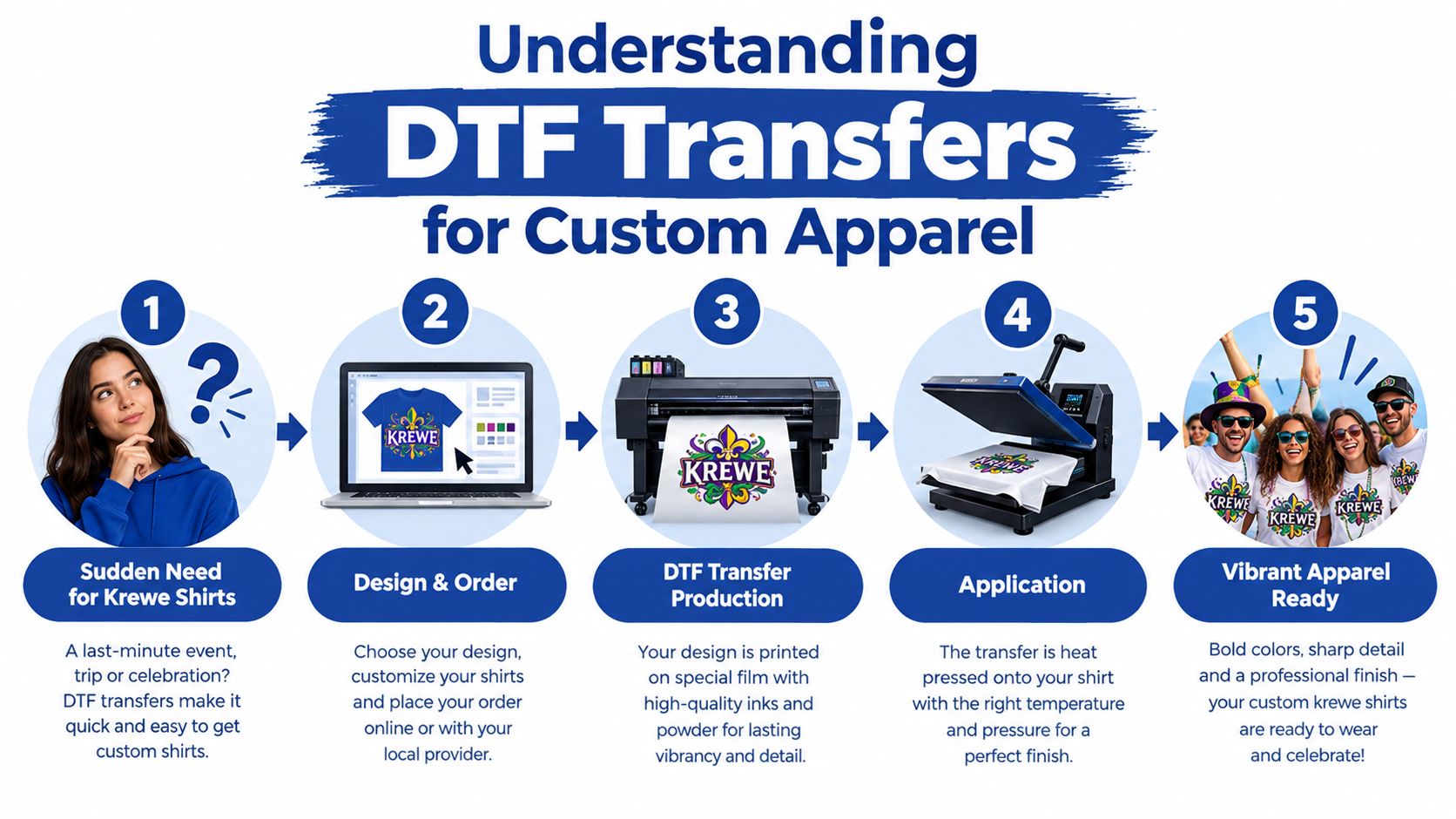
Why the process suits event merchandise
DTF works across cotton, polyester, and blended garments, which gives a local apparel brand more flexibility when a single order includes different shirt styles. It also handles detailed artwork, gradients, illustrations, and photographic elements without requiring a separate screen for every color. That makes it useful for small batches, mixed designs, and short product tests where screen-print setup would be disproportionate to the order.
This doesn't mean DTF replaces every decoration method. Screen printing can remain a strong choice for larger quantities of simple, bold artwork, while embroidery suits dimensional logos and structured garments. DTF earns its place when the artwork is complex, the run is varied, or the buyer needs a practical path from digital file to heat-pressed apparel.
Durability depends on more than the transfer
Wash performance provides a useful quality check. A peer-reviewed study found that DTF prints on cotton and polyester kept QR codes readable for up to five wash cycles, with recognition time around one second and color fastness rated about 4–5 on the standard gray scale after laundering. Those findings are reported in the peer-reviewed DTF QR-code durability study.
A separate textile durability study found no significant color loss after 15 wash cycles, while the strongest DTF samples remained resistant after 20 wash cycles. The results appear in this textile durability study of decorated fabrics. The practical lesson is simple: the transfer, adhesive cure, press settings, garment surface, and laundering instructions all matter. A vivid sample isn't enough if the application process is careless.
Comparing Local New Orleans Shops and Mail-Order DTF Providers
A local shop and a mail-order supplier solve different production problems. DTF Nola is based in Metairie and serves New Orleans and the Greater New Orleans area. Its website lists regular hours of Monday through Friday, 10am to 6pm, and Saturday, 10am to 4pm, plus same-day pickup for eligible orders and next-business-day shipping, according to the DTF Nola home page.
That access helps when a press operator needs a replacement transfer or a last-minute design correction. Staff can review the order in person, and pickup avoids carrier delays. The trade-off is operational overhead. Driving from New Orleans to Metairie takes time, parking can be inconvenient, and a busy counter may slow urgent orders during festival season.
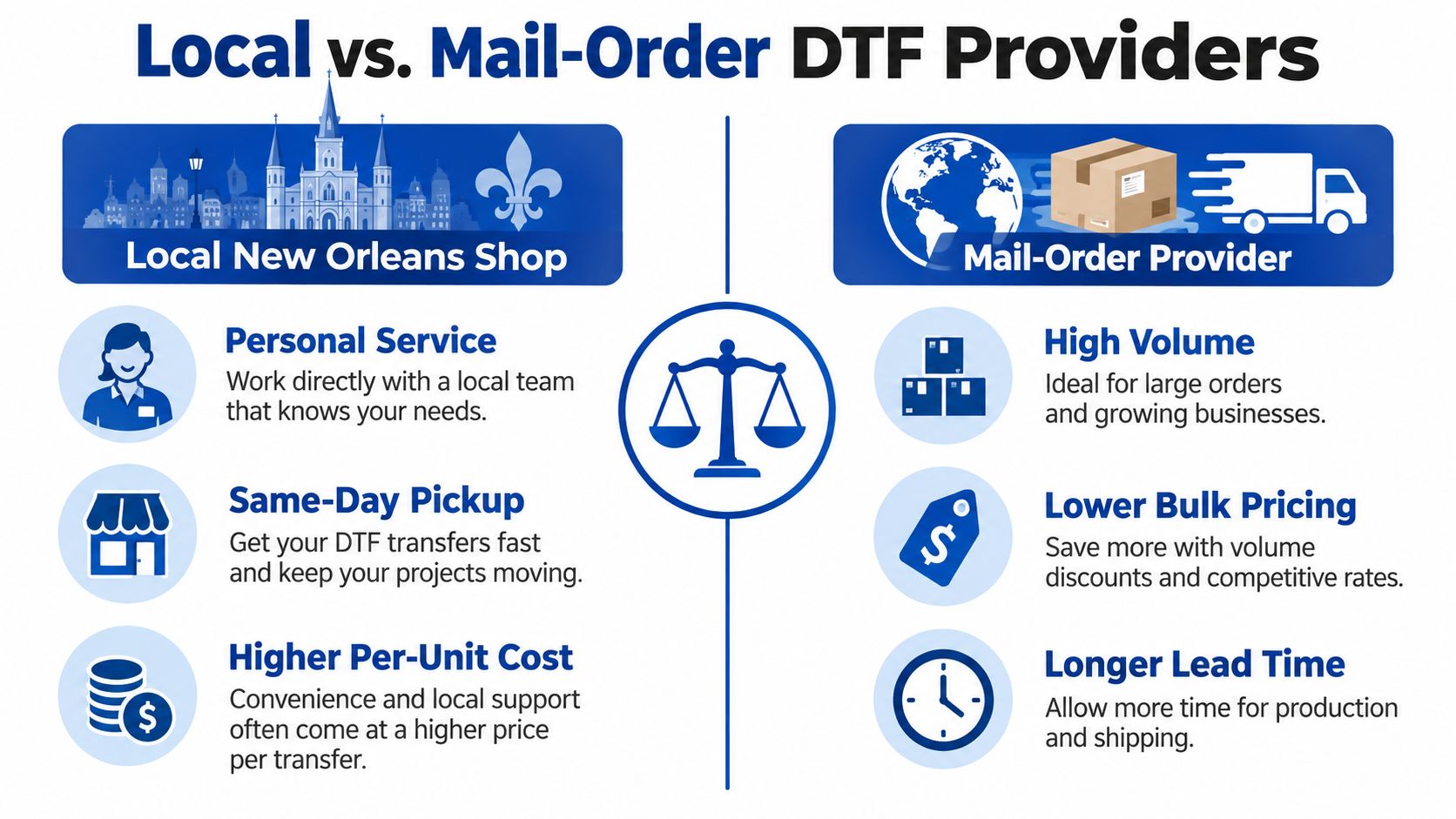
What local pickup actually costs you
Mail-order production replaces driving and counter handling with freight planning and delivery risk. An online provider may support gang-sheet tools and higher-volume production, but the buyer must schedule printing, packing, transit, and corrections when file details are wrong.
For event merch, the largest hidden cost can be layout labor. Someone still has to arrange mixed designs and sizes, check spacing, and prepare repeatable sheets. An automated gang-sheet workflow reduces that manual bottleneck, especially when one order includes many artwork files.
| Situation | More practical choice | Main risk to manage |
|---|---|---|
| An eligible urgent order needs physical inspection | Local pickup | Limited capacity during busy periods |
| A mixed order contains many designs and sizes | Automated mail-order workflow | Transit and file-approval timing |
| A large event run needs repeatable layouts | High-volume supplier | Poor artwork organization |
| A small local test needs fast feedback | Nearby shop | Higher labor and travel overhead |
Compare the complete workflow, not only the advertised transfer price. Add driving, pickup time, packing labor, missed production hours, shipping, and the cost of a reprint if a deadline is missed. A local order can carry higher labor and travel overhead, while a mail-order job requires earlier file approval and enough delivery time.
For a broader look at ordering options, review custom DTF transfers near New Orleans. The useful choice depends on urgency, order complexity, and whether your team can prepare layouts without slowing production.
Evaluating Print Quality and Supplier Reliability
A transfer can look impressive on a monitor and still fail in production. New Orleans adds a practical complication because humidity affects garment moisture, storage, pressing, and adhesive bonding. Buyers should evaluate the supplier's process before committing an event order, especially when a reprint would leave no time for recovery.
Start with the artwork and color workflow. Ask whether the supplier uses controlled color matching, how it handles brand colors across different garment blends, and whether someone reviews transparency, edges, and small details before printing. A supplier should also explain its film, ink, powder adhesive, curing process, and recommended heat-press settings in clear terms. If the answer is only “it will look fine,” you haven't learned enough.
What premium production should show
Look for evidence in the sample, not just a polished product page:
- Clean edges: The transfer shouldn't show stray adhesive or a fuzzy outline around the artwork.
- Consistent color: A logo should remain recognizable when applied to cotton, polyester, and blends, though the garment surface can affect perceived color.
- Even adhesive coverage: Powder that isn't properly applied or cured can contribute to weak bonding, peeling, or unwanted texture.
- Useful application guidance: The supplier should provide instructions for temperature, pressure, dwell time, peeling, and finishing.
- Wash-test transparency: Ask what laundering conditions were used and whether the supplier distinguishes tested results from general expectations.
Humidity also changes the operator's job. A damp shirt can interfere with adhesion, so a pre-press step that removes moisture is a practical safeguard. Store transfers flat and protected, keep garments dry before application, and test unfamiliar blanks before committing to a large order.
Practical rule: A bulk sample should pass both a visual inspection and a laundering test before you trust it with event merchandise.
Independent durability summaries report that properly applied DTF transfers commonly survive 40–50 washes with minimal degradation, while optimal conditions can produce 80–100+ washes without cracking, fading, or peeling, according to this technical DTF durability summary. Treat those figures as testing guidance, not a promise for every garment. Pressing technique, fabric, detergent, dryer heat, and artwork coverage all change the result. A practical supplier evaluation checklist is available in this guide to choosing a reliable DTF transfer supplier.
Preparing Print-Ready Files and Ordering Specifications
The cheapest reprint is the one you never create. Most preventable DTF problems begin before the file reaches the printer, with an opaque background, low-resolution artwork, stray pixels, incorrect color assumptions, or dimensions that were never confirmed.
Build the file for production
Use this pre-flight sequence before uploading:
- Start with a transparent PNG. Remove the background rather than placing a white rectangle behind the artwork. Transparency tells the printer which areas should remain open.
- Work at 300 DPI. At the final print size, 300 DPI helps preserve edges and small details. Enlarging a small web image won't create missing information.
- Confirm the color mode. Many workflows use CMYK, while some RIP systems accept RGB and convert internally. Ask the supplier which profile its production system expects instead of guessing.
- Inspect fine details at final size. Thin lines, tiny text, halftones, and distressed textures may disappear or fill in when reduced. Simplify details that won't survive the transfer scale.
- Set the finished dimensions. Name files with the intended width and height, especially when several shirt placements appear in one order.
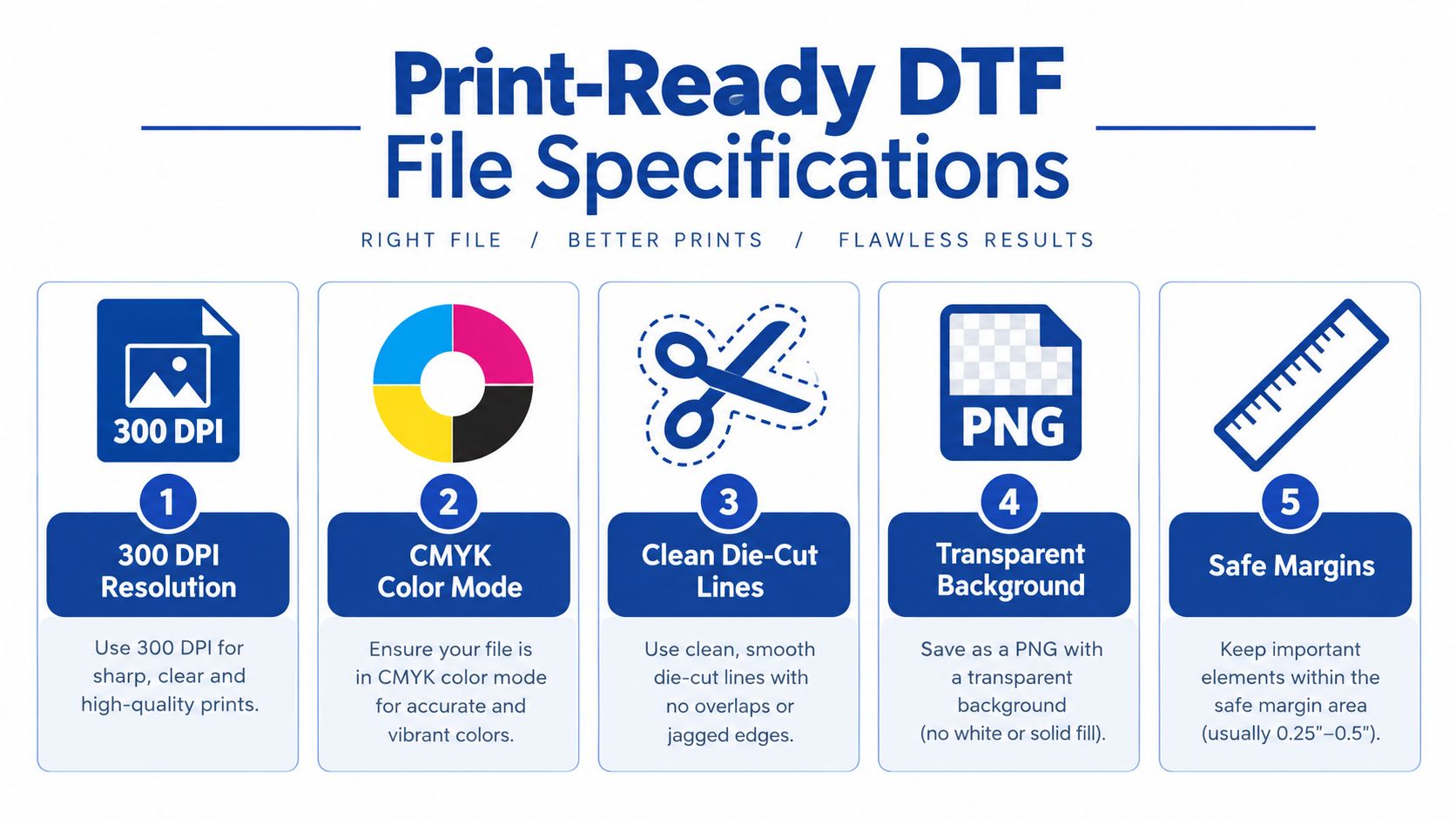
Remove the problems that waste film
Zoom into the artwork and look for isolated pixels, hidden layers, semi-transparent shadows, and faint marks outside the intended design. Those defects can receive adhesive and appear as unwanted specks on the shirt. Clean the outer edge, preserve intentional distress, and distinguish between a deliberate vintage texture and accidental damage from compression.
Use a safe margin around important lettering and logos. Keep registration-sensitive elements away from the cut edge, and don't assume a dark garment will hide a weak transparency boundary. If the design contains a white component, verify that the white layer is intentional and not missing because of a transparency or export setting.
Order details deserve the same care
Give the supplier a clear list of design names, finished dimensions, quantities, garment colors, and requested placement. For a gang sheet, identify every design so the press operator can match transfers to garments without opening multiple files and guessing.
File approval is production time. If a supplier flags a problem, answer quickly, but don't approve a visibly wrong proof just to preserve a deadline. A short review of the final file is cheaper than pressing a full batch that contains the wrong size, background, or color treatment.
Maximizing Cost Efficiency with Auto-Build Gang Sheets
A gang sheet combines multiple designs on one larger piece of transfer film. The economic advantage comes from using available film area instead of ordering each logo or shirt graphic as a separate piece. For an event brand, that might mean placing front logos, sleeve marks, sponsor artwork, and several shirt-size versions into one organized production layout.
Manual gang-sheet building creates a hidden labor charge. Someone must resize each design, rotate artwork, maintain spacing, check orientation, prevent collisions, and calculate whether another design will fit. That person also has to revise the layout when a customer changes one logo or adds another garment size. The work is easy to underestimate because it happens before the invoice for transfers arrives.
Automation removes the layout bottleneck
An Auto-build gang sheet builder calculates a more efficient arrangement from the uploaded artwork. Instead of asking a designer to manually test every rotation and position, the tool organizes the files to use available film space more effectively. The advantage isn't only material efficiency. It also reduces repetitive prepress work and lowers the chance that an exhausted operator will overlap artwork, waste a strip of film, or forget a design during a rushed event order.
The DTF gang sheet builder guide explains the workflow in practical terms. Upload the artwork, confirm dimensions, review the generated arrangement, and check the final sheet before placing the order. Automation doesn't eliminate judgment. You still need to confirm that the design sizes match the garment plan and that critical artwork has enough breathing room.
Apply the tool to New Orleans event volume
New Orleans has recurring demand tied to festivals, conventions, hospitality, and cultural events. One regional supplier reports fulfilling event orders of 1,000+ shirts, including Mardi Gras shirts, convention merchandise, and restaurant staff uniforms, as described in its New Orleans DTF market overview. At that scale, small layout inefficiencies repeat across a production schedule.
The business case is strongest when you have many unique designs or several decoration sizes. An automated layout can reclaim prepress hours, reduce avoidable film waste, and make reorders easier because the production team can preserve a documented arrangement. You shouldn't promise a saving before checking the actual artwork mix, but the workflow makes cost control visible. Compare the generated sheet with your old manual layout, then track unused space, revision time, and pressing errors across real orders.
Navigating Turnaround Times and Fulfillment Logistics
A deadline isn't met when the transfer is printed. It's met when the transfers arrive, the garments are dry and ready, the press settings are confirmed, and the finished shirts are boxed for delivery or sale. New Orleans brands often lose time by treating shipping as the only variable while ignoring artwork approval, pickup coordination, garment receiving, and pressing capacity.
DTF Nola's published service model includes local retail hours, same-day pickup for eligible orders, and next-business-day shipping. Those options can reduce transit exposure for a buyer close to Metairie, but eligibility and order timing matter. A local counter may be the right answer for an urgent replacement, while a shipped order can be more efficient when the buyer's team is already organized around production at another location.
Build the schedule backward
Set the event handoff first, then assign an internal deadline for each dependency:
- Finished merchandise date: Leave enough time to count, press, inspect, fold, and package every garment.
- Pressing window: Estimate the actual operator capacity, including setup, test presses, peeling, and quality checks.
- Transfer arrival: Select local pickup, standard shipping, or an expedited option based on the remaining buffer.
- File approval: Submit final artwork early enough to answer supplier questions without forcing rushed production.
- Garment readiness: Receive and inspect blanks before the transfers arrive, not after.
Mail-order suppliers can serve New Orleans without a local counter, but the buyer must distinguish printing time from transit time. Ask whether the order is printed immediately, whether a proof or file review pauses production, how tracking is handled, and what expedited service guarantees. Don't rely on a carrier's fastest advertised movement if the order still needs artwork approval or packing time.
Peak periods require a different operating rule
Festival demand can compress supplier capacity and carrier availability. Place repeat designs earlier, keep approved artwork archived, and separate urgent replacement pieces from the main batch so one correction doesn't hold the entire order. If a local supplier offers same-day pickup, confirm eligibility before assuming the service applies to your artwork, quantity, or submission time.
The best fulfillment strategy is often hybrid. Use a local source when physical access and immediate inspection outweigh travel costs. Use an automated, high-volume workflow when the order contains many designs, when layout labor is expensive, or when your team can plan shipping with a sensible buffer.
Frequently Asked Questions About DTF in New Orleans
How should I press DTF garments in humid weather?
Moisture is the first issue to control. Let the garment reach a dry, stable condition, then use a short pre-press to release moisture before positioning the transfer. Follow the supplier's specified temperature, pressure, dwell time, peel method, and finishing press instructions, because the correct settings depend on the film and adhesive system.
Don't press a damp shirt and then blame the transfer when the bond is weak. Test the first garment, inspect the edges after cooling, and adjust only one variable at a time. A sample is especially important when switching between a cotton shirt, a polyester performance garment, and a blended blank.
Is DTF suitable for cotton and polyester blends?
DTF is designed for broad fabric compatibility, including cotton, polyester, and blends. The fabric still affects the appearance and hand of the finished decoration, so test the exact blank used for production rather than treating every shirt as interchangeable.
For high-wear apparel, compare the transfer's coverage, stretch, color appearance, and laundering instructions on the chosen garment. A 50/50 blend may feel and behave differently from 100% cotton, while polyester can introduce its own dye-migration or heat-sensitivity considerations. Ask for a sample on the actual shirt style before approving a large event run.
How should customers wash DTF apparel?
Turn garments inside out, use a gentle wash process, avoid harsh treatment, and follow the supplier's care instructions. Excessive heat can shorten the life of decorated apparel, so use conservative drying practices and don't iron directly over the transfer.
The durability evidence discussed earlier shows why proper application and care must be considered together. Wash testing on the intended garment gives you a more useful answer than a generic lifespan claim, especially for uniforms, team apparel, and resale products that receive frequent use.
Can DTF work beyond shirts?
Traditional DTF transfers are primarily intended for heat application to suitable textiles. For hard goods such as brewery merchandise, cups, signs, or event giveaways, ask about UV DTF stickers, which use a different application method and material system. Don't assume a garment transfer can be moved to glass, plastic, or another rigid surface.
How do I scale a mixed event order?
Organize the artwork by design name, finished size, garment placement, and quantity before uploading. Use the Auto-build gang sheet builder to reduce manual layout work, then have one person review the generated sheet against the production list. Keep the approved file set and layout together so a reorder doesn't require rebuilding the job from memory.
A dependable New Orleans workflow treats the transfer as one part of a larger system. The press operator, garment buyer, artwork designer, supplier, and fulfillment person should all work from the same specifications. That coordination protects the deadline more effectively than choosing a supplier based on proximity alone.
Lion DTF Transfers offers custom DTF transfers, gang sheets, an Auto-build gang sheet builder, and UV DTF stickers for brands, schools, teams, and event organizers managing New Orleans merchandise. Use the Lion DTF Transfers ordering tools to upload production-ready artwork, organize mixed designs, and select shipping or nearest pickup options that fit your pressing schedule.
Email orders@LionDTF.com or Text or Call: 833-350-5466