










You're in Arlington, the event is close, and someone has just added more shirts to the order. Your artwork is ready, but waiting on an online shipment could put the team gear, merch drop, or school fundraiser at risk. That's why a search for DTF Arlington usually means more than “find a printer.” You're looking for dependable color, a transfer that bonds properly, clear file guidance, and a fulfillment option that matches the deadline.
Arlington sits inside a large and expanding market. The Dallas-Fort Worth-Arlington metropolitan area had an estimated 8,477,157 residents in 2025, while Arlington itself had an estimated 402,134 residents on July 1, 2025, according to the U.S. Census Bureau QuickFacts profile. That scale supports recurring demand from schools, teams, creators, local brands, event organizers, and print shops.
This guide focuses on the decisions generic print-shop pages often skip. You'll learn how DTF works, when it makes more sense than screen print, DTG, or vinyl, how hot-peel transfers and gang sheets affect production, and when local pickup can reduce deadline risk. You'll also see where Lion DTF Transfers fits, including custom transfers, UV stickers, and the Auto-build gang sheet builder.
Introduction to DTF Printing in Arlington
A last-minute apparel order has two separate problems: making the design and getting the finished garments ready on time. DTF separates those jobs. A specialist produces the transfer, and you apply it to the shirt, hoodie, bag, or other compatible item with a heat press. That can be useful when you already have blank apparel, need several designs in one run, or want to reorder a proven logo without rebuilding a complete garment-printing workflow.
Arlington is well suited to this model because it serves a broad local audience and connects closely with the wider DFW market. The city's history began with a planned rail stop surveyed in 1876, and its first train, Engine No. 20, arrived on July 19, 1876. Arlington incorporated in 1884, and its population later grew from 7,692 in 1950 to an estimated 19,000 by 1953, according to the Downtown Arlington history record. Today's buyers inherit that same practical need for reliable connections, only the connection is between artwork, transfers, blanks, and a deadline.
What local buyers are really comparing
Local DTF isn't automatically cheaper than online ordering. It can save money when a missed delivery would create rush shipping, replacement blanks, or a failed event order. It can also save time when you need to inspect a proof, clarify a file, collect transfers directly, or repeat a design with fewer handoffs.
For a small Arlington shop, the decision often comes down to four questions:
- Deadline: Can standard shipping arrive with room for pressing and inspection?
- Artwork: Is the file ready, or will you need vectorization, sizing help, or background cleanup?
- Quantity: Will a gang sheet combine multiple logos and reduce unused film?
- Risk: Is consistent color and adhesion more valuable than the lowest quoted line item?
UV DTF stickers add another route for hard goods and promotional items, while ready-to-press collections help buyers who don't yet have finished artwork. The important first step is understanding what bonds to the fabric, because that explains nearly every later decision.
How DTF Transfers Work From Film to Fabric
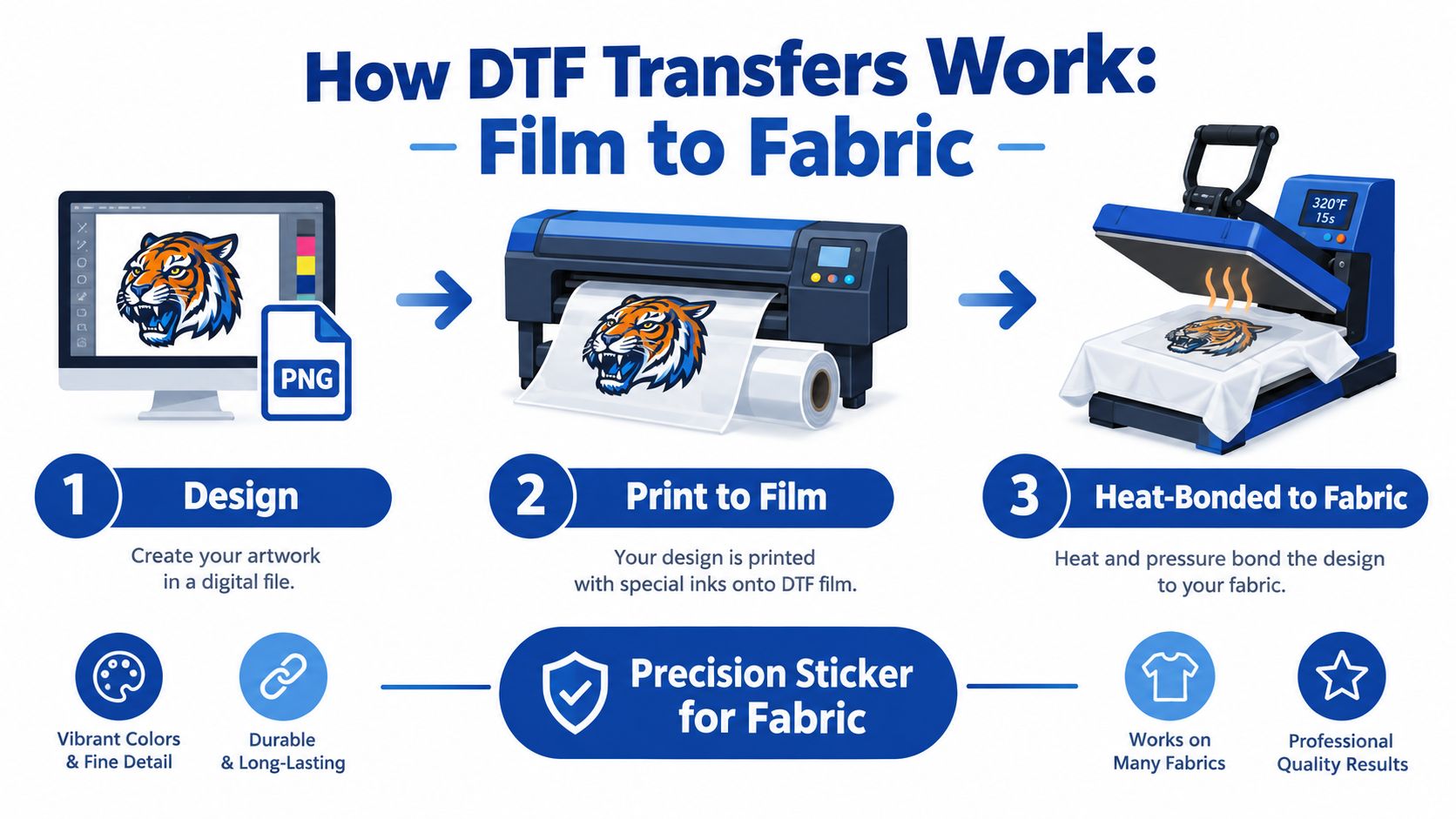
DTF works like a precision sticker for fabric, but the “sticker” is engineered through several controlled layers. You start with a digital design, print it onto PET film with water-based inks, add TPU hot-melt adhesive powder, cure that adhesive, and then use a heat press to bond the finished transfer to a garment.
From artwork to transfer
The printer places color onto a special PET film rather than directly onto the shirt. A white ink layer helps preserve brightness, especially when the design is applied to a dark garment. The adhesive powder is then added to the printed side, where it sticks to the ink.
Curing matters because the powder must form a usable adhesive layer before pressing. DTF relies on TPU, a thermoplastic polyurethane hot-melt adhesive. During pressing, the TPU melts and interlocks with textile fibers instead of depending on the fabric absorbing ink.
Practical rule: Treat curing and pressing as part of the print itself. A sharp image can still fail if the adhesive layer doesn't melt and bond evenly.
Why DTF works across fabrics
Because the adhesive sits between the printed design and the fabric, DTF can work on cotton, polyester, and blends. Smooth, slightly porous fabrics generally provide the most reliable surface. Water-repellent, DWR, silicone-treated, and anti-stain finishes can interfere with adhesive wetting, so test unfamiliar garments before committing to a production run.
After pressing, hot-peel film is removed while the transfer is still within its intended peel window. The exact result depends on film, adhesive, heat, pressure, timing, and fabric. A controlled technical study found that DTF prints on cotton and polyester maintained complete scannability, with recognition time around 1 second, and achieved good-to-excellent color fastness grades of 4–5 after five wash cycles under ISO 105-C06:2010 testing, as reported in this technical study of DTF print performance.
That evidence doesn't mean every transfer will perform identically. Under-curing, insufficient heat, uneven pressure, or skipping an appropriate post-press step can weaken the bond. Follow the supplier's pressing and aftercare instructions, then test the actual garment before a large team or retail run.
DTF Compared With Screen Print DTG and Vinyl
DTF becomes easier to evaluate when you compare the complete workflow, not just the finished image. Screen printing can be efficient for large quantities of one design, but each color and setup decision adds production work. DTG prints directly onto the garment and can produce detailed artwork, yet fabric preparation and garment compatibility matter. Vinyl remains useful for simple names, numbers, and bold shapes, especially when a cutter is already part of the shop.
For Arlington makers, DTF often fits short runs, mixed artwork, and garments that include cotton, polyester, or blends. It also lets you prepare several designs on one gang sheet instead of treating every logo as a separate order.
Choosing Your Print Method for Arlington Orders
| Criteria | DTF | Screen Print | DTG / Vinyl |
|---|---|---|---|
| Fabric range | Works across cotton, polyester, and blends when the surface accepts the adhesive | Strong results depend on ink, fabric, and setup choices | DTG is more fabric-specific, while vinyl depends on the material and vinyl type |
| Color on dark garments | White ink underbase supports bright, detailed artwork | Strong opacity is possible with the right screen setup | DTG needs appropriate garment preparation, while vinyl uses opaque cut material |
| Small orders | Well suited to short runs and mixed designs | Setup can make small, varied orders less efficient | DTG handles individual artwork, while vinyl is practical for simple personalization |
| Complex artwork | Supports fine detail, gradients, and full-color designs | Excellent for bold production artwork, with setup considerations | DTG handles detail, while vinyl is better for simpler shapes and lettering |
| Application workflow | Press ready-made transfers with a heat press | Print ink through screens, flash, and cure | Print directly with DTG or cut, weed, and press vinyl |
| Durability | Depends heavily on curing, pressing, fabric, and aftercare | Can be highly durable with correct ink and curing | Results vary by DTG settings, vinyl quality, pressing, and washing |
| Mixed designs on one order | Gang sheets make this especially practical | Each design may require separate setup | DTG and vinyl can handle variety, but the workflow differs for each design |
DTF isn't always the winner. A large run of one simple design may favor screen printing, while a single highly customized garment may suit DTG or vinyl. If you're deciding between direct-to-garment and DTF in more detail, review this DTF versus DTG printing comparison.
The useful question is not “Which method is best?” Ask, “Which method gives this order the right combination of fabric compatibility, artwork detail, setup effort, and deadline control?”
Lion DTF Transfers Services Pricing and Gang Sheets
For an Arlington buyer, the quoted price only tells part of the story. You also need to understand how much usable artwork fits on the film, whether the transfer arrives ready to press, and whether support is available when the file needs adjustment. Lion DTF Transfers offers premium hot-peel DTF transfers, custom gang sheets by size, UV DTF stickers, ready-to-press collections, and support options such as vectorization and a “We Build a Gang Sheet for You” service.
How gang-sheet pricing works
Custom gang sheets are generally understood through cost per square inch. You pay for the sheet area, so unused space becomes part of the effective cost of each transfer. The practical goal is to fill that space with artwork you'll use, while leaving enough separation for cutting and handling.
Suppose a small shop needs a left-chest logo, a larger front graphic, and several names for a team order. Ordering each design separately can create more individual setup and packaging steps. Placing compatible artwork together on a sheet can make the production plan easier to manage and reduce wasted film.
The Auto-build gang sheet builder is the simplest way to approach that calculation. Upload your designs, choose the sheet dimensions, and let the builder arrange the artwork for efficient use of the available area. You still need to check sizing and spacing, but you don't have to manually solve the layout from a blank canvas.
Match the product to the job
Premium hot-peel transfers suit decorators who want a ready-to-press application workflow. UV DTF stickers are intended for suitable hard goods and promotional surfaces rather than fabric. Ready-to-press collections can help when you need a themed design without creating original artwork from scratch.
Ask for help when the file is not production-ready. Vectorization can improve a logo that was supplied in a low-quality format, while a done-for-you gang sheet can help a non-designer avoid poor spacing or inefficient placement. The cost-effective choice isn't always the smallest sheet. It's the sheet that gives you usable transfers with less waste and fewer reprints.
How to Prepare Files and Order With the Auto Build Builder
Good DTF results begin before the printer runs. A transfer can only reproduce the artwork it receives, so file preparation affects edges, small text, transparent areas, and final size. Start with a clean file and decide how the design will sit on the garment before uploading.
Prepare the artwork
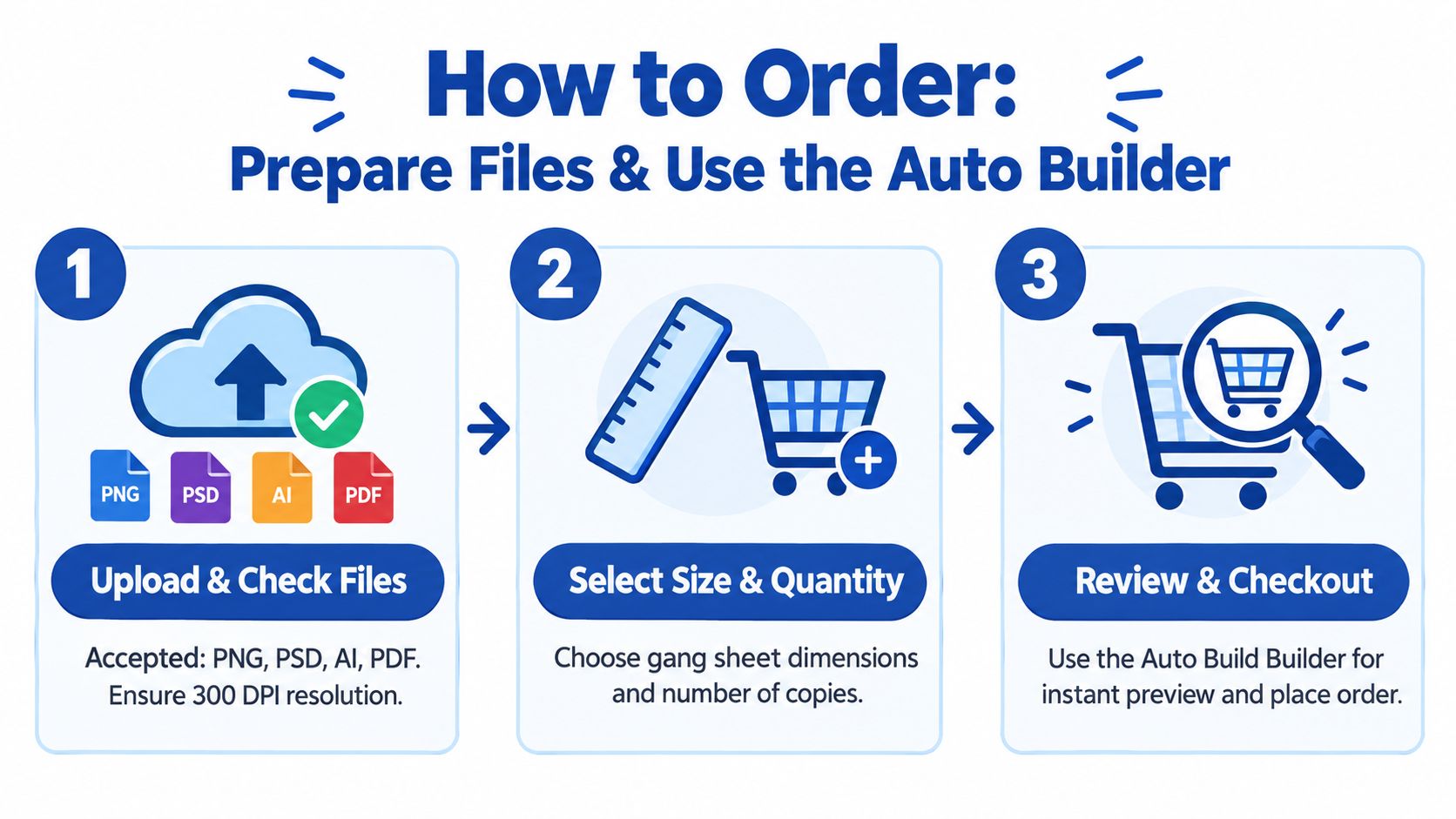
Use a production-friendly format such as PNG, PSD, AI, or PDF, and aim for 300 DPI at the intended print size. The Auto Builder feature guide shows how the builder supports the layout stage, but it can't repair every artwork problem.
Before uploading, check these points:
- Background removal: Delete unwanted boxes, white backgrounds, and stray pixels unless they belong in the design.
- Final sizing: Set the artwork to the size you want on the garment. Enlarging a small raster image can soften edges.
- Transparency: Confirm that transparent areas are transparent, not filled with a colored background.
- Color appearance: View the design against a dark background if it will be applied to dark garments. This helps reveal missing white areas or weak contrast.
- Small details: Inspect thin lines and tiny lettering. Details that look acceptable on a monitor may be difficult to cut, press, or read on fabric.
Build and review the sheet
Choose the sheet size and quantity that match your order. Upload the files, use Auto-build to arrange them, and inspect the preview before checkout. Look for sufficient spacing, consistent orientation, correct artwork dimensions, and any design that has been placed too close to an edge.
A practical ordering sequence looks like this:
- Choose the format: Decide whether you need individual transfers, a custom gang sheet, a ready-to-press design, or a UV DTF sticker.
- Upload files: Add the artwork in an accepted format and identify any sizing or color concerns.
- Select dimensions: Pick the sheet size and quantity based on the garments and placements you'll press.
- Run Auto-build: Let the builder arrange the designs, then make a visual inspection.
- Confirm the proof: Check orientation, spacing, transparency, and approximate final size.
- Place the order: Save the approved artwork and sheet layout for future reorders.
Don't assume the builder knows your garment placement. A chest logo, sleeve mark, youth-shirt graphic, and hoodie front need different physical dimensions. If you're uncertain, order a test or ask for file-prep support before producing the full batch.
Turnaround Shipping Pickup and Arlington Use Cases
Speed matters most when it protects the rest of your workflow. A transfer arriving quickly doesn't help if you still need to press, inspect, package, and distribute the garments. Plan backward from the moment the shirts must be in customers' hands.
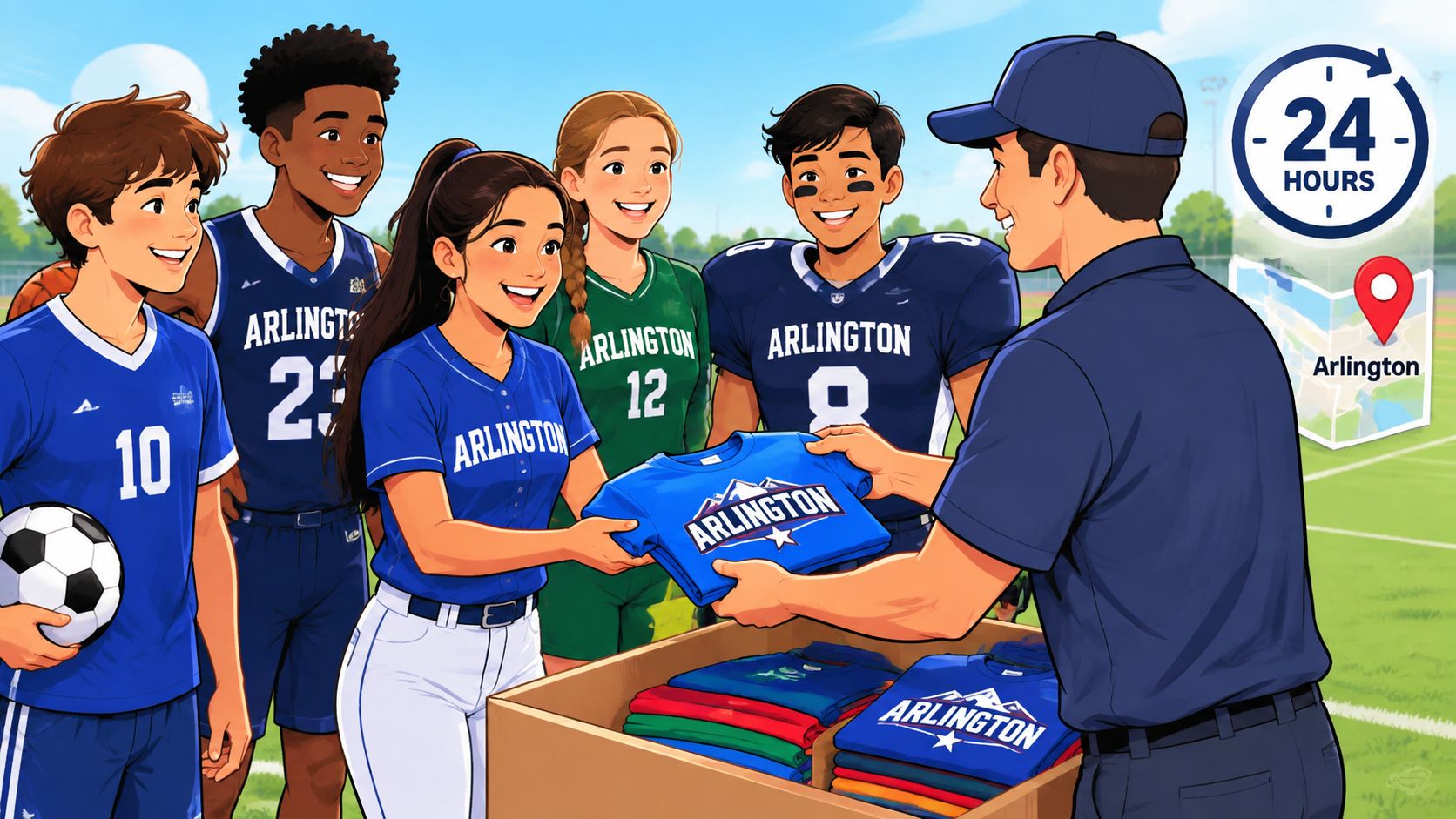
Lion DTF Transfers offers 24-hour printing, 1–2 business day shipping, same-day pickup, and next-day air options, according to the publisher's service information. Those choices create different levels of deadline control. Standard shipping may suit a planned reorder, while pickup or expedited delivery can make more sense when a team roster changes close to an event.
Match fulfillment to the use case
A school or youth sports organizer may need several sizes and names, which makes a gang sheet useful. An Arlington merch seller may prefer to keep blanks on hand and order transfers as designs sell, avoiding finished-garment inventory. A local event organizer may prioritize same-day pickup because the cost of a missed deadline is higher than the cost difference between fulfillment methods.
Small print shops can also use local production as a buffer. If a customer approves a revised logo late in the process, direct communication and pickup can reduce the number of shipping handoffs. That doesn't eliminate production or pressing time, so confirm the schedule before promising a finished delivery.
For pickup planning, follow the pickup instructions for Lion DTF Transfers and verify the order status before traveling. Keep the approved file, sheet layout, garment brand, and pressing notes together so a reorder doesn't depend on memory.
Protect consistency while moving fast
Fast fulfillment should never replace proofing. Save the final artwork version, record the intended transfer size, and press a sample when the garment fabric or finish is unfamiliar. This is especially important for water-repellent, silicone-treated, anti-stain, or heavily coated garments, since those surfaces can interfere with adhesive contact.
Local ordering saves time and money when it reduces uncertainty, not just because the vendor is nearby. Compare the complete path: transfer price, delivery or pickup, pressing labor, replacement risk, and the value of receiving help before the order enters production.
Making the Right Choice for Your Next Arlington Order
Use a short decision check before you order:
- File check: Is the artwork clean, transparent where needed, and prepared at its intended size?
- Method check: Does DTF fit the fabric, detail level, quantity, and personalization needs?
- Sheet check: Can multiple designs share a gang sheet without sacrificing spacing or usability?
- Fulfillment check: Do you need shipping, same-day pickup, or next-day air to leave room for pressing?
- Testing check: Have you verified the garment surface and pressing process before the full run?
- Reorder check: Have you saved the approved design, dimensions, and layout for consistency?
Use the Auto-build gang sheet builder when you have several designs and want an efficient layout without arranging every item manually. Choose a done-for-you gang sheet service when the artwork needs professional spacing, vectorization, or file-prep assistance. For a straightforward single design, ordering by size may be simpler.
After pressing, follow the supplier's instructions for cooling, peeling, finishing, washing, and drying. A reliable result comes from the full chain, artwork, adhesive, cure, heat, pressure, timing, garment, and aftercare. If a question remains, use the available call, text, email, or website chat support before committing to a large order.
The right Arlington DTF order isn't just the one that arrives quickly. It's the one that reaches you in a usable format, fits the garments, fills the sheet sensibly, and leaves enough time to inspect the finished apparel.
For Arlington teams, makers, shops, and merch sellers, Lion DTF Transfers offers ready-to-press hot-peel transfers, custom gang sheets, UV DTF stickers, file support, and fast fulfillment options that fit local deadlines. Visit Lion DTF Transfers to build a gang sheet with the Auto-build builder, upload your artwork, and choose the ordering or pickup path that fits your next project.
Email orders@LionDTF.com or Text or Call: 833-350-5466