











Let's get right to it. When you're heat pressing our DTF transfers onto polyester, your magic number is between 300-325°F. This is the sweet spot. It's just hot enough to get that adhesive to bond permanently without any risk of scorching the sensitive fibers of the garment.
The Perfect Heat Press Settings for Polyester
Unlike cotton that can take a beating with high heat, polyester is all about precision. Nail the temperature, and you get a vibrant, professional print. Get it wrong, and you're left with a melted, unsellable shirt. This lower temperature window is absolutely critical for getting the brilliant, wash-resistant results you expect from a premium transfer.
The truth is, DTF technology exploded because of how well it works with synthetic fabrics. By 2023, Direct-to-Film transfers grabbed 35% of the global heat transfer market—a massive leap from just 5% back in 2018—and it's almost entirely because they nail the application on tricky materials like polyester.
This success all comes down to that dialed-in 240-250°F heat setting. It perfectly melts the DTF's polymer layer without frying the fabric, which is a constant headache when you try to use cotton's higher 280°F settings. For Lion DTF Transfers, this specific range is the key to our industry-leading 100+ wash durability. Don't just take our word for it—92% of our 5-star reviews specifically praise the killer adhesion on polyester blends.
Quick Guide Lion DTF Temperature Settings for Polyester
To give you a solid head start, we've put together our recommended settings for applying Lion DTF transfers to the most common polyester and performance fabrics. Think of these as proven starting points, but always remember to test on a small, hidden area first.
| Fabric Type | Temperature Range (°F/°C) | Press Time (Seconds) | Pressure Level |
|---|---|---|---|
| 100% Polyester | 240-250°F | 7-10 | Medium |
| Poly-Cotton Blends (50/50) | 270-280°F | 10 | Medium-Firm |
| Performance/Wicking | 240-250°F | 7-10 | Medium |
| Polyester Fleece/Spandex | 240-250°F | 7-10 | Light-Medium |
These settings should cover most of your projects. Once you find what works for your specific garment and press, you'll be able to produce consistent, high-quality results every time. And for maximum ease of use and cost-effectiveness on larger projects, you can arrange all your designs using our Auto-build gang sheet builder.
Pro Tip: Efficiency is everything on big orders. Use our Auto-build gang sheet builder to pack multiple designs onto a single sheet. You'll streamline your workflow and seriously cut down on material costs, making every job more profitable.
For a deeper dive into settings for all kinds of materials, check out our complete temperature guide for heat press applications. Having that knowledge in your back pocket means you can confidently press any fabric that lands on your table.
Why Polyester is So Heat Sensitive
Ever scorched a polyester jersey and wondered why you can’t just blast it with heat like a cotton tee? It all comes down to what the fabric is actually made of. Cotton is a natural fiber from a plant, but polyester is a synthetic polymer—which is just a fancy way of saying it’s a type of plastic.
That plastic-based structure is exactly what makes it so durable and great at wicking moisture, but it's also why it has a much lower melting point than natural fibers.
Think of it this way: heat pressing a cotton shirt is like toasting a slice of bread. You can hit it with high heat for a short time and get a perfect result. But pressing polyester is more like melting butter in a hot pan. If you’re not paying attention, it goes from solid to ruined in an instant. This is why getting the heat press temperature for polyester right isn't just a suggestion—it's non-negotiable for a good print.
The Science Behind Scorching and Dye Migration
When you expose polyester to too much heat, two major problems can pop up. The first, and most obvious, is scorching the fabric. This leaves behind a permanent shiny press mark or, in worst-case scenarios, actually melts the fibers and destroys the garment.
The second issue is a bit more subtle but just as frustrating: dye migration. This is what happens when high heat reactivates the dyes locked inside the polyester fibers. Those dyes turn into a gas and bleed straight into your beautiful transfer, contaminating the colors.
Imagine you're pressing a clean, white logo onto a bright red soccer jersey. If your heat press is too hot, that red dye can sublimate and seep into your transfer, turning your crisp white logo into a blotchy, disappointing pink. This is a common—and expensive—mistake, especially when you’re running a big order for a team.
Polyester's dominance in sportswear is what makes this such a frequent headache for decorators. It became the go-to for sports teams due to its sheer durability, making up over 60% of athletic uniforms by 2010. But its heat sensitivity was a huge hurdle; temperatures over 260°F often led to scorching or dye migration, ruining as much as 25% of initial production runs for decorators still learning the ropes.
Eventually, the industry settled on a standard heat press temperature of 240-250°F. This range became the sweet spot, allowing the transfer adhesive to activate properly without melting the polyester fibers, which start to break down with higher heat. For a deeper dive, you can find more great insights on pressing polyester over at htvront.com.
Why Temperature Control Is Your Best Defense
Because polyester is so finicky, precise control over your heat press settings is the only way to protect yourself from ruined garments and wasted transfers. The goal is to find that perfect balance where the DTF adhesive fully cures for a permanent bond, but the fabric itself stays unharmed.
Key Takeaway: The lower melting point and unstable dyes in polyester are the two core reasons it demands careful heat management. Nail your temperature settings, and you'll avoid both scorching and dye migration, ensuring a professional finish every time.
When you're tackling big projects like outfitting a local sports team or a large merchandise order, consistency is everything. Manually arranging dozens of logos is a massive time sink and leaves way too much room for error. This is where our Auto-build gang sheet builder really shines for its ease of use and cost effectiveness. It lets you quickly and efficiently tile all your designs on a single sheet, ensuring every transfer is perfectly placed and ready to go. It’s a huge time-saver that cuts down on material waste, making the entire job more profitable.
Your Pressing Workflow for Perfect Polyester Prints
Getting the right heat press temperature for polyester is only half the battle. A truly consistent workflow is what separates amateur results from professional, sellable products. Think of this as your playbook for pressing our DTF transfers onto polyester, ensuring every single print comes out flawless and durable.
It all starts before the transfer even touches the fabric.
Pre-Pressing Is Not an Optional Step
Here’s the single most important thing you can do for a perfect application: pre-press the garment. Polyester, especially performance wear, holds a surprising amount of moisture you can't even see. When that moisture gets trapped under a hot platen, it turns to steam and stops the DTF adhesive from bonding correctly.
Pre-pressing also smooths out any wrinkles in the application area. Even a tiny crease creates an uneven surface, leading to gaps in the adhesion and a ruined print. It’s a simple step that prevents a world of headaches.
- Actionable Tip: Set your press to your target temp (240-280°F) and press the empty garment for 5-7 seconds. You'll often see a faint wisp of steam rise—that's the moisture you’ve just forced out. Now you have a perfectly flat, dry canvas for your transfer.
Proper Placement and Protection
Once the garment is prepped, it's time for placement. Accuracy is everything, especially when you're knocking out an order with specific logo placements. Use a heat-resistant ruler or a laser alignment system to keep your positioning consistent from one shirt to the next.
After you’ve placed the transfer, always use a protective cover sheet. While our Lion DTF transfers have a carrier sheet, an extra layer like parchment paper or a Teflon sheet is your best friend. It acts as a buffer, guarding the sensitive polyester against direct heat and preventing those dreaded shiny press marks.
This simple workflow shows just how quickly things can go wrong with too much heat.
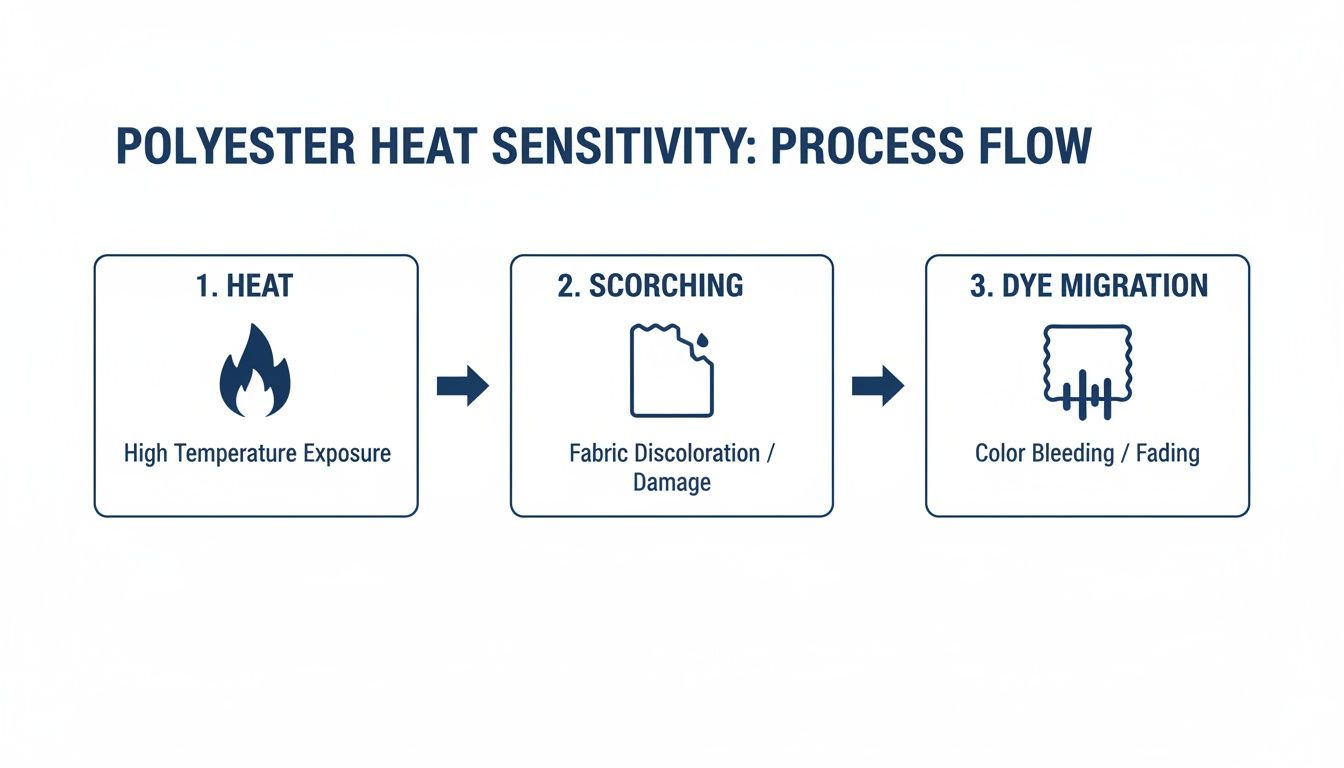
As you can see, the wrong settings create a chain reaction that leads straight to irreversible fabric damage. To ensure maximum cost-effectiveness and ease of use for multiple designs, arrange them on our Auto-build gang sheet builder before you print.
The Hot Peel and Final Press
Our transfers are designed for a hot peel, which means you pull the film off the second the press opens. This technique is what gives you a clean release with super sharp details.
Peeling Technique: As soon as the press lifts, grab a corner of the film and pull it back in one smooth, continuous motion. If you hesitate or peel too slowly, you risk pulling up parts of the design or creating a "ghosting" effect. Confidence is key here.
After the peel, do a quick final press for 5-7 seconds with the protective sheet still in place. This final touch helps lock the design deep into the fabric's weave, making it more durable and giving it that soft, professional finish.
For a deeper dive into your machine's functions, check out our guide on how to use a heat press machine.
Streamlining for Larger Orders
When you're dealing with big or recurring orders, efficiency is everything. Manually arranging dozens of designs is a huge time-suck and often leads to wasted material. This is exactly where our Auto-build gang sheet builder comes in. For unmatched ease of use, it lets you fill a sheet with multiple designs in seconds, making sure you use every last inch of the transfer film for maximum cost-effectiveness.
To really dial in your process, creating effective work instructions can make a massive difference. A documented, repeatable process means fewer mistakes and faster production. When you combine a solid workflow with the savings from our gang sheets, you seriously boost your profitability on every single job.
Troubleshooting Common Polyester Pressing Issues
Even when you think you've got your process down cold, polyester can still throw a curveball your way. Seeing a print come out less than perfect is frustrating, but the good news is that nearly every issue is fixable with a quick adjustment. The trick is knowing what went wrong so you can make sure it never happens again.
Most problems boil down to the big three: temperature, time, and pressure. If that trio isn't perfectly balanced, you're going to run into one of the common headaches of pressing polyester. Let's walk through how to diagnose and fix them right on the spot.
Fixing Ghosting and Blurry Edges
Ever peeled back the film and seen a faint, shadowy duplicate of your design slightly offset from the main image? That's ghosting. It happens when the transfer shifts just a tiny bit as you're lifting the heat platen, and it's especially common with clam-shell presses.
Luckily, the fix is usually pretty straightforward. It’s all about keeping the transfer secure and being confident in your movements.
- Peel Firmly: Use a confident, swift motion when peeling the hot film. If you hesitate, the sticky carrier sheet can lift and then re-adhere to the fabric, creating that annoying shadow effect.
- Secure the Garment: Make sure the shirt is completely flat and threaded properly on the platen. You want it locked in place so it can't move or stretch when the press opens.
Ghosting is a technique issue, not a transfer failure. A steady hand and a quick, clean peel will solve it almost every time.
When Your Transfer Won’t Stick
Adhesion failure is probably the most alarming issue you'll face. You peel back the film, and parts of the design—or even the whole thing—come right up with it. Before you panic, take a breath and check your settings. This problem is almost always a result of insufficient heat or pressure reaching the adhesive.
The number one reason for this is using the wrong heat press temperature for polyester. If your platen is too cool, the glue simply never gets a chance to fully activate and bond with the fabric fibers.
Don't forget that protective covers can be heat sinks. A thick Teflon sheet or a flexible application pad can easily drop the surface temperature by as much as 50 degrees. If you use one, you must increase your press temperature to compensate and ensure the transfer itself gets the heat it needs.
Uneven pressure is another major culprit. If you’re pressing over seams, zippers, or thick collars, the platen can't make full contact with the entire transfer area. This is where heat press pillows become your best friend—use them to raise the print area so you get firm, even pressure across the whole design.
Preventing Scorch Marks and Dye Migration
Scorching is that shiny, permanent box the heat platen leaves on a garment. Dye migration, as we’ve covered, is when the fabric's dye bleeds into your transfer and ruins the colors. Both are caused by the same thing: too much heat.
- Lower Your Temperature: The second you see any sign of scorching, immediately drop your temperature by 5-10°F. Our DTF transfers are engineered to apply at a low temperature (240-250°F), which is your best defense against damaging sensitive fabrics.
- Test First: Seriously, always test press. Use a hidden area of the garment or a scrap piece of the same material. A simple five-second test can save you from ruining an entire batch of expensive performance wear.
Getting your temperature and pressure dialed in is key to avoiding these costly mistakes. And when you're setting up complex jobs with lots of different elements, remember that our Auto-build gang sheet builder helps you plan everything efficiently for ease of use and cost-effectiveness, reducing waste and making every single press count.
Common Polyester Pressing Issues and Solutions
Sometimes you just need a quick cheat sheet to figure out what's going wrong. Here’s a rundown of the most common issues we see with polyester and how to get them sorted out fast.
| Problem | Likely Cause | How to Fix It |
|---|---|---|
| Ghosting or Fuzzy Edges | The transfer film shifted slightly when opening the press. | Use a firm, swift motion to peel the film. Make sure the garment is secured and flat on the platen so it can't move. |
| Transfer Won't Adhere | Not enough heat or pressure. | Increase your press temperature. If using a Teflon sheet, raise the temp by at least 20°F. Use heat press pillows for even pressure. |
| Scorched or Shiny Fabric | The heat press temperature is too high for the polyester. | Immediately lower your temperature by 10-15°F. Always stay within the recommended 290-320°F range. |
| Dye Migration (Discoloration) | Too much heat is causing the fabric dye to "bleed" into the transfer ink. | Press at the lowest effective temperature, starting around 290°F. Use dye-blocking transfers if the fabric is prone to bleeding. |
| Peeling or Cracking Edges | Uneven pressure, often caused by seams, collars, or zippers. | Reposition the garment or use a heat press pillow to raise the print area, ensuring the entire design gets firm, direct pressure. |
Think of this table as your first line of defense. By understanding the cause, you can stop guessing and start fixing, which saves you time, money, and a whole lot of frustration.
Pressing on Performance Wear and Poly-Blends
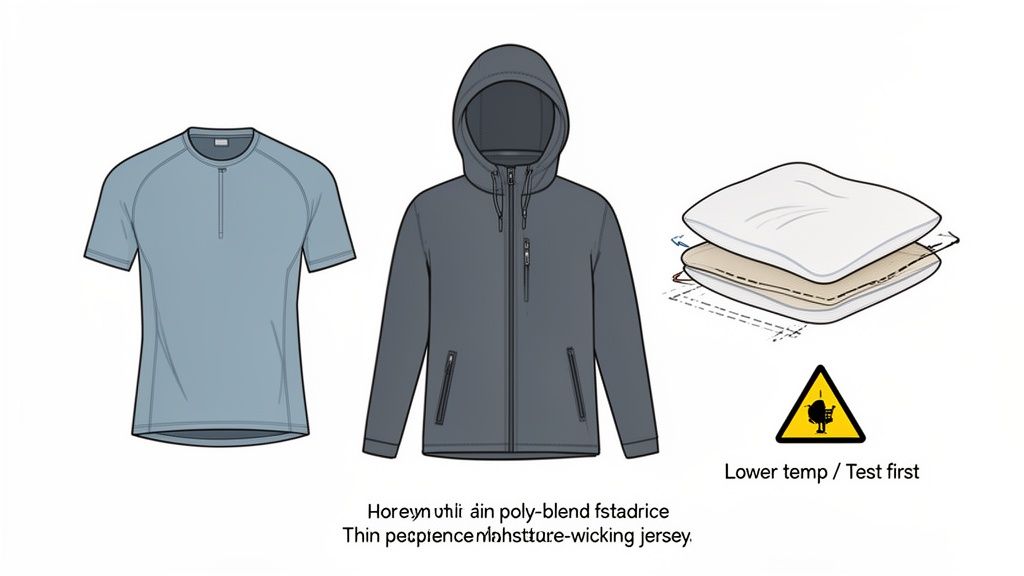
Let's be real: not all polyester is created equal. A thin, moisture-wicking jersey for a sports team needs a completely different touch than a thick, fluffy fleece hoodie. Mastering the right heat press temperature for polyester is all about learning to adapt your approach to these unique materials.
Performance wear, for instance, is notoriously sensitive to heat. Those garments are engineered with special weaves to pull sweat away from the body, but that same structure can easily be damaged by high temperatures. For these, you’ll want to start at the absolute low end of our recommended range, somewhere around 290-300°F.
On the flip side, a thick fleece or a garment with a heavy texture might need a slightly longer press to make sure the heat penetrates through all those fibers and fully activates the DTF adhesive. The temperature stays low, but an extra second or two can make all the difference.
Managing Uneven Surfaces Like Hoodies and Jackets
Pressing a perfectly flat t-shirt is one thing. But what about a hoodie with a chunky front pocket or a jacket with a zipper staring you down? These uneven surfaces are a classic cause of print failure because they prevent the heat platen from applying consistent pressure across the entire transfer.
This is where a heat-resistant pillow becomes your best friend. Slide one of these pillows inside the garment, and you can raise the printing area above any pesky seams, pockets, or zippers. This creates a firm, flat surface for the platen, ensuring every part of your design gets the even pressure it needs for a permanent bond.
The Dye Migration Test for Bright Garments
Brightly colored polyester—especially reds and neons—are infamous for dye migration. Before you commit to pressing a full run of vibrant team jerseys, it’s a smart move to run a quick test.
Place a small, white piece of scrap DTF transfer (or even just the carrier film) onto a hidden area of the garment. Press it using your intended settings. If you see any color bleed onto that test piece, you know that fabric is a high risk for dye migration.
If you run into a problem fabric, your best defense is to press at the lowest possible temperature that still gives you proper adhesion. This simple, proactive step can save you from ruining an entire order. If you want to dive deeper into the differences between synthetics and natural fibers, check out our guide on polyester vs. cotton for DTF transfers.
DTF vs. Sublimation: A Clear Advantage
The versatility of DTF really shines when you compare it to other methods like sublimation. Sublimation printing on polyester requires a scorching heat press temperature of 385-400°F for 35-60 seconds to lock in its gas-infused dyes. While that works for 100% white polyester, that intense heat is totally unsuitable for most colored garments and sensitive blends, making it far less forgiving.
This lower temperature requirement is what makes DTF so reliable across the vast world of polyester fabrics. For projects with a mix of different garments, our Auto-build gang sheet builder lets you combine designs for all of them onto a single sheet, a cost-effective solution known for its ease of use and incredible efficiency.
Your Polyester Pressing Questions, Answered
Even when you have the right settings dialed in, polyester can still throw a few curveballs. Here are the quick, no-nonsense answers to the most common questions we get from creators working with these tricky performance fabrics.
Should I Use the Same Temperature for 100% Polyester and 50/50 Blends?
Not exactly. While the range is close, you’ll want to start for 50/50 blends, somewhere around 260-280°F.
The cotton in the blend makes the garment a bit more forgiving than pure polyester, but a lower temp is still your best friend for preventing dye migration from the polyester fibers. Always play it safe and start low.
What's Causing That Shiny Square Outline From My Heat Press?
Ah, the dreaded "press box." That shiny outline happens when high heat and heavy pressure flatten the polyester fibers, leaving a permanent mark.
To avoid it, dial back your pressure to the lowest effective setting that still gets you a solid bond. Also, double-check that your temperature isn’t creeping too high. A great pro-tip is to use a flexible finishing sheet for a final, quick press after you peel the transfer.
The texture on a good cover sheet is a game-changer. It helps stop the heat press from completely flattening the fabric's fibers, which is what causes that shine. This one simple step can make all the difference.
How Do I Actually Get My Transfers to Last 100+ Washes on Polyester?
Getting that signature Lion DTF durability comes down to precision. There’s no room for guesswork here. Lock in your press at 240-280°F with medium-firm pressure, and never, ever skip the pre-press. Just 3-5 seconds is all it takes to zap any hidden moisture that could ruin the adhesive.
The real test, though, is aftercare. Wait a full 24 hours before that first wash. From there, the rules are simple:
- Turn the garment inside out before washing.
- Use cold water and tumble dry on low (or hang dry if you can).
- Stay away from bleach and fabric softeners—they're notorious for breaking down the transfer's adhesive over time.
Stick to these rules, and you'll deliver prints that stay vibrant and tough, giving your customers a product they'll wear for years.
Ready to streamline your production? Don't forget that Lion DTF Transfers offers a powerful Auto-build gang sheet builder. It's designed for ease of use and cost effectiveness, helping you cram more designs onto every sheet to save a ton of time and material.